📌 UPDATE — March 31, 2026
Tesla has expanded FSD Supervised parking with two notable additions. Drivers can now select a preferred parking space type — choosing between Parking Lot, Street, or Driveway — giving you more control over where the car looks for a spot. When navigating to a Supercharger, the system will automatically select the Charger type, streamlining the charge-and-park flow. Additionally, a new curb-side drop-off/pick-up mode lets the vehicle pull up to the curb for a short stop, making passenger handoffs hands-free and seamless.

30-Second Brief
The News: Tesla officially highlighted FSD Supervised's ability to autonomously scan a parking lot, identify an open space, and complete the full parking maneuver — no driver input required beyond initiating the feature.
Why It Matters: This is one of the most practical, everyday FSD use cases available right now — and a lot of subscribers don't know how to trigger it correctly.
Source: @Tesla on X
FSD Supervised Auto-Parking: How Tesla Finds the Spot and Parks Itself
Tesla just put a spotlight on one of FSD Supervised's most underused — and genuinely useful — capabilities: fully autonomous parking lot navigation. Your car scans for open spots, picks one, and parks itself. No circling. No hunting. No parallel-parking anxiety.
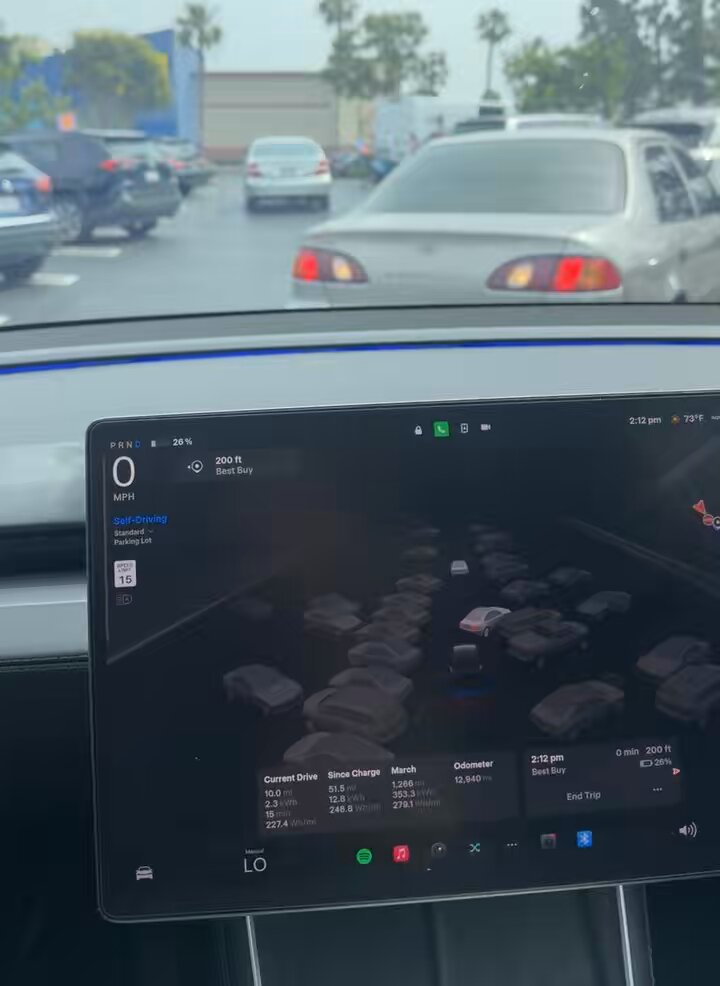
Tesla shared the demonstration directly on X, complete with in-car footage showing the system at work in a real, busy parking lot. If you haven't tried this yet, here's everything you need to know to use it correctly today.

📊 What This Feature Actually Does
FSD Supervised's auto-parking capability is more capable than most owners realize. It's not just the old Autopark that nudges you into a single detected space — the system can now actively navigate through a parking lot to locate a free spot and complete the full maneuver.
| Capability | What It Does |
|---|---|
| Spot Detection | Scans the lot using Tesla Vision cameras to identify open perpendicular and parallel spaces |
| Lot Navigation | Drives slowly through the parking lot (under ~8 mph) to reach the selected space |
| Space Selection | Since FSD v12.3.6, drivers can select from highlighted candidate spaces on the touchscreen |
| Arrival Options | FSD v14.1+ lets you pre-set parking preferences (lot, street, garage, driveway, curbside) per destination |
| Garage Parking | Can autonomously pull into your home garage if door is open and 'Driveway' is selected in Arrival Options |
| Supervision Required | Driver must remain attentive and hands-ready at all times — this is SAE Level 2 automation |
🚦 Owner's Action Plan
Verdict: Recommended — If you're already paying for FSD Supervised ($99/month), this is one of the highest-value features in real daily use. Make sure you know how to trigger it correctly.
Step 1 — Confirm You Have FSD Supervised Active
Go to Controls → Autopilot and verify that Full Self-Driving (Supervised) is enabled on your account. FSD is now subscription-only at $99/month as of February 2026 — there is no longer a one-time purchase option.
Step 2 — Set Your Arrival Options (FSD v14.1+)
Before you leave, or when you're close to your destination, tap the destination in your navigation. You'll see Arrival Options — select Parking Lot for open-lot scenarios, or Parking Garage, Street, Driveway, or Curbside depending on your situation. These preferences are saved per destination, so you only need to set them once per location.
Step 3 — Enter the Parking Area Slowly
Drive into the parking lot at low speed (under ~8 mph). The system needs slow, deliberate movement to scan effectively. Don't rush the approach — let the cameras do their work.
Step 4 — Select or Confirm a Spot
Highlighted candidate spaces will appear on your touchscreen. You can tap your preferred spot or let the system select automatically. Once confirmed, the car takes over the full maneuver.
Step 5 — Stay Attentive
Keep your hands near the wheel and eyes on the surroundings. FSD Supervised requires active driver oversight at all times. The system will abort the maneuver if it detects an obstacle or hazard — be ready to take over instantly.
Step 6 — For Home Garage Parking
If you want FSD to pull into your garage autonomously, set your home address as the destination and select Driveway in Arrival Options. Make sure the garage door is open before the car arrives.
⚠️ Known Limitations to Keep in Mind
- Speed cap: Autopark functions at low speeds only — typically under 8 mph (13 km/h). Don't expect it to work if you're moving through the lot at normal driving speed.
- Camera condition matters: Dirty or obscured cameras will degrade performance. Clean your camera lenses regularly, especially in winter or after rain.
- No traffic navigation: The system parks the car — it does not navigate through active traffic to reach the lot. You still need to drive to the lot entrance.
- Tow hitch caution: Tesla advises against using Autopark if you have anything attached to the tow hitch, as it affects the system's spatial calculations.
- Environmental conditions: Heavy rain, snow, or poor lighting can affect detection accuracy. The system may abort if confidence is low.
- NHTSA scrutiny: As of March 19, 2026, NHTSA has raised concerns about FSD's performance in low-visibility conditions. Stay especially alert in fog, heavy rain, or at night.
📰 Deep Dive
Tesla's decision to highlight this feature now isn't accidental. With FSD Supervised available only via subscription since February 2026, Tesla has a clear incentive to demonstrate tangible, everyday value to justify the $99/month price tag. Autonomous parking in a crowded lot is exactly the kind of feature that converts skeptics — it's visible, practical, and works in a scenario every driver encounters regularly.
The evolution of this capability has been steady. FSD v12.3.6 introduced selectable parking spaces on the touchscreen, giving drivers more control over where the car parks rather than just accepting whatever spot the system chose. FSD v14.1 then layered in Arrival Options, which essentially lets you pre-program your parking preferences per destination — a meaningful quality-of-life upgrade that brings the experience closer to what you'd expect from a fully autonomous vehicle.
The bigger picture here is Tesla using parking as a proof point for the broader FSD roadmap. Every successful autonomous parking maneuver is the same underlying technology stack — vision-based perception, real-time spatial reasoning, precise low-speed control — that will eventually power fully unsupervised autonomy. Elon Musk has confirmed the $99/month price will increase as capabilities improve toward that unsupervised milestone, so owners who subscribe now are effectively locking in at the current rate while the system continues to develop. For our FSD coverage, this is a feature worth watching closely as Tesla pushes toward removing the supervision requirement entirely.

Marcus covers Tesla's software releases, FSD rollouts, and OTA changes. Background in automotive engineering. Based in Austin.
Sources verified at publish time. Spotted an inaccuracy? Email editorial@basenor.com.