Model 3 Highland New Owner Guide
We Drove the First 7 Days in a Model 3 Highland — Here’s What to Set Up First
The refreshed Model 3 is easy to live with after a week, but the first 48 hours feel different because Highland removes the stalks, moves shifting to the touchscreen, and changes enough interior geometry that older Model 3 accessories become risky guesses.
Bottom Line Up Front
Day 1: learn stalkless signaling and touchscreen shifting before adding any distractions. The 2024+ Model 3 Highland uses driver-control turn-signal buttons and touchscreen shifting, unlike 2017-2023 Model 3.
Day 2-4: solve the daily friction points first: cabin organization, phone position, door-pocket rattles, windshield heat, and lower-body splash protection.
Skip for now: cabin filters, aero covers, and major cosmetic upgrades unless you have a specific problem. A new Highland leaves delivery with a new filter, and several Highland floor-mat families are currently out of stock in our catalog.
The 7-Day Setup Plan We Use With a New Highland
Our lab treats the first week as a shakedown, not a shopping sprint. The goal is to make the car feel normal before you lock in habits or buy accessories that only solve a one-day annoyance. Highland changed the driver interface enough that a Legacy Model 3 owner should still give it a fresh learning week.
Day 1: controls
Practice steering-wheel turn signals, touchscreen shifting, mirror/wheel settings, driver profile, phone key, and backup key card. Do this before the first commute.
Day 2: charging
Set a home charging limit, test scheduled charging if you use off-peak electricity, and save your common Supercharger route.
Day 3: storage
Assign fixed places for key card, sunglasses, toll tag, charging adapter, wipes, insurance card, and tire gauge so they stop sliding around.
Day 4: heat
Park in direct sun once and measure which glass surface bothers you most: windshield glare, roof radiant heat, or side-window privacy.
Day 5: protection
Inspect splash zones behind all four wheels and the painted trunk lip after a wet drive or grocery run.
Days 6-7: refine
Remove anything you did not touch all week. Keep the first-week kit small: the best setup is the one that stays quiet and easy to clean.
The “do this before buying more” checklist
We do not recommend filling a new Model 3 with ten accessories on delivery day. A better first-week method is to separate permanent friction from novelty friction. Permanent friction repeats across at least three drives: the same bottle rattles in the same door pocket, the same sunglasses disappear in the console, the same windshield heat makes the touchscreen hard to read, or the same gravel spray marks the lower doors. Novelty friction happens once because the owner is still learning the car.
For the first 100 miles, keep a note on your phone with three columns: “annoying every drive,” “annoying once,” and “wait.” The first column can justify an accessory. The second column usually disappears after you learn the menu or move one item to a better place. The wait column includes anything cosmetic, expensive, or hard to remove. This keeps the Highland setup clean and prevents the common new-owner mistake: buying a product for a problem the car did not actually have.
The Highland cabin also has less tolerance for generic fitment than older Model 3 interiors. The center console, screen zone, rear display area, and storage pockets differ enough that Legacy Model 3 accessories should not be treated as default-compatible. If a product page does not explicitly say 2024-2026 Model 3 Highland, we treat it as unverified until measured.
Highland Controls to Practice Before Your First Busy Drive
The biggest first-week adjustment is not acceleration. It is muscle memory. Model 3 Highland removed the physical turn-signal stalk and uses driver-control buttons. Shifting also happens through the touchscreen interface. That is normal for Highland, but it is a real change if you came from a 2017-2023 Model 3, Model Y Standard, or most non-Tesla cars.
We recommend 15 minutes in a quiet parking lot: left signal, right signal, canceling signals, reverse, drive, three-point turns, quick parking, wiper control, and camera view. The point is not to debate whether stalkless is better. The point is to make the controls boring before traffic asks you to do three things at once.
One small setup detail matters: do not mount a phone or organizer where it blocks your view of the driver-control buttons or the lower touchscreen shift area. Highland rewards a clean driver zone.
Charging and Range Habits: What to Confirm in Week One
Fueleconomy.gov lists the 2024 Model 3 RWD at 272 miles of range, 132 MPGe combined, and a 10.5-hour 240V charge time in its vehicle record. Your daily result will vary with weather, speed, tires, elevation, cabin heat, and how much you precondition. Use the first week to build your baseline instead of judging the car from one drive.
The U.S. Department of Energy’s Alternative Fuels Data Center separates home charging into Level 1 and Level 2 behavior. In practical first-week terms: Level 1 can be a backup, but Level 2 is the setup most owners use when they want the car to feel full again overnight. If you cannot install Level 2 immediately, make your first week about route certainty: save nearby Superchargers, test one session, and learn how quickly your usual errands consume battery.
| First-week check | What to record | Why it matters |
|---|---|---|
| Home charging | Miles added overnight | Shows whether your outlet covers the commute |
| Commute loop | Battery used both directions | Builds a weather-adjusted baseline |
| Public charging | Best nearby backup site | Reduces first-trip anxiety |
The Week-One Accessories That Solved Real Friction in Our Highland
We verified current BASENOR catalog coverage before writing this guide. The products below are active, in-stock, and fit the 2024-2026 Model 3 Highland use case. We intentionally left out out-of-stock Highland floor mats and any discontinued families.

1. Console Organizer — 4PCS Hidden Set
The Highland console is clean, but small items slide into one deep bin quickly. Our 4-piece set adds a center console tray, armrest storage box, hidden storage, and cup-holder insert mat.
Best for: key card, sunglasses, toll tag, wipes, parking cards. Tradeoff: four removable pieces add one cleaning step.

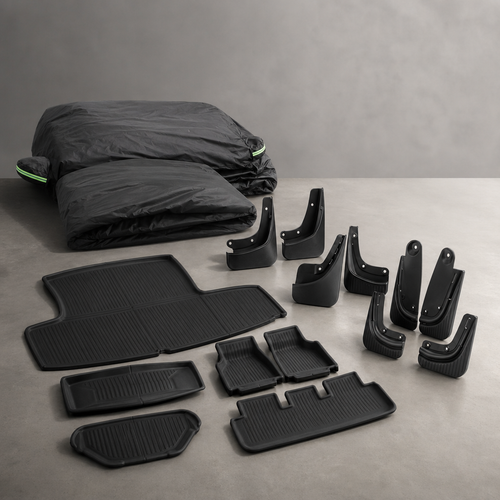
2. No-Drill Mud Flaps — 4PCS
Install these before the first wet week if your roads have gravel, winter sand, construction dust, or steep driveway splash. They use original hole locations, so the install does not require drilling.
Best for: lower rocker and door-splash protection. Tradeoff: wider coverage is more visible than the bare factory line.

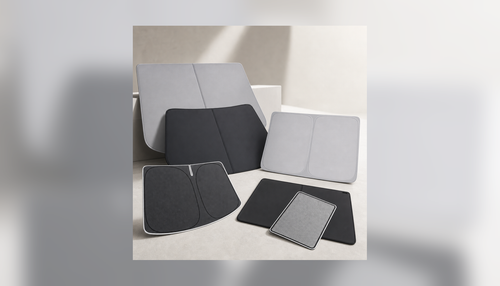
3. Roof Sunshade — Grey Retractable
The glass roof is part of the Model 3 feel, but parked heat becomes obvious during the first sunny errand run. The grey retractable shade targets radiant roof heat while keeping the cabin lighter than black fabric.
Best for: hot climates and outdoor parking. Tradeoff: alignment takes longer than a fold-out windshield shade.
4. Screen-Corner Phone Mount
Tesla navigation is strong, but many owners still keep a phone visible for calendar calls, rideshare work, Waze alerts, or ABRP route planning. This mount fits the Highland screen-corner area without covering the central display.
Best for: backup navigation and one-handed phone checks while parked. Tradeoff: adhesive needs a clean surface and curing time.
5. Door Storage Box — TPE 4PCS
Door pockets collect bottles, keys, wrappers, charging cards, and receipts faster than most owners expect. TPE liners keep the pocket base easier to clean and reduce rattles from hard items.
Best for: daily carry clutter. Tradeoff: liners reduce absolute pocket depth by a few millimeters.
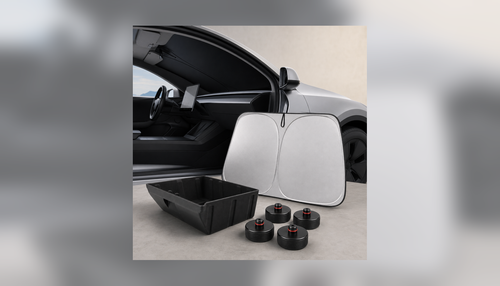
6. Windshield Sunshade — Foldable Silver
If you park outside, windshield heat is the fastest discomfort to notice. The foldable silver shade is the simple first layer for errands, charging stops, and outdoor workdays.
Best for: quick parked heat reduction. Tradeoff: it must be removed before driving and stored safely.
Our first-week accessory decision table
| Problem noticed | First fix | Buy now? |
|---|---|---|
| Key card, glasses, and charging cards slide around | Console organizer | Yes, if it repeats after three drives |
| Lower doors collect spray or gravel marks | No-drill mud flaps | Yes before wet season or winter sand |
| Cabin heats up during errands | Windshield or roof sunshade | Yes if parked outdoors daily |
| Phone needs visible backup navigation | Screen-corner phone mount | Only if it does not block controls |
Notice what is missing from that table: “looks cool.” We like cosmetic upgrades, but they work better after the car has been washed, driven at night, parked in the sun, loaded with groceries, and used in normal traffic. Week one is for protecting surfaces and removing repeat friction. Week two is when visual upgrades become easier to judge.
Finally, do one quiet-night drive before you finalize the setup. Night driving reveals different issues than a delivery-day inspection: screen reflections, phone-mount glare, cabin rattles, charging-card placement, and whether the roof or windshield shade storage spot stays silent over broken pavement. If an accessory creates noise, glare, or reach problems during that drive, fix the placement before adding anything else. That restraint keeps the car easier to clean, easier to service, and easier to hand to another driver tomorrow.
What We Would Skip Until Later
Cabin filters: do not replace a brand-new filter in week one unless there is a real odor or service note. Put the reminder at 6-12 months depending on dust, pollen, wildfire smoke, and HVAC use.
Out-of-stock Highland floor mats: several Model 3 Highland floor-mat families in the catalog are active but not available at research time. We do not recommend sending owners to out-of-stock fitment in a first-week guide.
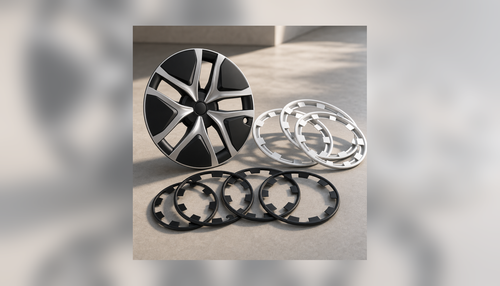
Major cosmetic pieces: spoilers, wheel covers, and dashboard skins can be worth it later, but week one is too early unless you already know the exact look you want. Drive the car, wash it once, then decide.
Safety, Recalls, and the One Check Owners Forget
NHTSA’s recalls API returned four recall records for the 2024 Tesla Model 3 at research time, covering components such as airbags, hood latch, tire pressure monitoring, and back-over prevention software. That does not mean your VIN is affected, but it does mean the first week should include a VIN recall lookup before a long road trip.
We also use the first wash to inspect delivery marks: trunk sill scuffs, lower rocker chips, door pocket scratches, and water paths behind the front wheels. Those are the surfaces where week-one protection makes sense because damage can happen before the owner has formed a cleaning routine.
Fitment Notes We Would Hand to a New Highland Owner
Console pieces: Highland and Juniper share some refreshed interior packaging, but that does not mean every shared-looking part fits every trim. We verified the recommended console organizer through BASENOR catalog tags and current product copy before including it here. The useful detail is the 4-piece layout: center tray, armrest box, hidden storage, and cup-holder insert mat. That covers the items owners touch daily without turning the cabin into a shelf system.
Mud flaps: the first week is when owners notice how quickly the lower doors collect road film. A no-drill set is sensible because it uses existing mounting points and can be removed later. The tradeoff is visual: any mud flap changes the side profile. If you lease and care about factory appearance, photograph the install and keep the hardware organized.
Sunshades: separate windshield heat from roof heat. A foldable windshield shade works fastest for errands because it goes in and out quickly. A roof shade is better when overhead radiant heat bothers passengers or the car sits outside for hours. Buying both is not mandatory; use one sunny parking test to decide which surface causes the real discomfort.
Phone mounts: Highland’s clean screen area makes mount placement more important. Keep the mount away from the driver-control signal buttons, airbag zones, and the touchscreen shift path. After installation, sit in your actual driving position and check whether your hand path to the wheel and display still feels natural.
Storage liners: TPE door-pocket inserts are not glamorous, but they solve a measurable problem: hard objects sliding against hard plastic. They are also easy to remove and rinse. The only real tradeoff is reduced pocket depth, so avoid overpacking the door with tall bottles that can tip during cornering.
FAQ
Does the Model 3 Highland have turn-signal stalks?
No. The 2024+ Model 3 Highland uses driver-control buttons for turn signals. Do not confuse it with Model Y Juniper, which retains a physical turn-signal stalk.
Should I buy floor mats during the first week?
Only if an active, in-stock Highland-specific set is available. At research time, the Highland floor-mat families we found in Shopify were out of stock, so this guide does not recommend them.
Is a phone mount necessary if Tesla navigation is built in?
Not for every owner. It becomes useful if you use Waze, calendar calls, rideshare apps, ABRP, or delivery checklists. Keep it out of the driver-button and touchscreen-shift zones.
What should I verify before the first road trip?
Run a VIN recall check, test one public charging session, confirm tire pressure, save backup charging stops, and make sure your key card is in the car even if phone key works.
Which BASENOR products fit the Highland specifically?
Use product pages that explicitly name 2024-2026 Model 3 Highland or carry verified Highland fitment tags. Interior pieces from 2017-2023 Model 3 should not be assumed to fit.
Sources
- Fueleconomy.gov vehicle record 47909 — 2024 Tesla Model 3 RWD range, MPGe, and charging data.
- NHTSA recalls API — 2024 Tesla Model 3 recall records.
- Alternative Fuels Data Center — home EV charging overview.
- IIHS 2024 Tesla Model 3 ratings page — neutral safety-ratings reference.
Build the Highland kit after the first real drive
Start with the parts that solve measured first-week friction: storage, heat, phone position, and splash protection. Every linked product above was checked against active BASENOR catalog status and in-stock inventory.
Shop Model 3 Highland AccessoriesAuthor: Jacob Guo, BASENOR founder. Jacob reviews BASENOR owner guides with the product team using current catalog fitment, inventory status, and installation notes.
Updated: May 2026 — added Highland-specific controls, charging, recall, and product availability checks.