Tesla is rolling out a firmware update for its Mobile Connector, and the delivery mechanism is a little different from a typical OTA drop — your car does the heavy lifting. Instead of updating over Wi-Fi directly, the Mobile Connector stays plugged into the vehicle while the car downloads the software package from Tesla's servers and pushes it across. Here's everything owners need to know.

1. Your Car Is the Update Server
The Mobile Connector has no independent Wi-Fi or cellular radio — it can't pull updates on its own. Instead, Tesla routes the firmware through the vehicle: the car connects to Tesla's servers, downloads the package, and pushes it to the connector over the charging cable. This means the connector must stay physically plugged in for the entire process. Unplug it mid-update and you risk leaving the firmware in a partial state.
2. The Trigger Depends on Your Vehicle's Software Version
How the update kicks off varies based on which version of Tesla's vehicle software you're running. On vehicles with software 2024.14 or newer, the process is straightforward: your battery just needs to be above 5% state of charge, and after about 10 minutes of charging with the Mobile Connector, the update begins automatically. On older vehicle software, you'll need to charge to at least 55% first, then manually set your charge limit below the current level to trigger the process — according to Tesla's documented instructions.
3. Watch for the On-Screen Notification
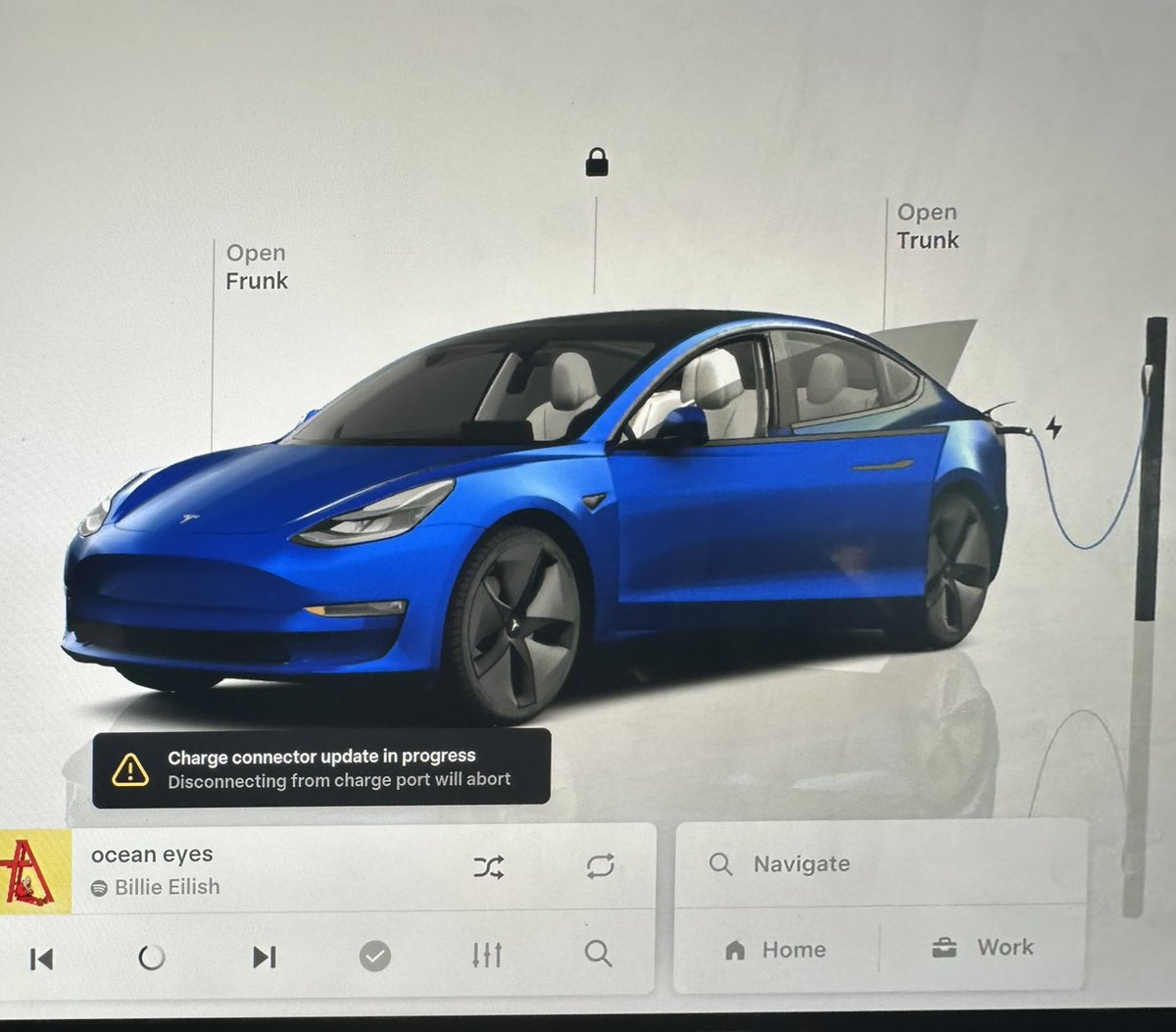
You won't be left guessing. Once the update is underway, a "Charge Connector Update in Progress" notification appears on your touchscreen (or instrument panel on older software). That's your confirmation the process has started. According to Tesla's support documentation, the firmware update typically completes within 3 minutes on current-generation vehicles — so this isn't a leave-it-overnight situation.

4. Gen 2 UMC Owners May Unlock Higher Charging Amperage
For owners of the Generation 2 Universal Mobile Connector, this type of firmware update has previously unlocked a meaningful capability bump: the ability to charge at 10A/15A instead of the default 8A/12A — making it compatible with non-Tesla EVs at higher rates as well. That earlier update required vehicle software 2021.12.25 or higher. It's worth noting the Gen 2 UMC's LED will flash green during the update process, which is normal behavior, not an error signal.
5. A Few Things to Keep in Mind Before You Start
To avoid interrupting the process, Tesla's guidance recommends keeping all vehicle doors closed and the climate system off during the update — particularly relevant for Gen 2 UMC updates, which can take between 5 and 10 minutes. Make sure you're not about to drive anywhere. The vehicle needs to remain stationary and connected throughout. If you're on older software and manually triggering the update via the charge limit slider, set the limit just below your current charge level — that's the signal the car needs to initiate the firmware push.

If you use a Mobile Connector regularly, it's worth plugging in tonight and letting the update run — the whole process takes only a few minutes once conditions are met, and keeping connector firmware current ensures you're getting the latest charging behavior and compatibility improvements Tesla has shipped.
Related Gear
Gear up your Tesla with tested, custom-fit BASENOR accessories — shop Tesla accessories →
Sources & reporting notes
The links below identify the material source records used for this report.
- @TeslaNewswire on X (2026-08-06T06:09:32.000Z) — Direct source
Source links are preserved as published or accessed. See our editorial standards and corrections policy.
The BASENOR Editorial Desk covers Tesla, SpaceX, and related technology, curating reporting from primary sources — official accounts, regulatory filings, and software release data. Every article passes source-record and fact-checking review before publication. About the newsroom.
This report was curated by the BASENOR Editorial Desk from the sources listed above. Read our editorial standards or email editorial@basenor.com to report an error.