📌 UPDATE — April 28, 2026 🔍
Tesla has already pushed a follow-up release: 2026.14.3 is now rolling out, first spotted on a Model X AWD (2023) in Aargau, Switzerland by Teslascope. The new version carries a large batch of undocumented changes not announced by Tesla, including enhancements to Rear Display, Weather Maps, Keyboard, and Security Improvements — none of which were part of the official 2026.14.2 changelog. Music App Queuing and Automatic Software Updates also appear as newly detected features in this point release.
Notably, Hey Grok and Pet Mode — featured in 2026.14.2 — are being re-detected in 2026.14.3, suggesting Tesla has made under-the-hood refinements to both. Entertainment apps Paint Shop, Sketchpad, and the Trips feature are also flagged in this build. It is unclear at this stage whether 2026.14.3 is a targeted hotfix or a broader staged rollout replacement for 2026.14.2.

30-Second Brief
The News: Tesla's 2026.14.2 software update — officially branded the Spring Update 2026 — is now in its second rollout wave, hitting vehicles today.
Why It Matters: This is one of Tesla's most feature-packed OTA updates in recent memory: hands-free Grok activation, a redesigned FSD app, Pet Mode, extended Dashcam retention, blind spot accent lights, and much more.
Source: @NowRollingOut — April 22, 2026
Tesla Spring Update 2026 (2026.14.2): Every New Feature Explained
Tesla's 2026.14.2 software update — the Spring Update 2026 — is actively rolling out in its second wave as of today, April 22. Less than 0.1% of the global fleet has received 2026.14.2 so far, meaning most owners are still waiting, but the queue is moving. The earlier 2026.14.1 wave reached roughly 3% of the fleet by April 19, so deployment is accelerating. Here's everything that changed and exactly what you should do.

📊 What Changed in 2026.14.2
| Change | Type | Models |
|---|---|---|
| Redesigned FSD App — subscribe, activate, and view usage stats in one place | Official | AI4 hardware vehicles |
| "Hey Grok" Hands-Free — activate Grok AI without touching the screen; location-based reminders supported | Official | All models |
| Pet Mode — renamed from Dog Mode; choose dog, cat, or hedgehog icon; add your pet's name to the display | Official | All models |
| Dashcam: 24-Hour Retention — recent footage now kept for up to 24 hours; clips saveable to vehicle or phone | Official | All models |
| Blind Spot Accent Lights — interior lights flash red when a blind-spot object is detected with turn signal on, or when an object approaches while parked | Official | All models |
| Automatic Software Updates — vehicles can now self-install updates overnight when parked and idle | Official | All models |
| Weather Maps Upgrade — improved snow/rain color differentiation; last hour of precipitation shown along your route | Official | All models |
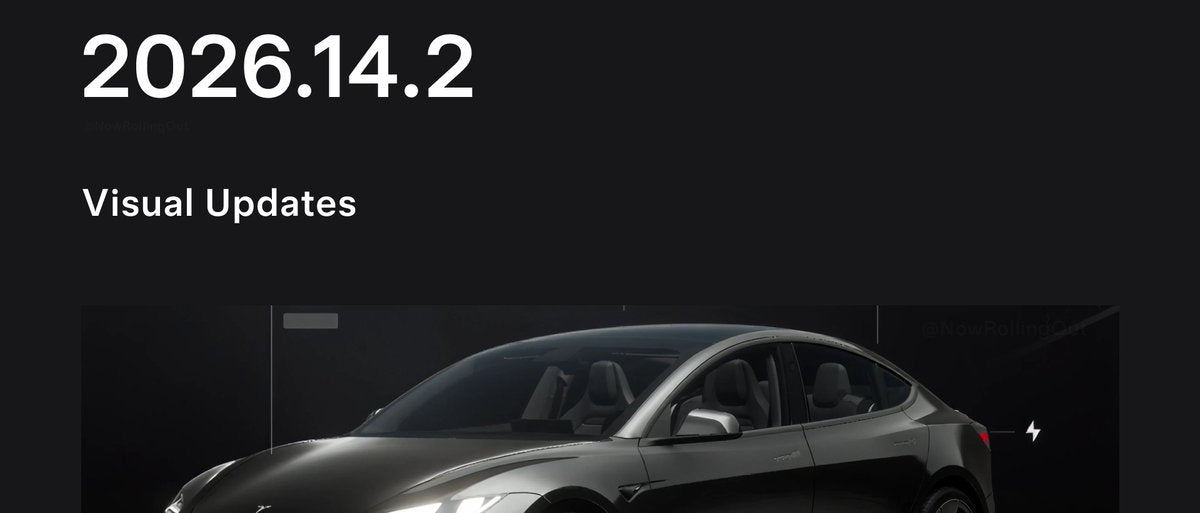
| Improved Car Visualization — updated on-screen renderings for Highland and Juniper | Official | Model 3 (Highland), Model Y (Juniper) |
| Trip Stats in Energy App — create and manage multiple trips to track energy usage per journey | Official | All models |
| Sketchpad Stickers & Emojis — Sketchpad now supports stickers and emojis (saving requires app v4.55.6+) | Official | All models |
| Immersive Sound Upgrade — advanced sound extraction for premium audio systems | Official | New Model 3, New Model Y (premium audio) |
| Rear Display Maps — rear passengers can view and interact with navigation maps on the rear screen | Official | Models with rear display |
| Custom Wraps & License Plates (UI) — Model S and X gain UI options to visualize custom wraps and plates | Official | Model S, Model X |
Rollout Status — Wave 2
<0.1% of fleet on 2026.14.2 • Wave 2 began April 22, 2026 • Source: @NowRollingOut
🚦 Owner's Action Plan
Verdict: RECOMMENDED — Several features here are genuinely useful. Worth installing promptly.
- Check for the update now. Go to Controls → Software on your touchscreen. If 2026.14.2 is available, you'll see it here. Tap Install Now or schedule it for overnight.
- Update your Tesla app first. Several features — including Dashcam clip viewing with speed/steering data and Sketchpad saving — require Mobile App version 4.55.6 or later. Update the app on your phone before or immediately after installing the OTA.
- Enable Automatic Updates (new feature). Once updated, go to Controls → Software → Software Update Preference and turn on automatic overnight installs. You'll never have to manually trigger an update again.
- FSD subscribers on AI4 hardware: Open the redesigned FSD app after updating. Your usage stats, subscription management, and activation guidance are now consolidated in one place. Check our FSD coverage for the latest on what FSD can do in this release.
- Test "Hey Grok." With the update installed, say "Hey Grok" without touching the screen. Set a location-based reminder to test the new hands-free capability.
- Pet owners: update Pet Mode. Navigate to Controls → Safety → Dog Mode — it's now called Pet Mode. Customize the icon (dog, cat, or hedgehog) and add your pet's name to the display before your next trip.
- Check your Dashcam settings. Go to Controls → Safety → Dashcam and confirm footage retention is set to the new 24-hour window. If you want clips saved permanently, use the in-car option or the Tesla app (v4.55.6+ required for full playback with telemetry data). Note: telemetry playback requires Premium Connectivity.
- Model S/X owners: Explore the new custom wrap and license plate UI options under vehicle settings to preview different looks.
📰 Deep Dive
The Spring Update 2026 is shaping up to be one of Tesla's most substantive seasonal releases. The breadth of changes — spanning AI integration, safety features, media, and personalization — signals Tesla is pushing hard to differentiate its software experience at a time when competitors are narrowing the hardware gap.
The "Hey Grok" hands-free activation is the headline feature for most owners. Integrating xAI's Grok directly into the voice command layer — without requiring a screen tap — is a meaningful UX shift. Location-based reminders add a layer of practical utility that goes beyond novelty. For context on how voice commands work across the Tesla lineup, see our complete voice commands list.
The Dashcam improvements deserve attention from a safety standpoint. Extending recent footage retention from roughly an hour to a full 24 hours dramatically increases the likelihood of capturing footage from an incident that occurred earlier in the day. The ability to permanently save clips — and view them with speed, steering angle, and FSD state overlaid — turns the Dashcam into a much more powerful incident reconstruction tool. The Premium Connectivity requirement for telemetry playback is a notable caveat for owners on the base connectivity tier.
Rollout pace is worth watching. The 2026.14.1 wave reached ~3% of the fleet over roughly a week. With Wave 2 of 2026.14.2 beginning today at sub-0.1% penetration, most owners are still in the queue. If Tesla follows its typical cadence, broad fleet coverage should arrive within 2–3 weeks. Keep checking Controls → Software daily — the update doesn't always send a push notification before it's available to install.

Sarah focuses on Tesla Energy, SpaceX missions, and the broader Musk AI portfolio. Former data analyst in clean energy. Based in San Francisco.
Sources verified at publish time. Spotted an inaccuracy? Email editorial@basenor.com.