What Should Tesla Owners Know About Tesla Valet Mode?
Valet Mode is the Tesla setting to use any time another person needs to move your car but does not need your full driver profile, full performance, or full access to storage areas. It is useful for restaurants and hotels, but it is just as useful for tire shops, detailing appointments, service intake lanes, car washes that require a driver, and shared household handoffs.
The mistake owners make is treating Valet Mode like a magic privacy shield. It is better understood as a restriction layer. You still need to remove valuables, check what is visible in the cabin, know your PIN, and understand which features your specific Tesla model locks down.
Bottom line up front
Use Valet Mode when: someone else needs to park, move, clean, inspect, or briefly drive your Tesla and you do not want them using your normal profile or access settings.
Do not rely on it alone: remove valuables, hide daily-carry items, and check the cabin before handoff. Valet Mode limits functions; it does not erase everything a person can see through the glass.
Cybertruck owners: pair the software setting with physical prep because the cabin is large, open, and easy for a valet or service writer to glance through.
What Valet Mode actually does
Valet Mode reduces the amount of vehicle control available to the temporary driver. Owner guides and Tesla-focused references consistently describe the core idea the same way: it limits performance and access, protects personal driver settings, and blocks casual access to areas such as the glovebox or front trunk on supported vehicles. The exact interface can move by software version, so check the Controls menu in your car before you need it.
Think of the setting in four layers. First, it reduces driving freedom. Second, it reduces cabin and storage access. Third, it protects profile-level privacy such as saved locations or personal settings. Fourth, it creates a clean mental handoff: the person moving the car knows they are operating in a restricted mode, not your normal driver profile.
| Area | What owners expect | What to verify before handoff | Risk if skipped |
|---|---|---|---|
| Driving behavior | Reduced acceleration and speed-limited operation | Confirm Valet Mode is active on the screen before exiting | A valet or shop runner drives with your normal profile active |
| Storage access | Glovebox/front-trunk restrictions where supported | Remove anything valuable anyway; do not treat software lockouts as a safe | Visible or reachable valuables remain in the vehicle |
| Personal data | Saved profile and location data are less exposed | Do not hand over your phone key unlocked; use the correct key/card flow | The temporary driver can see or change more than intended |
| Handoff recovery | You can disable Valet Mode with the PIN | Know the PIN before you arrive, not while a line is waiting behind you | You create delay, confusion, or a reset problem at pickup |
Important limitation
Valet Mode is not a replacement for common-sense cabin prep. A person standing outside the car can still see items left on seats, in open bins, or in cup holders. Before handoff, treat the cabin like a hotel lobby: if you would not leave it visible there, do not leave it visible in the car.
The 60-second Tesla handoff checklist
- Remove wallet, passport, garage remote, and spare key cards. Do this before you reach the valet stand or service lane.
- Move small daily-carry items into a closed compartment. Sunglasses, toll tags, adapters, and work badges should not sit in open view.
- Activate Valet Mode while parked. Watch for the visual confirmation on the center screen.
- Confirm the key method. If you are handing over a key card, make sure the driver understands where to tap and that your phone key is not the handoff device.
- Take one quick cabin photo if the car is being serviced or detailed. This gives you a timestamped record of cabin condition and visible accessories.
- At pickup, disable Valet Mode before driving away. Check seat position, mirrors, storage areas, and any accessories that could have been moved.
Model-specific notes: Model 3, Model Y, S/X, and Cybertruck
The principle is the same across Tesla vehicles, but the handoff friction changes by cabin design. Legacy Model 3 and older Model Y owners usually deal with a familiar stalk-based cabin and center-console storage layout. Highland Model 3, Juniper Model Y, refreshed Model S/X, and Cybertruck use newer controls or larger display-led interfaces, so the temporary driver may need a clearer handoff about shifting, opening doors, and key-card use.
Cybertruck deserves special mention because it has a big, visually open cabin and a lot of flat surfaces. Valet Mode handles the software side; physical organization handles the human side. If your phone, sunglasses, charging adapter, work badge, or garage remote is sitting out, the software setting does not make it invisible.
What to do before different handoff scenarios
A good Valet Mode routine changes slightly depending on who is taking the car. A hotel valet needs the simplest possible key-card handoff. A detailer may need to move the vehicle multiple times around a shop. A tire store or alignment shop may need access long enough to put the car on equipment. In each case, the goal is the same: give them enough access to complete the task without giving them your normal owner environment.
For short parking handoffs, keep the instruction simple: “It is in Valet Mode; use this key card to move and park it.” For service-adjacent handoffs, ask whether they need the glovebox, frunk, or screen settings before you lock everything down. For a friend or family member, Valet Mode is less about distrust and more about preventing accidental profile changes, unexpected acceleration, or awkward access to saved places.
If you often use valet parking, build a repeatable cabin layout. Put work badges in one closed area, charging adapters in another, and sunglasses or cards in hidden storage. The point is speed: when the handoff moment arrives, you should not be digging through the console while another driver waits.
Restaurant or hotel valet
Use Valet Mode, hand over only the needed key method, and remove visible personal items. This is the classic use case and should take less than one minute.
Service or detail shop
Use Valet Mode when the shop only needs to move the car. If they need diagnostic access, ask what they require instead of guessing.
Friend or family handoff
Use Valet Mode if you want a simple boundary: they can move the car, but they are not using your everyday driver setup.
Valet Mode vs. Sentry Mode vs. PIN to Drive
Owners sometimes mix up three separate protections. Valet Mode is a handoff mode: it lets another person move the car with restrictions. Sentry Mode is a parked-surveillance feature: it helps monitor activity around the vehicle when it is parked. PIN to Drive is a start authorization layer: it is meant to prevent driving without the PIN. They can be part of the same security mindset, but they solve different problems.
| Feature | Primary job | Best use case | What it does not solve |
|---|---|---|---|
| Valet Mode | Restrict temporary driver access | Valet, shop, detailer, friend handoff | Visible valuables or messy cabin organization |
| Sentry Mode | Monitor the parked vehicle | Public parking, hotel lots, street parking | Giving someone controlled permission to move the car |
| PIN to Drive | Add a driving authorization step | Extra theft-resistance mindset | Convenient short-term handoff unless the other driver has the PIN |
For a valet stand, Valet Mode is usually the feature that fits the job. For an overnight lot, Sentry Mode may matter more. For daily theft prevention, PIN to Drive is a separate owner preference. The safest owner habit is not to treat any single toggle as a complete security plan.
Where BASENOR accessories help without overclaiming
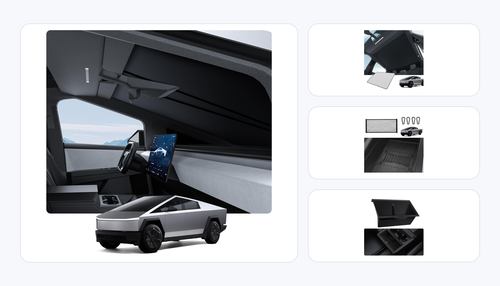
No accessory “turns on” Valet Mode. The honest role for BASENOR products is different: they make the pre-handoff cleanup faster and reduce the chance that someone sees, scratches, or misplaces items inside the cabin. For Cybertruck owners, these three active/in-stock products are the cleanest fit.

Behind-screen storage
Cybertruck behind-screen storage gives sunglasses and small items a low-visibility home before you hand off the truck. Verified catalog inventory: 41 units.

Console organizer
Cybertruck console organizer keeps cards, cables, and daily-carry items separated so you can clear the cabin quickly. Verified catalog inventory: 32 units.

Armrest cover
Cybertruck armrest cover protects a high-touch area during valet, shop, or shared-driver use. Verified catalog inventory: 81 units.
Our practical recommendation
Use Valet Mode for software boundaries, then use storage discipline for visual privacy. The best setup is boring: valuables removed, small accessories hidden, key handoff understood, Valet Mode visibly active, and the pickup PIN ready.
Common mistakes owners make
- They activate Valet Mode too late. Do it before you are blocking a hotel driveway or service line.
- They leave a phone key in play. A key card handoff is cleaner than leaving your unlocked phone involved.
- They assume the glovebox equals a safe. Remove truly sensitive items instead of relying on any in-car compartment.
- They forget the return flow. Pickup is when you should check storage areas, accessory placement, seat position, and the Valet Mode PIN.
- They treat all Tesla cabins alike. Newer screen-led controls can confuse a first-time driver; give a 10-second handoff if needed.
Privacy prep: what Valet Mode does not hide
The strongest Valet Mode habit is to separate software privacy from visual privacy. The software can restrict settings, performance, and certain storage access, but it cannot change what is sitting in the cup holder, on the passenger seat, in the open console tray, or on top of the wireless charging pad. That is why our team treats Valet Mode as step two, not step one. Step one is a physical cabin sweep.
Start with anything that identifies you or gives access to another place: garage remotes, office badges, house keys, hotel key cards, passports, insurance documents, spare Tesla key cards, toll transponders, and parking permits. Then clear anything expensive enough to invite curiosity: sunglasses, earbuds, laptops, camera gear, cash, adapters, and charging accessories. Even if the person moving the vehicle is trustworthy, a visible item can be misplaced during cleaning, moved during service intake, or left behind when the car changes hands inside a parking operation.
Cybertruck owners have one extra issue: the cabin has long horizontal surfaces and a very visible center area. Small objects that disappear in a Model 3 console can stand out in a Cybertruck. We recommend using hidden or divided storage so the pre-handoff routine is repeatable. If every daily item has a fixed home, the handoff takes seconds instead of becoming a last-minute search.
Pickup checklist: what to check before you drive away
The return handoff matters as much as the drop-off. Before leaving the lot, disable Valet Mode with your PIN, then do a quick four-zone inspection: driver area, center console, rear cabin, and storage compartments. Confirm the seat and mirror positions, check that the key card is back with you, and make sure no accessory has been moved into a footwell or seat track. If the car was washed or detailed, check high-touch trim such as the armrest, screen edge, console lid, and door sills while you are still on site.
For service or tire-shop visits, add one more step: compare the cabin to the photo you took at drop-off. You are not trying to create conflict; you are creating a clean record. If a console organizer, sunglasses tray, armrest cover, or cable holder was moved, it is easier to ask about it immediately than to discover it after you have driven home.
If another family member uses the car after pickup, tell them Valet Mode has been turned off and normal controls are restored. This avoids a common second-order problem: one owner disables the restriction, another assumes the car is still in a limited state, and small profile or driver-assistance settings get changed during the next trip.
When we would skip Valet Mode
There are a few situations where Valet Mode is not the right tool. If a Tesla technician or qualified repair shop explicitly needs full diagnostic access, do not fight the workflow; ask what access they need and document the handoff instead. If a trusted household driver needs normal navigation, climate, seat memory, and charging controls for a longer trip, a separate driver profile may be better than Valet Mode. If the car is being transported on a flatbed, the priority is tow/transport procedure, not a parking-valet restriction.
The practical rule is simple: use Valet Mode when the other person needs to move the vehicle briefly and does not need your normal owner environment. Use another handoff method when the job genuinely requires deeper access. That keeps the feature useful instead of turning it into a source of confusion at the worst moment.
FAQ
What is Tesla Valet Mode for?
It is for temporary handoffs where another person needs to move or park the car but does not need full access to your driver profile, storage areas, or normal performance settings.
Does Valet Mode protect everything in the car?
No. It restricts software and access layers, but it does not hide items that are visible in the cabin. Remove valuables before handoff.
Should I use Valet Mode at a service center or detail shop?
Use it when the shop only needs to move the vehicle. If they need diagnostic or service access, ask what mode or key handoff they require.
Can a valet drive normally in Valet Mode?
They can move and park the vehicle, but Valet Mode is designed to reduce access and performance compared with your normal driver setup.
What should Cybertruck owners do differently?
Because the cabin is open and high-visibility, clear valuables, use hidden storage for small items, and make the key-card/shifting handoff especially clear.
Update log
Updated May 2026 with Cybertruck-specific handoff notes, active BASENOR storage/protection inventory checks, and a no-overclaim accessory rule.
References & further reading
- Not a Tesla App — Tesla Valet Mode: everything it does
- MakeUseOf — What Is Tesla's Valet Mode, and How Does It Keep Your Vehicle Secure?
- BASENOR catalog snapshot, 2026-05-11 — active Cybertruck storage and protection inventory used for product fit validation.
Make every Tesla handoff less stressful
Start with Valet Mode, then organize the cabin so valuables are not visible in the first place.
Shop Cybertruck Cabin Accessories
Jacob Guo
Founder & Editor-in-Chief
Founder of BASENOR. Industrial designer and Tesla owner since 2019. Writes the foundational fitment guides and Design Stories — the ones explaining why a product was engineered the way it was.