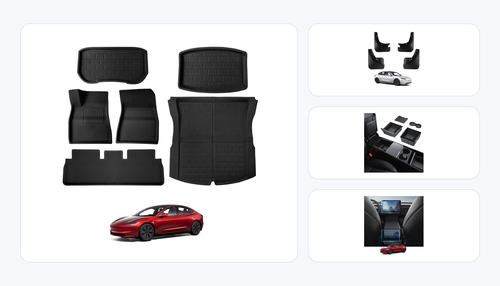
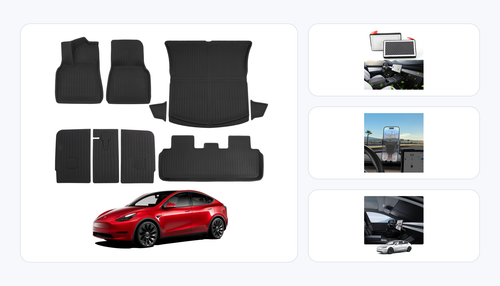
Model 3 Highland / Model Y Juniper Fitment Guide
Model 3 Highland and Model Y Juniper Console Organizers: What Actually Fits
The safest way to solve Tesla center-console clutter is to buy by generation first, then by storage zone. Highland and Juniper organizers can share several molded tray designs, but legacy Model 3 and legacy Model Y organizers are not reliable substitutes.
Bottom Line Up Front
Best rule: for molded organizers, match the refresh generation before you match the model name. A 2024-2026 Model 3 Highland and a 2025-2026 Model Y Juniper can share several console-bin inserts, but a 2017-2023 Model 3 organizer should stay with legacy cars.
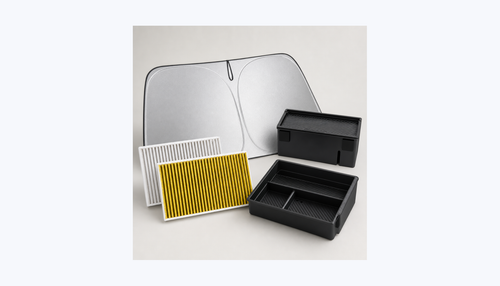
Best BASENOR starting point: the 4PCS Hidden Console Organizer covers the main current-generation storage pockets with verified product images and a current-gen fitment page.
Skip if: the listing says only "Model 3 / Model Y" without Highland, Juniper, or exact year ranges. That usually means the seller is relying on broad search language instead of confirming the molded console shape.
Why Console Organizer Fitment Changed With Highland and Juniper
Tesla refreshes do not only change exterior lighting or screen hardware. The interior storage areas around the front center console, under-screen area, hidden bins, armrest pocket, cup-holder path, and lower console can change enough that a molded tray either sits flat or becomes an annoying rattle source. That is why the product title matters more than the broad model badge.
For current owners shopping in 2026, the relevant split is simple: 2024-2026 Model 3 Highland and 2025-2026 Model Y Juniper are the current-generation refresh cabins. 2017-2023 legacy Model 3 and 2020-2024 legacy Model Y need their own organizer shapes. If a tray is molded for a legacy bin, it may look close in a product photo but still leave a lip, block a cover, or let small items slide underneath.
The crowded market makes this harder because many listings bundle terms like Highland, Juniper, 2025, 2026, Model 3, and Model Y in the same headline. We use those pages only as market context: they confirm that buyers are seeing cross-model claims everywhere, but they do not replace direct BASENOR fitment verification.
The 5 Checks Before Buying a Tesla Console Organizer
1. Exact year range
Start with year and generation, not the model badge. A product for 2024-2026 Model 3 Highland is not automatically right for a 2023 Model 3. A product for 2025-2026 Model Y Juniper is not automatically right for a 2024 Model Y.
2. Storage zone
Front hidden bin, lower console, armrest tray, under-screen tray, rear console, and cup-holder organizers solve different problems. Buying one tray for every clutter problem usually ends in either dead space or duplicated plastic.
3. Material behavior
Look for a stiff tray body with an anti-slip or soft-touch surface where small items rest. Glossy carbon-texture finishes can look cleaner in photos, but matte or textured pockets usually hide dust better in daily use.
4. Access clearance
A good organizer should not block console covers, charging access, USB access, cup access, or the ability to lift a tray out quickly. If the organizer forces a two-hand workaround every time you grab sunglasses or a key card, it is solving the wrong problem.
5. Rattle control
Molded fit matters most when the cabin is quiet. A tray that rocks even a millimeter can become a recurring buzz over rough pavement. Favor generation-specific trays with flush edges and removable rubber or soft-contact surfaces.
Quick owner test
Before checkout, read the product title aloud and remove every word except year, generation, model, and storage zone. If the remaining promise is not specific enough, keep searching.
BASENOR Fitment Matrix for Current-Generation Console Organizers
For this guide, we narrowed the recommendation set to active BASENOR products with verified product pages and live Shopify CDN images. The first recommendation stays current-gen because new 2026 shoppers are usually choosing Highland or Juniper cabins, not discontinued legacy interiors.

Best Overall: 4PCS Hidden Console Organizer
Choose the 2024-2026 Model 3 Highland and Model Y Juniper 4PCS Hidden Console Organizer if the goal is to clean up the main console pockets in one pass. It is the best starting point for owners who carry cards, keys, cables, sunglasses, parking tags, and small charging adapters.
Real tradeoff: a four-piece kit gives you more sorted pockets, but it also creates more removable pieces during a deep clean. If you prefer one simple tray, choose a narrower organizer instead.
Price checked: $39.99 on BASENOR at draft time.

Carbon-Texture 3PCS Option
The Carbon Edition 3PCS Console Organizer is for owners who want a lower visual-profile storage upgrade with a carbon-texture appearance.
Tradeoff: carbon-look surfaces can show dust and fingerprints more readily than plain matte-black trays.

Budget Hidden-Bin Fix
The Carbon Hidden Console Organizer is a narrower pick when one storage pocket is the pain point and a full kit feels unnecessary.
Tradeoff: it solves a specific bin, not the full console organization problem.

Lower Console Storage
The Model 3 Highland Lower Console Organizer is best for backup items: cables, cards, cleaning cloths, parking passes, and spare accessories.
Tradeoff: lower storage adds retrieval friction, so it is not the right place for items you grab while driving.
Legacy owners still have options
If you drive a 2017-2023 Model 3 or a 2020-2024 Model Y, shop legacy-fit organizers intentionally. The mistake is not buying a legacy accessory; the mistake is buying a legacy accessory for a Highland or Juniper cabin because the title used broad model language.
| Organizer | Best For | Fitment Focus | BASENOR Price | Main Tradeoff |
|---|---|---|---|---|
| 4PCS Hidden Organizer | Whole-console cleanup | Highland + Juniper | $39.99 | More pieces to remove for deep cleaning |
| Carbon Edition 3PCS | Visual upgrade plus sorting | Model 3 Highland | $29.99 | Carbon-look finish can show dust |
| Carbon Hidden Organizer | One-pocket fix | Highland + Juniper | $19.99 | Narrower storage coverage |
| Lower Console Organizer | Backup cables and cards | Model 3 Highland | $19.99 | Less convenient for daily-grab items |
What Not to Buy
The riskiest console organizer is the one with a vague title and a perfect-looking hero photo. Product photos can hide the edge that does not sit flat, the cover that no longer slides smoothly, or the small gap that catches coins and cards. Use these filters before you trust the listing:
- Do not buy "fits Model 3 and Model Y" without years. That phrase is too broad for refresh-generation interiors.
- Do not buy a legacy organizer for a Highland cabin. The legacy Model 3 split ends at 2023 for this shopping decision.
- Do not buy a Juniper accessory based only on standard Model Y claims. A 2025-2026 Juniper buyer should see Juniper or the exact current-generation year range in the fitment promise.
- Do not overbuy organizers. A tray in every pocket can make the cabin feel busy. Solve the pocket that creates friction first.
- Do not treat carbon texture as carbon fiber. Unless the material proof confirms actual composite carbon-fiber construction, describe it as carbon texture or carbon-look appearance.
The better purchase path is boring but reliable: identify your generation, identify the storage zone, check the exact product page, then choose the smallest organizer set that fixes the actual daily annoyance.
Installation and Daily-Use Tradeoffs
Most console organizers are drop-in parts, but "drop-in" should not mean "forget to test." After installation, open and close the console cover, place a phone or cable where you normally keep it, drive over a rough road, and remove the tray once. That short check tells you whether the organizer fits your habits as well as the car.
For small items, split the console by frequency. Keep daily-grab items in the shallowest tray: key card, sunglasses, toll pass, parking ticket, or cleaning cloth. Put backup items lower: extra charging cable, adapter, spare microfiber, insurance card, or infrequently used accessories. If you reverse those zones, the organizer can make the cabin look cleaner while making every stop slower.
For families and rideshare-style use, choose removable trays you can lift out and rinse or wipe. For a minimalist cabin, choose fewer pieces and accept less sorting. For owners who hate rattles, prioritize soft-contact surfaces and a flush molded edge over decorative finishes.
The important detail is not whether one organizer is universally better. It is whether the organizer matches the way you use the console every day. A full kit is best when several pockets are cluttered; a single hidden-bin tray is better when one pocket is the only problem.
Which Organizer Setup Fits Your Owner Scenario?
The same Tesla center console can serve very different jobs. A commuter uses it like a landing zone for parking cards and sunglasses. A parent uses it as damage control for snack wrappers, wipes, charging cables, and rear-seat handoffs. A road-trip owner wants backup adapters and cleaning cloths where they will not disappear. The right organizer setup depends on that routine more than on the number of pieces in the kit.
Daily commuter
Prioritize a shallow top-access tray plus one hidden pocket. Keep the key card, toll pass, sunglasses, parking receipt, and microfiber cloth in predictable positions. Avoid filling every pocket because the goal is faster entry and exit, not maximum storage volume.
Family car
Choose removable pieces and separate clean from dirty items. A full kit makes more sense here because snacks, wipes, cables, toys, and rear-seat clutter migrate into the console quickly. Lift-out cleaning matters more than a showroom-minimal look.
Minimalist owner
Pick one hidden-bin organizer and leave the rest of the console open. If you only carry a key card, sunglasses, and one cable, a four-piece kit may create more visual structure than you need.
Road-trip owner
Use the lower console for backup items and the shallow tray for active items. Keep adapters, spare cloths, gum, tire-pressure notes, and emergency cards below. Keep the items you need at each stop in the easiest pocket.
This scenario-first approach also helps avoid buying duplicate parts. If you already use a lower console tray for backup cables, adding another hidden organizer may be useful only if the front bin still collects loose items. If you already use a full four-piece kit, adding a separate carbon-look pocket may only make sense if you want a specific visual finish or a replacement for one storage zone.
A good test is to empty the console for one day and put every item back only when you use it. At the end of the day, the items that returned first deserve the easiest tray. The items that returned last can live lower or deeper. That simple audit prevents the most common organizer mistake: arranging the cabin around product photos instead of your real driving routine.
A 60-Second Fitment Audit Before You Keep the Organizer
Once the organizer arrives, do not judge it only by whether it drops into place. Run a short fitment audit while the return window is still open. First, seat each tray without stored items and press lightly on the front, rear, and both side edges. The tray should feel stable without a rocking point. Second, open every cover or access point you normally use. Nothing should catch, scrape, or force the cover off its normal path.
Third, add the actual items you carry. A tray that works empty may become awkward when a sunglass case, charging cable, garage remote, and parking card are inside. Check whether the tallest item blocks the cover and whether cables bend sharply. Fourth, drive a short route with rough pavement. Listen for plastic-on-plastic ticks, coin movement, or a low buzz around the tray edge. Small cabin rattles are easier to fix before you build a routine around the organizer.
Fifth, remove the tray with one hand. This sounds minor, but it matters after a spill, a receipt jam, or a dropped card. If a tray needs two hands and careful angling to remove, reserve it for backup items instead of high-frequency items. If it lifts cleanly, it can handle daily-grab storage.
This audit is especially important when shopping across Highland and Juniper language. The two refresh cabins share enough current-generation shopping intent that many sellers group them together, but each storage zone still deserves confirmation. A product page that is correct for one tray does not prove every organizer in the same listing family will be right for your exact pocket.
Cleaning and Maintenance Notes
Console organizers work best when they are cleaned before grit builds up under the edges. Once a month, lift out the tray, shake out debris, wipe the storage pocket, and let both surfaces dry before reinstalling. If you store sunscreen, hand sanitizer, pens, or drink packets in the console, check those pockets more often because residue can transfer to the tray surface.
Do not use harsh solvents on carbon-texture or soft-touch organizer surfaces unless the product care instructions specifically allow it. A damp microfiber cloth is usually enough for dust and light grime. For sticky residue, use a mild soap solution on the cloth rather than pouring liquid into the tray. The goal is to clean the insert without letting moisture sit in the console pocket below it.
If a tray starts to rattle after months of use, remove it and inspect the contact points. Often the cause is not the tray itself but a coin, small card, or cable end underneath. Reset the pocket, reinstall the organizer, and repeat the edge-press test. If the tray still moves, switch that organizer to a lower-frequency pocket or replace it with a more specific fitment part.
Author Note
Written by Daniel Zhang, BASENOR Engineering. Daniel focuses on generation-aware fitment checks for Tesla interior accessories, with special attention to Highland and Juniper cabin changes, removable organizer behavior, product-page accuracy, and owner friction during daily use.
FAQ
Do Model 3 Highland console organizers fit Model Y Juniper?
Some current-generation organizer designs are sold for both 2024-2026 Model 3 Highland and 2025-2026 Model Y Juniper, but you should confirm the exact product page. Do not assume every Highland tray fits Juniper automatically.
Will a 2023 Model 3 organizer fit a 2024 Model 3 Highland?
Treat 2023 legacy Model 3 organizers as legacy-fit parts. For a 2024 Model 3 Highland, choose a product that explicitly names Highland or 2024-2026 Model 3 fitment.
Is a four-piece console organizer better than a single tray?
A four-piece kit is better when several storage zones are messy. A single tray is better when one pocket is the only problem and you want fewer removable parts during cleaning.
Do console organizers block charging or USB access?
A well-matched tray should preserve normal access, but every owner should test cover movement, cable routing, and item retrieval immediately after installation. If the tray makes charging or daily access awkward, choose a narrower storage-zone organizer.
What should I organize first in a Tesla center console?
Start with daily-grab items: key card, sunglasses, toll pass, cleaning cloth, and short cables. Put backup items in lower or hidden zones so the console stays clean without slowing down every stop.
Related BASENOR Guides
Update Log
Updated June 2026 with current BASENOR Highland and Juniper console-organizer product pages, product images, generation-bound fitment notes, and owner buying checks.
Ready to fix console clutter without fitment guesswork?
Start with the exact current-generation organizer that matches your Highland or Juniper cabin, then add only the storage zones you actually use.
Shop Highland Accessories