
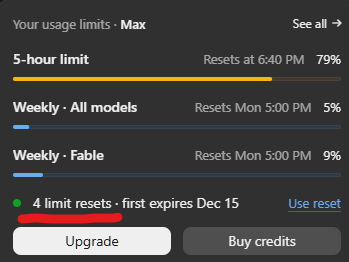
Tesla FSD (Supervised) access has always had a gating mechanic, and safety score resets are one of the more useful tools in an owner's toolkit. Now, at least one owner is reporting a notably generous reset allocation — four resets with more than a month on the clock to use them.

What is a safety score reset, exactly?
A safety score reset allows an FSD (Supervised) subscriber to wipe their current safety score and start a fresh evaluation period. This matters because your safety score is calculated from real driving behavior — hard braking, aggressive turning, unsafe following distance, and similar factors. If you've had a rough stretch of driving, a reset gives you a clean slate rather than dragging down your average for weeks.
Why does the safety score still matter in 2026?
The role of the safety score has evolved significantly. According to background research, Tesla launched Safety Score v3.0 in April 2026, built on more than 26.5 billion miles of real-world driving data. One notable change: every mile driven with FSD (Supervised) engaged now automatically receives a perfect score of 100. That means the score's primary influence has shifted toward Tesla Insurance premium calculations in eligible states, rather than acting as a hard gate on FSD access itself. Even so, your manual driving behavior still feeds into the overall score — and resets remain a meaningful lever for insurance subscribers.
Is four resets unusually generous?
It appears to be on the higher end of what owners typically see. The combination of four available resets alongside a 30-plus-day window to use them suggests either a periodic refresh of reset allocations or a possible change in how Tesla is distributing them. It's worth checking your own Tesla app to see what your current reset count looks like — the allocation isn't always the same across accounts.
How do I check my safety score reset count?
Open the Tesla app, navigate to your Safety Score section (found under your profile or the insurance tab depending on your region), and look for the reset indicator. If you're enrolled in Tesla Insurance, this screen is also where you'll see how your score is affecting your premium. Resets are applied from the same menu — tap to initiate one before the window closes.
Should I use a reset now or save it?
If your current safety score is already strong, there's no urgency. But if you've accumulated a few dings — aggressive braking events, close following incidents — and you're in a Tesla Insurance-eligible state, burning a reset to lift your score before a premium recalculation cycle makes practical sense. With four resets and over a month available, there's room to be strategic rather than reactive. Use one now if your score needs it, and hold the others in reserve for later in the window.
Related Gear
Gear up your Tesla with tested, custom-fit BASENOR accessories — shop Tesla accessories →
Sources & reporting notes
The links below identify the material source records used for this report.
- @DirtyTesLa on X (2026-11-09T23:10:34.000Z) — Direct source
Source links are preserved as published or accessed. See our editorial standards and corrections policy.
The BASENOR Editorial Desk covers Tesla, SpaceX, and related technology, curating reporting from primary sources — official accounts, regulatory filings, and software release data. Every article passes source-record and fact-checking review before publication. About the newsroom.
This report was curated by the BASENOR Editorial Desk from the sources listed above. Read our editorial standards or email editorial@basenor.com to report an error.