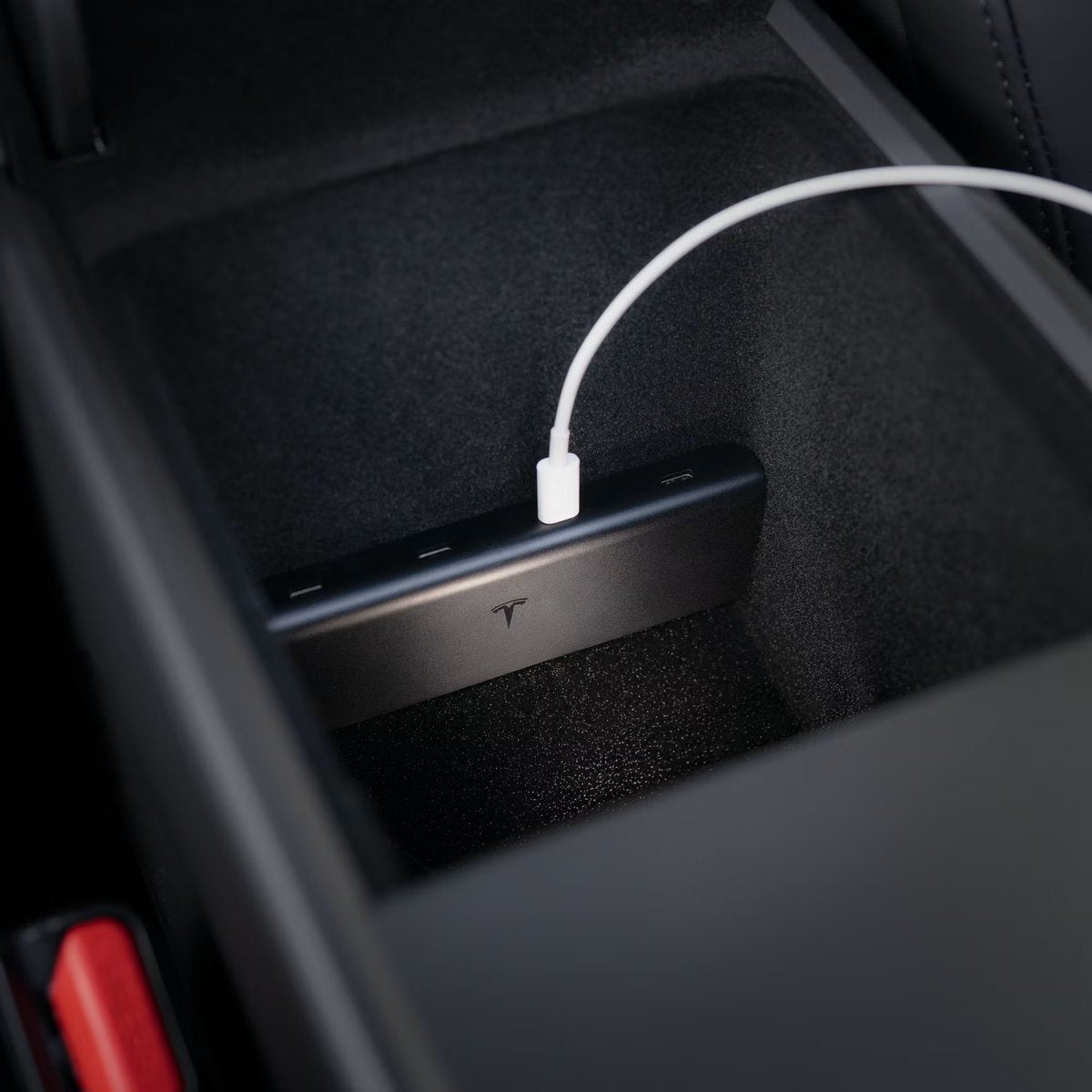
The News: Tesla has added an official USB hub for the Model 3 and Model Y to its online shop.
Why It Matters: An official Tesla-branded hub means guaranteed compatibility and integration with your vehicle's interior — no more guessing whether a third-party accessory will fit or function correctly.
Source: @wholemars on X
Tesla owners have long relied on third-party USB hubs to expand the limited port options in the Model 3 and Model Y center console. That changes today. Tesla has quietly listed an official USB hub in the Tesla shop, purpose-built for these two models — and it's the first time the company has offered a first-party solution for this particular connectivity gap.

📊 What Changed
| Category | Before | After |
|---|---|---|
| Official USB hub availability | Third-party only | Official Tesla shop listing |
| Compatibility assurance | Varies by manufacturer | Tesla-verified for Model 3 & Y |
| Interior fit | Approximate, varies | Designed to OEM spec |
| Purchase channel | Amazon, eBay, specialty retailers | Tesla shop (direct) |
Why This Actually Matters
The Model 3 Highland (2024+) and Model Y Juniper (2025/2026+) refreshes both brought updated interior layouts that left some owners scrambling to find USB hubs that fit cleanly. The third-party market responded with dozens of options — some excellent, some not — but the lack of an official product meant owners were always taking a compatibility gamble.
An official Tesla accessory changes that calculus. When Tesla designs and sells a hub for its own vehicles, you can reasonably expect it to slot in without gaps, match the interior trim, and work reliably with Sentry Mode and Dashcam recording — the two use cases where a flaky USB connection is most costly. Third-party hubs have historically required trial-and-error to find one that doesn't interfere with dashcam write speeds or cause false Sentry Mode triggers.
There's also a support angle: if something goes wrong with an official Tesla accessory, you have a direct path to Tesla's customer service rather than navigating a third-party warranty process.
🚦 Owner's Action Plan
Verdict: Recommended — especially for owners of the refreshed Model 3 Highland or Model Y Juniper who haven't yet found a hub they're happy with.
- Check the Tesla shop now. Head to tesla.com/shop and search for the USB hub. Confirm it lists your specific model and year before purchasing.
- Verify compatibility with your trim. Model 3 and Model Y have had multiple interior revisions. Confirm the listing specifies your production year (Highland 2024+ or Juniper 2025/2026+ vs. earlier variants).
- If you already own a third-party hub that works well, hold off. There's no functional reason to switch unless you're experiencing issues. An official product is a nice-to-have, not a necessity if your current setup is stable.
- Prioritize Sentry/Dashcam compatibility. When reviewing the product listing, look for confirmation that the hub supports continuous dashcam recording. This is the most common pain point with USB hubs in Teslas.
- Watch for pricing. Tesla's official accessories tend to be priced at a premium vs. third-party alternatives. Weigh the convenience and compatibility guarantee against the cost difference.
📰 Deep Dive
Tesla's decision to enter the USB hub market for Model 3 and Model Y is a small but telling move. Accessories like floor mats, center console organizers, and now USB hubs represent a growing revenue stream for Tesla beyond vehicle sales — and they signal that Tesla is paying attention to the friction points owners experience in daily use. A USB hub is one of the first things many new Tesla owners buy, which makes it a logical product for Tesla to own directly.
The timing also aligns with the maturation of the Highland and Juniper refresh cycles. Both vehicles are now widely delivered, and the third-party accessory ecosystem has had time to identify the gaps. Tesla stepping in with an official solution at this stage suggests the company is monitoring what owners are buying and where the aftermarket is most active.
One open question is whether this hub will support the full range of use cases owners care about: fast charging for phones and tablets, data transfer for flash drives used with Sentry Mode, and compatibility with the USB-C ports found in newer Model 3 and Model Y variants. Until the full product listing is reviewed, those specs remain unconfirmed. Check the Tesla shop listing directly for the complete technical details before purchasing. For more on all software updates and accessories news, we'll keep this page updated as more details emerge.

David covers the EV industry, regulatory developments, and accessory ecosystem. 15+ years writing about consumer tech. Based in London.
Sources verified at publish time. Spotted an inaccuracy? Email editorial@basenor.com.