
Tesla has officially expanded its Supercharger waitlist feature to 300 sites across the United States, the company announced on November 19, 2026. The virtual queue system — first piloted at five high-traffic locations earlier this year — lets both Tesla and non-Tesla drivers hold their place in line through the Tesla app or the vehicle's touchscreen, rather than circling the lot hoping a stall opens up.

1. The pilot started small — 300 locations is a major jump
Tesla quietly launched the waitlist feature on May 11, 2026, at just five high-traffic Supercharger locations: four in California (Los Gatos, Mountain View, San Francisco, and San Jose) and one in the Bronx, New York. That controlled pilot was designed to stress-test the queue mechanics and gather real-world feedback before any broader rollout. Six months later, Tesla has pushed the feature to 300 US sites simultaneously — a scale-up that signals the pilot results were good enough to move fast.
2. How the queue actually works
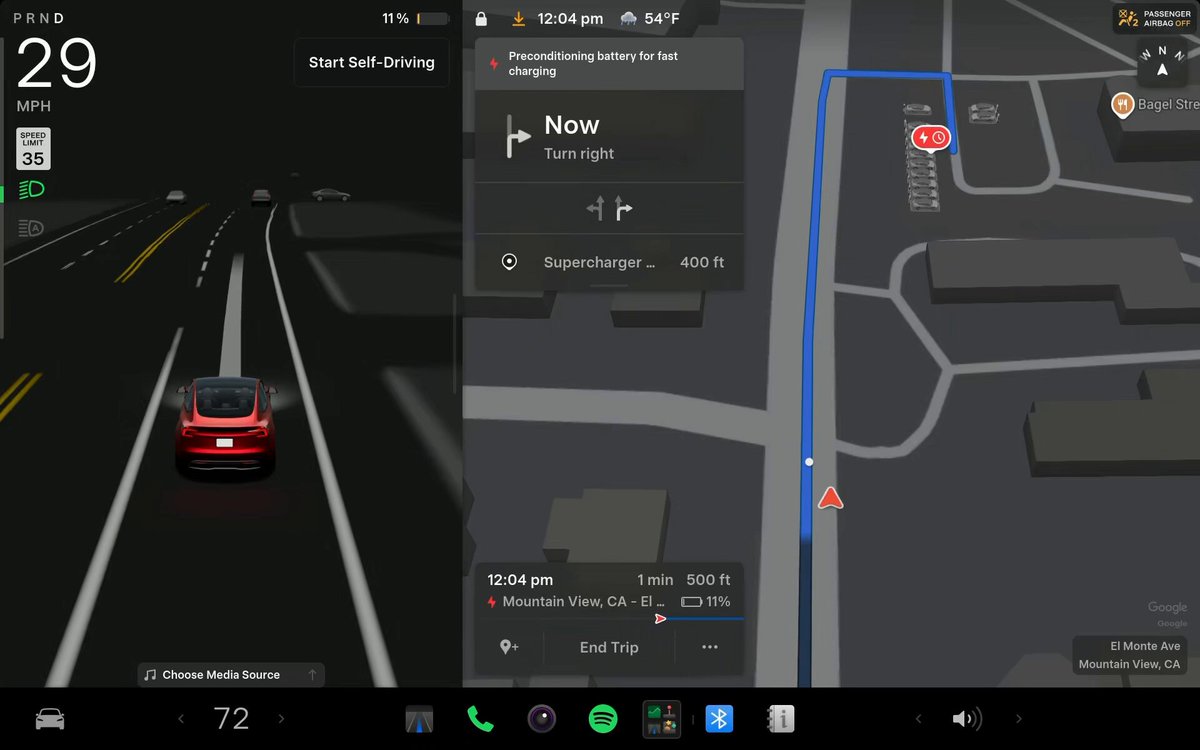
When you arrive at a participating Supercharger and all stalls are occupied, you can join the waitlist directly from the Tesla app or your vehicle's touchscreen. The system tracks your position in line and displays an estimated wait time. When a stall becomes available, you receive a notification with a short window — typically two to three minutes — to claim the spot. The system uses vehicle and phone location data to confirm you're actually on-site, so you can't ghost-queue from your couch. According to earlier pilot reporting, the system currently operates largely on an honor system: it won't physically block a non-queued driver from pulling into an open stall, but it will flag the attempt.
3. Non-Tesla owners can join too — through the app
Tesla has been opening its Supercharger network to non-Tesla EVs for some time, and the waitlist feature follows the same logic. Non-Tesla owners can join the queue using the Tesla app — they just can't use the in-vehicle touchscreen method, which is naturally limited to Tesla hardware. If you drive a non-Tesla EV and want to use a busy Supercharger, download the Tesla app and look for the waitlist option at supported locations.
4. Where to find a waitlist-enabled station
Tesla hasn't published a public list of all 300 participating locations, but the easiest way to check is through the Tesla app's charging map. Stations with the waitlist feature active should surface the option when you navigate to them or tap on a stall. For Tesla owners, the in-car navigation will also surface the queue prompt when routing to a supported site. Expect the list of participating stations to grow — Tesla has previously indicated that hundreds of congested Supercharger sites globally are the long-term target for this feature.
5. What this means for busy charging stops going forward
The practical upside is straightforward: less time idling in a parking lot, and a clearer picture of whether it's worth waiting or routing to a different station. For road-trippers hitting popular corridors on holiday weekends — when Supercharger queues at busy locations can stretch to 20-plus minutes — a virtual queue that notifies you on your phone is a meaningful quality-of-life upgrade. The bigger picture is that Tesla is building the infrastructure management layer to match the physical network, which matters as both Tesla and third-party EV adoption continues to grow.
Related Gear
Gear up your Tesla with tested, custom-fit BASENOR accessories — shop Tesla accessories →
Sources & reporting notes
The links below identify the material source records used for this report.
- @TeslaCharging on X (2026-11-19T22:29:00.000Z) — Direct source
- @TeslaNewswire on X (2026-11-19T22:54:50.000Z) — Direct source
Source links are preserved as published or accessed. See our editorial standards and corrections policy.
The BASENOR Editorial Desk covers Tesla, SpaceX, and related technology, curating reporting from primary sources — official accounts, regulatory filings, and software release data. Every article passes source-record and fact-checking review before publication. About the newsroom.
This report was curated by the BASENOR Editorial Desk from the sources listed above. Read our editorial standards or email editorial@basenor.com to report an error.