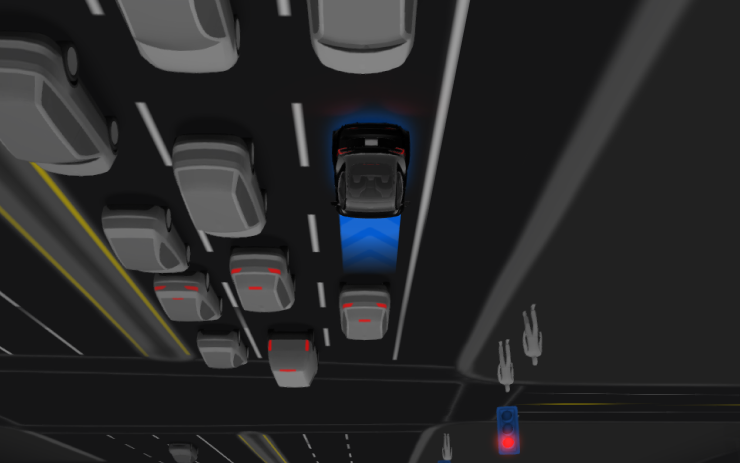
Tesla has begun pushing Full Self-Driving (Supervised) V14.3.9 to Hardware 4 vehicles in Australia and New Zealand — the first time this version has reached the region. The update arrives via software version 2026.28.5, first spotted on a Model 3 Performance (2024) in New South Wales, and marks another step forward in Tesla's ongoing global expansion of its latest FSD generation.

What This Update Brings
V14.3.9 is the latest iteration of Tesla's FSD V14 generation, which first arrived in Australia and New Zealand back in June 2026 — a significant leap from the V13 era. According to background research, the previous version actively rolling out in the region was V14.3.3 (via 2026.16.6). The jump to V14.3.9 via 2026.28.5 represents a meaningful incremental improvement for owners who have been on that earlier build.
Critically, this rollout is limited to AI4 (Hardware 4) vehicles. If your Tesla was built on the older Hardware 3 platform, V14.3.9 is not yet available for you — a separate FSD V14 Lite track for HW3 vehicles is in development for the region, but has not yet been confirmed for AU/NZ.
| Change | Type | Models |
|---|---|---|
| FSD (Supervised) V14.3.9 | Official | All AI4/HW4 vehicles |

How to Check If You Have It (and How to Get It)
The rollout is in early stages, so not every eligible vehicle will see it immediately. Here's what AU/NZ owners should do right now:
- Confirm your hardware generation. On your touchscreen, go to Controls → Software → Additional Vehicle Information. Look for "Autopilot Computer" — it should read "Full Self-Driving Computer (HW4)" or similar AI4 designation. If it shows HW3, this update is not yet available for your vehicle.
- Check your current software version. Go to Controls → Software. If you're already on 2026.28.5, you have the update. If not, note your current version — anything below 2026.28.5 means you're waiting.
- Verify your FSD subscription is active. FSD (Supervised) in Australia and New Zealand moved to subscription-only as of April 1, 2026. In Australia, that's AUD $149/month; in New Zealand, NZD $159/month. Without an active subscription, the update will install but FSD features won't be accessible. Check your subscription status at Controls → Autopilot or via the Tesla app under Upgrades.
- Request the update manually. Go to Controls → Software and tap Check for Updates. If 2026.28.5 is available for your VIN, it will appear here. If not, Tesla's servers are still staging the rollout — check again in 24-48 hours.
- Schedule the install for a convenient time. Once the update appears, you can schedule it for off-peak hours (overnight works well). The vehicle needs to be in Park. Keep it plugged in if possible to avoid drawing from the battery during installation.
- After install, re-enable FSD features. Following any FSD update, do a quick check that Autosteer on City Streets and Navigate on Autopilot are still set to your preferred configuration under Controls → Autopilot. Occasionally settings revert after major FSD version jumps.
HW3 Owners: What to Expect
If you're on Hardware 3, you're not left behind — but you are on a different timeline. According to background research, Tesla has been developing FSD V14 Lite specifically for HW3 vehicles in Australia and New Zealand, though a confirmed release date for that track has not been announced. The global HW3 rollout of V14.2 Lite began around mid-September 2026, so the AU/NZ version of that track may not be far off. Keep an eye on your software update screen and follow our all software updates coverage for the latest.
For HW4 owners in Australia and New Zealand, this is a straightforward upgrade worth grabbing. V14.3.9 has already been rolling out globally for several days, and early reception has been positive. The regional debut here — confirmed independently by both Teslascope and Whole Mars Catalog — closes the gap between AU/NZ and the rest of the world's HW4 fleet considerably faster than previous FSD generations managed.
📋 Tracking Tesla software? See every firmware, FSD and app version in one place in our Tesla Software Update Tracker.
Related Gear
Gear up your Tesla with tested, custom-fit BASENOR accessories — shop Tesla accessories →
Sources & reporting notes
The links below identify the material source records used for this report.
- @teslascope on X (2026-09-16T19:37:55.000Z) — Direct source
- @teslascope on X (2026-09-16T19:37:58.000Z) — Direct source
- @teslascope on X (2026-09-16T19:38:12.000Z) — Direct source
- @teslascope on X (2026-09-16T19:44:01.000Z) — Direct source
- @wholemars on X (2026-09-16T19:46:42.000Z) — Direct source
Source links are preserved as published or accessed. See our editorial standards and corrections policy.
The BASENOR Editorial Desk covers Tesla, SpaceX, and related technology, curating reporting from primary sources — official accounts, regulatory filings, and software release data. Every article passes source-record and fact-checking review before publication. About the newsroom.
This report was curated by the BASENOR Editorial Desk from the sources listed above. Read our editorial standards or email editorial@basenor.com to report an error.