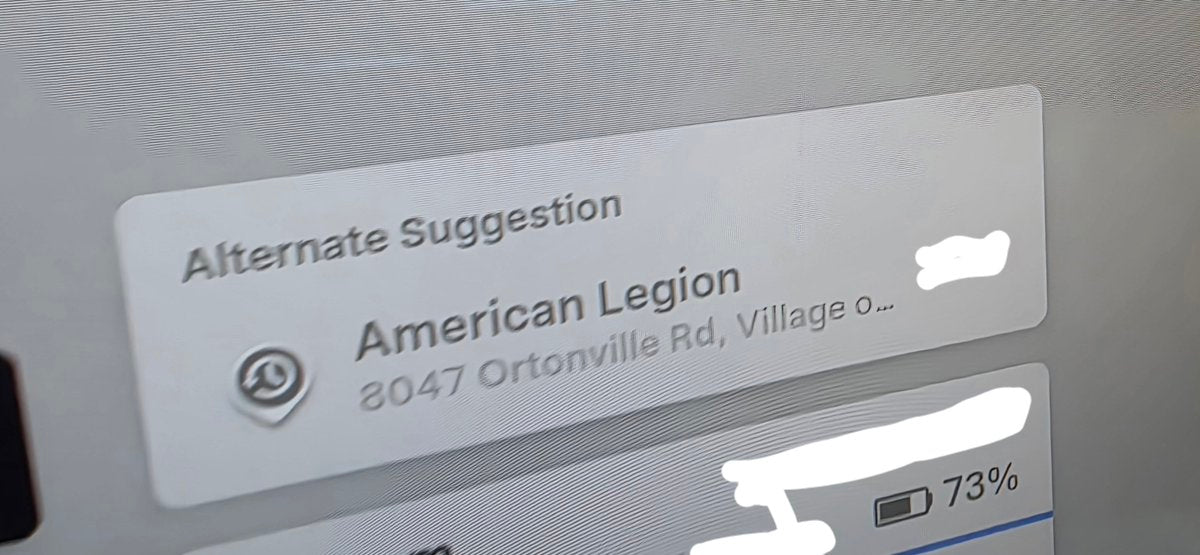
Tesla owners are spotting a new navigation behavior that wasn't announced in any release notes: when you get into your car and Automatic Navigation kicks in, an "alternate suggestion" destination now appears above the auto-added route. It's a small UI change with a genuinely useful purpose — and if you haven't seen it yet, here's what to look for and how to make sure the underlying feature is switched on.

What's Actually Happening
Tesla's Automatic Navigation has been able to predict your destination — home, work, a regular coffee stop — for a while now. What's new is the Alternate Suggestions module sitting above that primary auto-destination card. Instead of being locked into the one place Tesla thinks you're headed, you now get a quick-tap shortcut to other frequently visited locations or calendar-linked destinations right at the top of the nav card.
This builds on the Preferred Routes feature that rolled out with map update 2026.26 in August 2026 for US owners. That update taught the nav system to learn your habitual routes — not just your home and work addresses, but places like a school drop-off or the gym — and surface them as "Your Route" when the travel time is reasonably close to the fastest option. The alternate suggestion UI appears to be the next layer on top of that learned-habits engine.
Because none of this appeared in official release notes, the exact software version carrying it isn't confirmed. @DirtyTesLa spotted it on a Model Y, but the underlying Preferred Routes and Automatic Navigation improvements are documented as available on all Tesla models with Intel or AMD infotainment units.
How to Make Sure It's Enabled
The alternate suggestion card only shows up if Automatic Navigation is active. If you've never touched that setting, it's likely already on — but it's worth a quick check, especially if you've done a factory reset recently.
- Open Controls from the main touchscreen.
- Tap Navigation.
- Confirm Automatic Navigation is toggled on.
- While you're there, verify Online Routing is enabled — Preferred Routes requires it, and it's on by default but can be switched off manually.
- Get in your car, don't set a destination, and start driving. If the system has learned your patterns, you should see the primary auto-destination card appear — and now, potentially, an alternate suggestion above it.
One note on map version: Preferred Routes specifically requires map update 2026.26 or later. If you're on an older map package, the alternate suggestions may not appear even with Automatic Navigation enabled. You can check your map version under Controls > Software > Additional Vehicle Information.
A Word on Privacy
According to Tesla, the location data powering both Automatic Navigation and Preferred Routes is anonymous and not associated with your specific vehicle. If that matters to you, it's worth knowing before you let the system build a habit profile — but it also means you can use these features without your daily routines being tied back to your VIN.
The alternate suggestion feature is still spreading across the fleet, so not every owner will see it immediately. If you're on a recent software version, have Automatic Navigation enabled, and drive consistent routes, you're the most likely candidate to get it first. Keep an eye on the nav card the next time you get in — it may already be there.
Related Gear
Gear up your Model Y with tested, custom-fit BASENOR accessories — shop Model Y accessories →
Sources & reporting notes
The links below identify the material source records used for this report.
- @DirtyTesLa on X (2026-10-18T16:56:15.000Z) — Direct source
Source links are preserved as published or accessed. See our editorial standards and corrections policy.
The BASENOR Editorial Desk covers Tesla, SpaceX, and related technology, curating reporting from primary sources — official accounts, regulatory filings, and software release data. Every article passes source-record and fact-checking review before publication. About the newsroom.
This report was curated by the BASENOR Editorial Desk from the sources listed above. Read our editorial standards or email editorial@basenor.com to report an error.