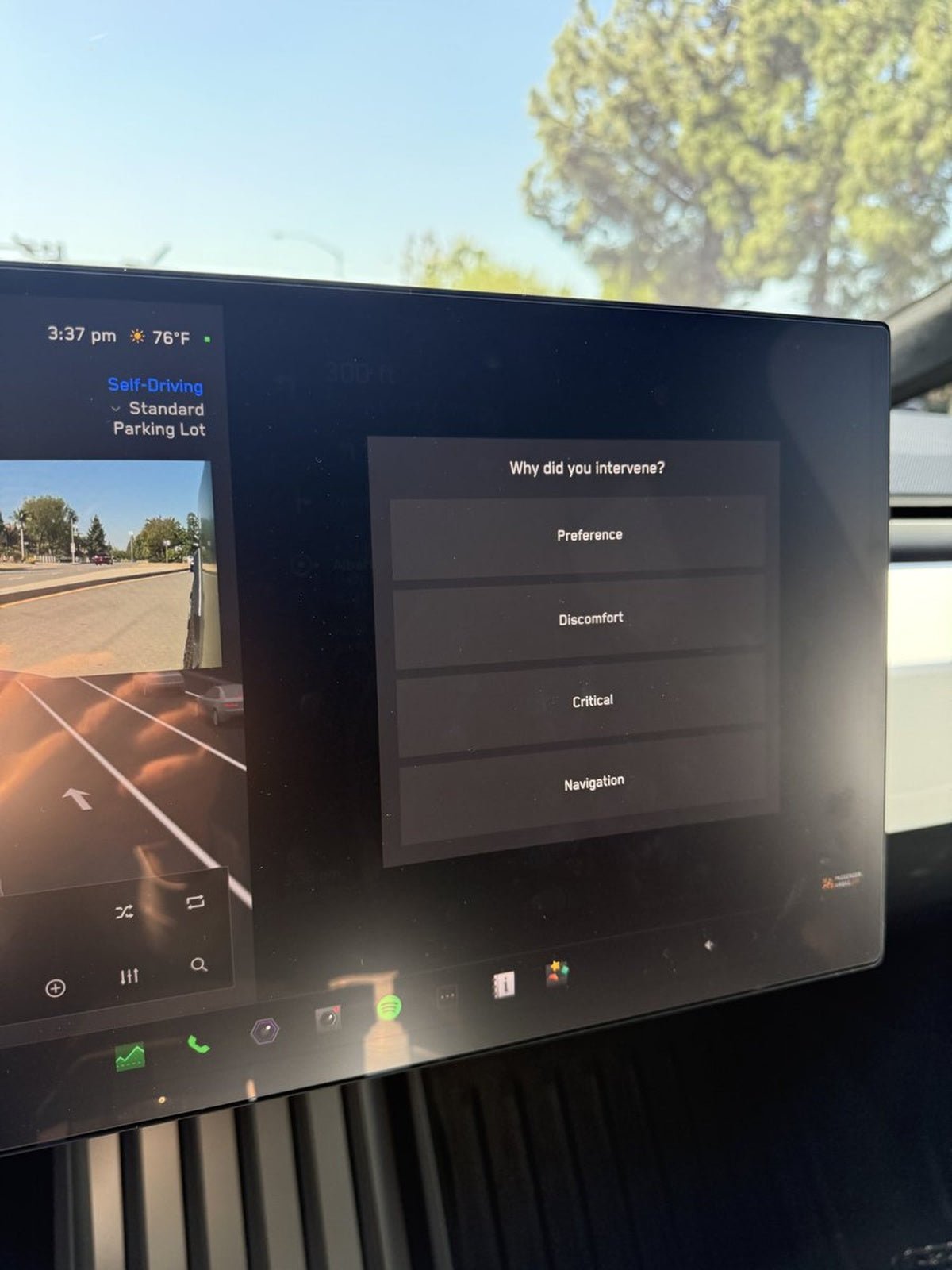
The News: Tesla has introduced a new pop-up screen interface for submitting in-car bug reports and feedback, replacing the previous voice-input method.
Why It Matters: Reporting issues from inside your Tesla just got significantly faster and more intuitive — meaning Tesla gets better diagnostic data, and you spend less time fumbling with voice commands.
Source: @ray4tesla on X
Tesla's In-Car Bug Reporter Just Got a Major Upgrade
If you've ever tried to report a glitch in your Tesla while driving — or even while parked — you know the old voice-input method was more frustrating than it needed to be. Tesla has now rolled out a new pop-up screen interface for in-car bug reporting and feedback submission, and early reactions from owners suggest it's a meaningful quality-of-life improvement.
Longtime Tesla community member Ray (@ray4tesla) was among the first to flag the change, calling it noticeably easier than the previous voice-driven approach.

📊 What Changed
| Aspect | Before | After |
|---|---|---|
| Input Method | Voice input | Pop-up touchscreen interface |
| Ease of Use | Required spoken description of the issue | On-screen prompts guide the report |
| Accessibility | Difficult in noisy environments or for non-native speakers | Fully touchscreen-driven, no voice required |
| Existing Tool Access | Hold the car icon (lower-left of touchscreen) to log diagnostics | New pop-up screen appears to streamline the full reporting flow |
It's worth noting that Tesla has had an in-car bug reporting tool for some time — holding the car icon in the lower-left corner of the touchscreen has historically triggered a diagnostic log that the service team can review. This new pop-up interface appears to build on that foundation, making the process more guided and accessible for everyday owners rather than requiring them to know the right voice command or hidden gesture.
🚦 Owner's Action Plan
Verdict: RECOMMENDED — Takes 30 seconds. Helps Tesla improve your car.
Here's how to find and use the new pop-up bug reporter in your Tesla:
- Trigger the report: When you notice an issue, tap the car icon in the lower-left corner of your touchscreen, or look for a new prompt that may appear contextually when a fault is detected.
- Look for the pop-up: The new interface should present a guided screen — follow the on-screen prompts to describe the issue. No voice input required.
- Be specific: The more detail you provide (what you were doing, what the car was doing, which feature was affected), the more useful your report is to Tesla's engineering team.
- Submit and move on: Once submitted, Tesla logs the report alongside your vehicle's diagnostic data. You don't need to follow up — the service team reviews flagged submissions.
- Don't see it yet? This feature may be rolling out gradually. If the pop-up interface isn't visible on your vehicle, check that your software is up to date via Controls → Software. Keep an eye on your all software updates feed for confirmation of wider rollout.
Why This Actually Matters for Your Car's Quality
Bug reporting might sound like a minor housekeeping feature, but it has a direct impact on how quickly Tesla identifies and fixes real-world issues. Voice input created friction — owners in noisy environments, those less comfortable speaking commands, or anyone in a hurry simply wouldn't bother. A touchscreen pop-up lowers that barrier significantly.
More reports submitted = more data for Tesla's engineers = faster fixes pushed to your car via OTA updates. It's a feedback loop that benefits every owner in the fleet, not just the ones who file reports.
Tesla has not published official release notes for this change as of publication, and it does not appear to be tied to a specific named software version. It may have arrived as a server-side update or as part of a recent software build. If you spot the new interface, note your software version and share it — that information helps the community track the rollout.
📰 Deep Dive
The shift from voice to touchscreen for bug reporting reflects a broader pattern in Tesla's UX evolution. Early Tesla software leaned heavily on voice commands as the "futuristic" input method, but real-world usage data has consistently shown that touchscreen interactions have higher completion rates for multi-step tasks. A pop-up that walks you through a report step-by-step is simply more reliable than asking an owner to articulate a technical problem out loud while sitting in a parking lot.
There's also an accessibility dimension here. Voice-only reporting disadvantaged owners who are hard of hearing, non-native English speakers, or simply in environments where speaking isn't practical. A touchscreen interface removes all of those barriers at once.
From Tesla's engineering perspective, structured touchscreen input likely produces cleaner, more categorized data than free-form voice transcriptions. If the pop-up guides owners through selecting a category (navigation, audio, climate, FSD, etc.) before adding free-text detail, the resulting dataset is far easier to triage and prioritize. That's a win for the engineering team and, ultimately, for every owner waiting on a fix.
Related Gear
Gear up your Tesla with tested, custom-fit BASENOR accessories — shop Tesla accessories →
Sources & reporting notes
The links below identify the material source records used for this report.
- @ray4tesla on X (2026-04-28T23:31:27.000Z) — Direct source
Source links are preserved as published or accessed. See our editorial standards and corrections policy.
The BASENOR Editorial Desk covers Tesla, SpaceX, and related technology, curating reporting from primary sources — official accounts, regulatory filings, and software release data. Every article passes source-record and fact-checking review before publication. About the newsroom.
This report was curated by the BASENOR Editorial Desk from the sources listed above. Read our editorial standards or email editorial@basenor.com to report an error.