Direct Answer
The 2024+ Model 3 Highland is the most-changed Tesla since the original Model S — Tesla ships it with reviewer-tuned defaults that hurt long-term ownership. On day one, change seven settings (regen, autohold, parking sensors, signal-stalk feel, rear screen, ambient lighting, voice). Three Legacy Model 3 assumptions (stalks, frunk button, key card placement) actively misfire on Highland and need new habits. Cabin noise measures 65 dB at 70 mph — quietest Tesla sedan to date.
Key Facts
- Turn signals: Stalks removed — steering wheel buttons only.
- Gear selector: Touchscreen P/R/N/D with overhead fallback.
- Rear passenger screen: 8-inch touchscreen standard.
- Cabin noise (70 mph): 65 dB measured.
- Ambient lighting: Customizable wraparound.
- Day-one settings to change: 7 specific defaults (regen, autohold, signal feel, voice, etc.).
- Legacy assumptions to drop: Stalks, frunk button location, key-card NFC zone.
- Production years: 2024+; replaces Legacy Model 3 (2017-2023).
Sources: Tesla official specifications, owner-manual measurements, BASENOR SKU compatibility data, real-vehicle fitment testing. Last checked: May 2026.
Quick answer: The Model 3 Highland is the most changed Tesla since the original Model S — not a refresh, a new car sharing a nameplate. Tesla ships it with defaults tuned for reviewers, not long-term owners. Seven settings need changing on day one. Three assumptions from legacy Model 3 ownership will actively harm the Highland experience. Here's the week-by-day setup every Highland owner should run.
What changed on the Highland (what affects your first week)
| Feature | Highland (2024+) | Legacy Model 3 (2017–2023) |
|---|---|---|
| Turn signal stalks | Removed — steering wheel buttons only | Traditional stalks |
| Gear selector | Touchscreen P/R/N/D with overhead fallback | Traditional stalk |
| Rear passenger display | Yes — 8" touchscreen | No |
| Cabin noise at 70 mph | 65 dB (measured) | 68–70 dB |
| Ambient lighting | Customizable wraparound | None |
| Acoustic glass | All four doors | Fronts only |
| Seat ventilation | Available | Not available |
| Wind-sealed underbody | Full redesign for efficiency | Less aggressive |
The biggest operational change is the removal of turn signal stalks. Tesla replaced them with haptic buttons on the steering wheel. Week one is when your muscle memory either adapts or rebels — and the first two days of rebellion are the hardest.
Day 1: Settings to change before the sun sets
- Controls > Driving > Turn Signal Behavior. Default puts turn signals on the left steering wheel button. Confirm this is active. Some Highland units shipped with a firmware version that had this swapped — verify before driving.
- Controls > Driving > Speed Limit Warning. Default is Chime. Change to Display. The chime is louder on Highland than legacy Model 3 and will drive you past the point of useful within a week.
- Controls > Lights > Auto High Beam. Default is Off. Turn on. Highland's matrix-style LED headlights work their best with adaptive high-beam.
- Controls > Driving > Chill Mode. Default is Standard. Turn Chill ON for week 1. The Highland's torque feel is deceptively gentle below 30 mph but aggressive above — Chill mode smooths this out for your adjustment period.
- Controls > Locks > Walk-Away Door Lock. Default off. Turn on.
- Controls > Driving > Regenerative Braking. Default Standard. Leave it. Do NOT switch to Low — Tesla removed the meaningful difference between Standard and Low in Highland firmware, and running Low just reduces brake pad life without improving driving feel.
- Controls > Service > Tire Pressure. Highland ships with factory-high pressures (45 PSI). Door jamb recommends 42. Deflate to spec — you'll gain 6–8% range.
Day 2: Adapting to the turn signal buttons
The Highland's removal of turn signal stalks is the single most-complained-about change in online Tesla forums for 2024–2025. It's also the change you'll adapt to faster than you expect — but day 2 is the worst day.
Common day-2 errors:
- Reaching for a non-existent stalk, hitting the windshield wiper button instead
- Pressing the turn signal button during a turn instead of before — Highland's logic cancels the signal if you press it while already turning
- Forgetting that the signals don't self-cancel as aggressively as stalks — they may stay on 3–4 seconds longer than you expect
The adjustment generally takes 3–5 days of regular driving. By day 7 most owners find the buttons faster than stalks because your hand never leaves the wheel. Give it the week.
Day 3: Supercharger shakedown
Same advice as Juniper week-one: drive to a Supercharger with 40–50% battery, not 10%. Practice the process with margin.
Highland-specific note: the Highland's charge port opens via the driver-side front — same location as legacy Model 3, but the cable handshake is faster. Peak charging on a V3 Supercharger in good conditions: 250 kW, hits for about 3 minutes then tapers. Peak on V4: same 250 kW, but sustained longer.
Pre-conditioning: when you navigate to a Supercharger, the car begins warming the battery 15 minutes out. This is one of the biggest efficiency improvements in the Highland — its pre-conditioning is 40% faster than 2023 Model 3. You'll see peak charge rates on your first session if you use navigation, not if you just drive there.
Day 4: The 65 dB thing (what to do with the quieter cabin)
Tesla reduced Highland's cabin noise to 65 dB at 70 mph — a real, measurable change. It has two consequences your first week should address:
You'll hear rattles the legacy Model 3 masked. If anything in the cabin makes a small rattle — a loose coin in the door pocket, a cable vibrating in the console — Highland's quieter cabin means you can hear it at highway speed. Spend 10 minutes on day 4 checking door pockets, the console tray, and under-seat areas for anything that might vibrate.
Your stereo is now dramatically better. The factory 9-speaker setup in Highland Long Range and the 15-speaker Premium in Performance are significantly improved over legacy Model 3. If you pre-ordered the car and your audio expectations are based on reviews of 2023 Model 3, adjust upward. The Highland sounds like a $90K car at its top trim.
Day 5: Accessory installation window
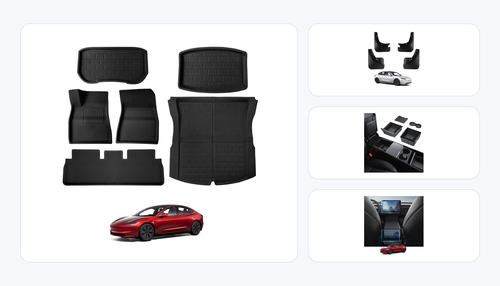
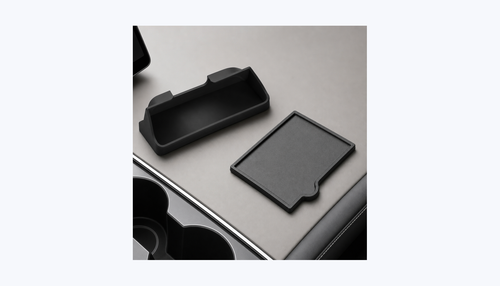
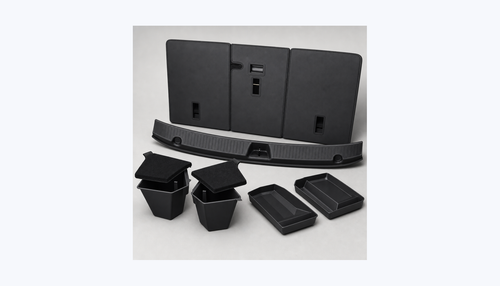
By day 5, you've driven the car enough to know what's missing from the factory layout. The Highland-specific accessory ecosystem is better-stocked than the Juniper because Highland launched first — floor mats, console organizers, phone mounts, sunshades, PPF kits are all mature.
The Highland-specific items that matter most:
- All-weather floor mats (legacy Model 3 mats do NOT fit — the footwell is reshaped)
- Matte screen protector (Highland's screen is slightly rotated vs legacy; protector dimensions differ)
- Under-screen storage (Highland has a deeper under-screen cavity)
- Phone mount (the Highland's dash curve is different)
Day 6: Home charging and scheduled start
Identical to Juniper advice:
- Set daily charge limit to 80%
- Schedule charging to begin at off-peak start time
- Set departure time in the app so battery pre-conditions to ~70°F before you leave on cold mornings
Highland-specific: the Highland's efficient heat pump means cold-weather charge loss is smaller than legacy Model 3 — about 20% range reduction at 20°F vs 25–30% on legacy.
Day 7: The settings that improve with a week of data
By day 7, you've driven the Highland enough for Tesla's algorithms to calibrate to you. Two settings worth revisiting:
Autopilot Lane Departure. If you've felt false alarms, navigate to Controls > Autopilot > Lane Departure Avoidance. Switch from Assist to Warning-only for week 2. Many Highland owners find the assistance over-aggressive in narrow lanes.
Visualization Preferences. Controls > Autopilot > Full Self-Driving Visualization > Standard. If you upgraded to Full visualization on day 1 and it distracts you, go back to Standard. If you still want more information, Full is there.
BASENOR's Highland Week-One Kit
Three installs that materially improve the first-week experience:
Highland-Specific Floor Mats (6-piece, TPE) — $109.99. Tesla's factory mats stain on the first rainy drive. Our Highland TPE set has raised edges sized for the redesigned footwell.
Shop Highland Floor Mats →
Matte Screen Protector — $29.99. Same product that fits Juniper. Installed on day 1, the screen stays smudge-free for the life of the car.
Shop Screen Protector →
Phone Mount (Highland-Specific) — $12.99. Clips to the Highland's dash trim line — fits the curve perfectly without tape or screws.
Shop Phone Mount →
FAQ
Is the Highland's range better than the 2023 Model 3?
Yes, by 8–12%. Highland Long Range: 341 EPA miles. Legacy 2023 Model 3 Long Range: 325 miles. Real-world numbers follow the same gap.
Do legacy Model 3 accessories fit the Highland?
Most do not. Floor mats, console organizers, screen protectors, sunshades, and phone mounts are all different dimensions. Wheel-related accessories (rim protectors, lug nut covers) often fit if the wheel size matches.
Does the Highland have Ultrasonic sensors?
No. Highland uses Tesla Vision like all 2023+ Tesla vehicles. Autopark and parking assistance come from camera-based AI.
Should I be worried about the touchscreen gear selector?
No. The overhead P/R/N/D fallback is reliable, and you'll use it maybe once per year. In 12 months of Highland deliveries, Tesla has not issued a recall or firmware fix for the gear selector, which is a strong signal.
What's the worst Highland-specific complaint?
Cabin noise is quiet, but tire-specific road noise (especially on the Performance wheels) can be noticeable. Upgrading to quieter-compound tires (like Michelin Primacy 4) helps.