Tesla Key Card Guide: Backup Setup, Tap Zones, and Storage Fitment
A Tesla key card is not old-fashioned backup hardware. It is the physical recovery path we want every owner to test before they need it: when a phone is dead, a phone key stops pairing, a valet needs temporary access, or a second driver needs a clean handoff.
Our team treats the key card like a fire extinguisher: most owners do not touch it every week, but the setup has to be obvious when something goes wrong. The goal is not to replace Phone Key. The goal is to know exactly where the card is, how to use it, and how to remove it if it is lost.
Bottom Line Up Front
Keep one tested card with you: Phone Key is convenient, but the physical card is the simplest backup when your phone battery dies or Bluetooth access fails.
Do not store your only spare inside the car: a holder can create a reliable place for a backup card during daily use, but the second emergency card should stay outside the vehicle.
Fitment matters: BASENOR’s current key-card storage products are for legacy Model 3 / Model Y interiors. We would not claim Highland, Juniper, or Cybertruck fitment unless the product page verifies it.
What the Tesla key card actually does
The key card is an authenticated key for the car. In normal owner language, it can unlock the vehicle, authorize driving, and help authenticate key-management changes when the car asks for an existing key. Tesla’s public service documentation describes key management around an authenticated key being present, which is why we never treat a loose card like a harmless plastic token.
The card is also passive. Unlike a phone, it does not need charging, Bluetooth, or a mobile app session. That is the whole reason it belongs in your owner setup: it is boring, thin, and reliable when your more convenient access method has a bad day.
Daily role
Backup access when Phone Key is unreliable, unavailable, or not shared with another driver.
Setup role
Authentication support when adding or removing keys, depending on vehicle prompts and software flow.
Handoff role
Simple physical access for valet, service, detailer, or short-term driver situations.
Where to tap it — and why new owners miss it
Most confusion comes from expecting the card to behave like a remote. It does not unlock from across the parking lot. You present it at the correct exterior reader area, then place it in the correct interior reader area when the car needs drive authorization.
Model-specific reader locations can vary by generation, so we recommend using Tesla’s official manual or service documentation for your exact vehicle. The owner habit is still the same: practice once in the driveway before you need the card in a rainstorm, airport lot, or service lane.
| Moment | What to do | Owner mistake to avoid | Our test habit |
|---|---|---|---|
| Unlocking | Hold the card at the exterior reader area until the car responds. | Waving it quickly like a remote fob. | Pause for one beat; do not swipe past the reader. |
| Starting | Place the card where the vehicle prompts for drive authorization. | Leaving it in a pocket and expecting Bluetooth behavior. | Practice card-only start once after delivery. |
| Valet or service | Hand over the card only after removing private items and setting the correct drive mode/settings. | Giving full phone access for a simple handoff. | Use the card as the cleanest temporary key. |
How to add, name, and remove key cards safely
We would handle key cards like house keys, not like accessories. Add cards intentionally, name them clearly in the car’s key list, and remove any card you cannot physically account for. If a card is lost, do not wait until the next service visit — remove access as soon as you confirm it is gone.
- Start with a known authenticated key. Tesla key-management flows are built around proving you already have valid access.
- Name each key in plain language. “Jacob wallet card” is more useful than “Key 3” six months later.
- Test the card after adding it. Unlock and authorize driving before you call the setup complete.
- Remove lost cards immediately. If you cannot find it, treat it as an active key until removed.
- Keep a written household rule. One card in the wallet or bag, one emergency card stored at home, not both inside the car.
Security note
A storage accessory can make your backup card easier to find, but it does not improve Tesla authentication. We would never describe a holder as an anti-theft device or a software security upgrade.
The backup-card habits we recommend
After testing owner handoff routines across different Tesla generations, our best advice is simple: make the card boring. It should have one predictable location, one clear purpose, and one monthly test.
The monthly test is the step most owners skip. We would rather find out in the driveway that a card was removed, misplaced, or never paired correctly than discover it after a phone battery dies at a trailhead or airport pickup zone. The test takes less than one minute: turn Bluetooth off on your phone, unlock with the card, authorize driving with the card, then put the card back in the same location.
For shared vehicles, label the cards by person or storage location. A household with two drivers should be able to answer two questions without opening a drawer: which card is in daily use, and which card is the emergency spare? That naming habit also makes removal safer if one card disappears.
Good setup
- One card in a wallet, bag, or removable daily organizer.
- One spare outside the car at home.
- Each card named in the vehicle key list.
- Card-only unlock/start tested monthly.
Risky setup
- The only physical card lives inside the vehicle.
- Cards are unnamed, so nobody knows which one was lost.
- A valet receives phone access instead of a limited physical handoff.
- The owner discovers the card location during an emergency.
When a key-card holder helps — and when it does not
A holder helps when it solves a behavior problem: your card always disappears into the console, slides under a mat, or gets mixed with sunglasses and charging adapters. It does not help if the product does not fit your interior generation.
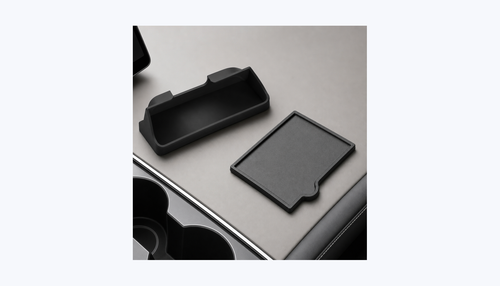
For legacy Model 3 and Model Y owners, BASENOR currently has two active key-card storage options we would consider depending on the cabin layout. The center-console key card holder is the simpler habit cue for older Model 3 / Model Y interiors. The silicone sunglasses holder with key-card storage makes more sense if your daily clutter is sunglasses plus a backup card.
The real tradeoff is fitment age. A 2017-2024 Model 3 / Model Y console product can be exactly right for a legacy cabin and wrong for a refreshed interior. Model 3 Highland changed the cabin layout, and Model Y Juniper updates are not the same as legacy Model Y. We keep those generations separate because a storage piece that is off by a few millimeters becomes annoying every single drive.
If you lease, keep the setup removable. A key-card holder or silicone storage piece should leave no drilled holes, wiring changes, or adhesive residue that creates a return-condition argument. That is why this article recommends habit-based organization, not permanent key-card modifications.
Fitment boundary we would keep in the article
These are legacy Model 3 / Model Y storage products. We would not position them for Model 3 Highland, Model Y Juniper, or Cybertruck unless a product page and physical test confirm that fitment.
The five moments when the key card earns its place
The key card is easy to ignore because Phone Key works so well most days. The owners who appreciate the card are usually the ones who have already been locked out of a smooth routine once: a dead phone after a concert, a Bluetooth pairing glitch before work, a valet stand that does not want your phone, a service visit, or a family driver who needs access for one errand.
That is why we do not frame the card as an everyday replacement. We frame it as the low-drama fallback. If you test the card once, give it a predictable storage spot, and remove lost cards quickly, the whole system becomes easier for every driver in the household.
| Scenario | Best key choice | Why it works | What to avoid |
|---|---|---|---|
| Daily solo driving | Phone Key plus wallet card | Phone stays convenient while the card covers battery or Bluetooth failure. | Leaving every physical card at home. |
| Airport parking | Phone Key plus card in carry-on | You still have a way in if the phone drains during travel. | Putting the only card in checked luggage. |
| Valet or detailer | Named physical card | The handoff is clear and does not expose your phone or app session. | Sharing your phone or account credentials. |
| Family spare | Second named card at home | Another trusted driver can recover the car without searching your bag. | Keeping both cards inside the vehicle. |
| Lost-card event | Remaining authenticated key | You can remove the missing card from the key list quickly. | Waiting days because “it is probably somewhere.” |
Model and generation notes: universal habit, not universal accessory fitment
The key-card habit applies across Tesla ownership, but storage fitment is not universal. That distinction matters because many owners search “Tesla key card” as if the card, tap zone, holder, and console shape are one topic. They are not. The card behavior belongs to Tesla’s access system; the storage accessory has to match your interior generation.
For legacy Model 3 and Model Y cabins, a small organizer can make the card easier to find without adding electronics. For Model 3 Highland, Model Y Juniper, Model S, Model X, and Cybertruck owners, we would first verify the exact product page and physical mounting area before buying any holder. A key-card holder that fits an older console can look close in photos but still miss the revised trim, charging pad, console lip, or storage geometry.
If you own legacy Model 3 / Model Y
Use the product fitment range first, then decide whether the holder solves a real routine problem. The strongest use case is a removable daily location: wallet card goes with you, spare card stays at home, and the holder prevents the daily card from getting buried during errands or service handoffs.
If you own Highland, Juniper, Cybertruck, S, or X
Treat this article as an access and security guide, not a blanket holder recommendation. The safe purchase path is to confirm current product-page fitment or choose a universal wallet-style solution outside the car until a tested interior holder exists for your exact cabin.
If the card does not work the first time, check these basics
A failed tap does not always mean the card is bad. Most first-time problems are reader position, speed, or key-list confusion. Slow down, use the official tap area for your model, and confirm the card still appears as an active key. If you bought a used Tesla, do this immediately after delivery so old keys and new household keys are easy to audit.
- Hold, do not swipe. Pause the card flat against the reader area for a moment instead of flicking it past the pillar or console.
- Try card-only access in a calm setting. Disable Bluetooth briefly or leave the phone away from the car so you know the card is doing the work.
- Confirm the card is named in the key list. A plain name makes removal faster if the card is later misplaced.
- Separate the card from metal clutter. Do not test it while it is buried under coins, tools, or a stack of other cards.
- Do not force an accessory workaround. If a holder makes the card harder to remove or tap, the holder is hurting the emergency routine.
Our monthly test routine
Once a month, unlock with the card, start the car with the card, check the key list names, then put the card back in its assigned location. The test takes less than two minutes and prevents the worst kind of surprise: discovering the backup is missing when the phone is already dead.
Should you buy a key-card holder?
Buy a holder only if it improves the owner routine. The right holder gives the card a predictable home, is easy to remove for valet or service, and does not imply extra security that the accessory cannot provide. The wrong holder creates false confidence by hiding your only backup card inside the vehicle or by claiming fitment beyond the tested cabin range.
For the two BASENOR options referenced here, the decision is simple. Choose the center-console key-card holder when the card itself is the item you keep misplacing. Choose the silicone sunglasses holder if the real clutter problem is sunglasses plus a card sliding around together. If neither description matches your daily behavior, skip the accessory and improve the habit first: one card with you, one card at home, names updated in the vehicle.
- Best fit for a holder: owners who use valet/service handoffs, share the car with family, or often move the card between wallet, bag, and console.
- Bad fit for a holder: owners planning to store their only spare inside the car, owners with unverified Highland/Juniper/Cybertruck interiors, or anyone expecting the holder to change Tesla authentication.
- Best non-product fix: add a calendar reminder to test card-only access monthly and remove any card you cannot physically locate.
The 10-minute setup checklist we would use after delivery
Use this checklist before your first long trip, before handing the car to a second driver, or immediately after buying a used Tesla. It turns the key card from a mystery item in the glovebox into a real recovery tool.
- Find every physical card that came with the vehicle.
- Open the key-management screen and rename each key in plain language.
- Remove any unknown or unclaimed key from the list after confirming you have valid access.
- Test one card for exterior unlock.
- Test the same card for drive authorization.
- Put one card in the wallet, bag, or daily carry location.
- Store one emergency card outside the car at home.
- If using a holder, confirm the product fitment matches your exact cabin generation.
- Practice the valet/service handoff once so the card is easy to remove.
- Add a monthly reminder to test the card and verify it is still physically present.
Sources we used
FAQ
Can you drive a Tesla with only the key card?
Yes, if the card is an active authenticated key and you present it where the vehicle expects it. We recommend testing card-only unlock and start once before relying on it away from home.
Does a Tesla key card battery die?
No. The key card is passive, which is why it works well as a backup to Phone Key. The tradeoff is that it must be tapped at the correct reader area instead of working like a remote fob.
Should I keep a spare key card inside the car?
Not as your only spare. A removable holder can help organize a daily backup card, but at least one emergency card should stay outside the vehicle.
What should I do if I lose a Tesla key card?
Open the vehicle key-management screen and remove the missing card as soon as possible, using a remaining authenticated key as required by the vehicle flow.
Is a key card safer than Phone Key?
It is different, not automatically safer. Phone Key is convenient; the card is a simple physical backup. The safest setup is clear key naming, quick removal of lost keys, and a tested spare outside the car.
Make the backup card easy to find
If your Model 3 or Model Y still uses the legacy console layout, use a removable BASENOR storage piece to keep the card habit consistent without drilling, wiring, or permanent changes.
Shop Model Y interior organizationAuthor: Jacob Guo, BASENOR Product Testing Lab. Updated May 18, 2026 with verified key-management sources and BASENOR product fitment boundaries.

Jacob Guo
Founder & Editor-in-Chief
Founder of BASENOR. Industrial designer and Tesla owner since 2019. Writes the foundational fitment guides and Design Stories — the ones explaining why a product was engineered the way it was.