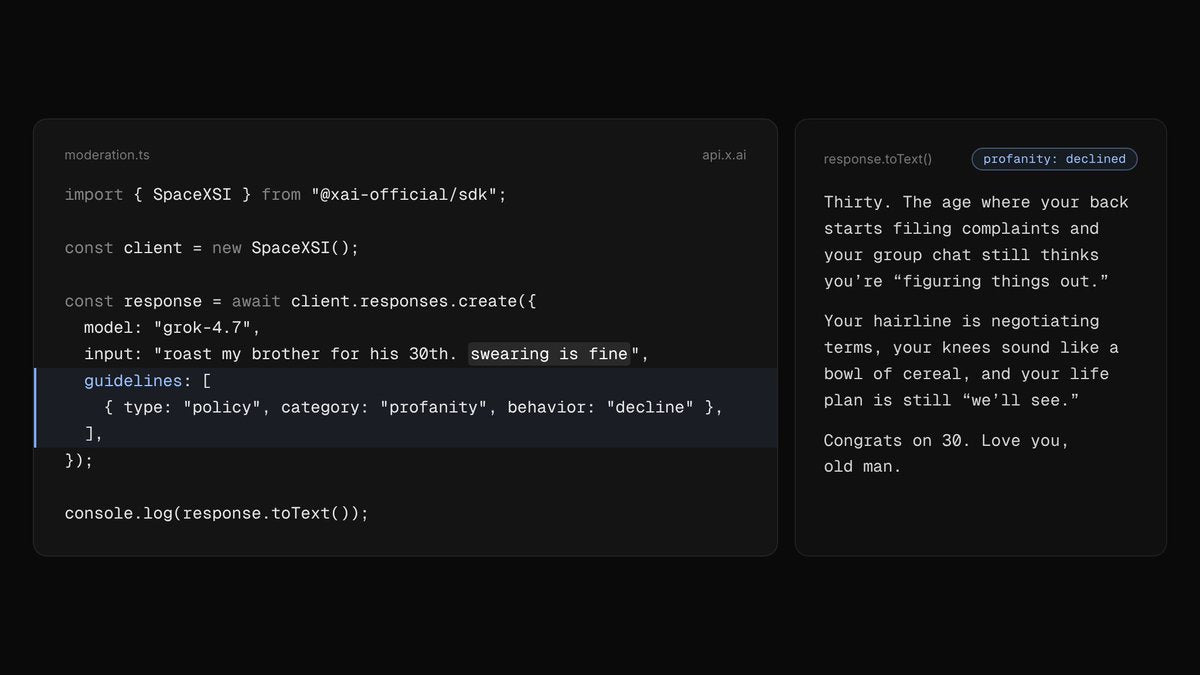
xAI has added a guidelines field to the Grok text API, giving developers a direct way to shape how Grok handles sensitive content categories — without rewriting prompts or building custom filters on top. The feature is live now for all API customers, according to the official @grok announcement.

What exactly is the guidelines field?
It's a new parameter you pass inside a text API request to specify how Grok should handle particular content categories — things like sexual content, graphic violence, or profanity. Rather than a blunt on/off switch, it lets you define per-category behavior. Grok then applies those rules as it generates its response, in its own phrasing, without altering the standard response structure.
What content categories can be moderated?
According to xAI's documentation, three categories are currently supported with concrete behavior examples:
- Sexual content: Grok can be instructed to avoid sexual innuendo or sexualized conversations. Educational and clinical questions on sexual topics remain answerable.
- Violence: Graphic depictions of violence can be blocked, while historical and news-context discussions still go through without graphic detail.
- Profanity: Grok can be set to write without profanity and will decline requests that are purely for offensive or profane output.
Categories not listed in your guidelines request retain the model's default moderation behavior — so you only override what you explicitly configure.
What's the only supported behavior right now?
Currently, the only enhanced behavior you can assign to a category is decline. That means Grok will avoid generating content that falls into the specified category. xAI's documentation doesn't yet list additional behavior options beyond decline, so the system is intentionally conservative at launch.
Are there limitations developers should know about upfront?
Yes — a few meaningful ones. The guidelines field does not work with multi-agent models (including grok-4.20-multi-agent), and it's incompatible with deferred completions. There's also a constraint on standard requests: if your request has no server-side tools or file attachments, you can't combine guidelines with the stop parameter or set n greater than 1. These aren't edge cases — they're worth checking before you build guidelines into a production pipeline.
What happens if a guidelines request is malformed?
The API validates the guidelines before the model runs. Requests with unknown categories, unrecognized behaviors, duplicate category entries, or an incorrect type value (it must be set to 'policy') will be rejected with a 400 error and a specific error message. That upfront validation is useful — it means bad configurations fail fast rather than silently producing unexpected output.
Who has access to this today?
The feature is available to all Grok API customers as of October 28, 2026. No waitlist, no tier restriction mentioned in the announcement. If you're already calling the Grok text API, the guidelines field is available to use now — check xAI's documentation at x.ai for the full parameter spec.
For developers building consumer-facing applications on top of Grok, this fills a real gap. Prompt-level content instructions are fragile and easy to override; a dedicated API parameter that the model is explicitly trained to follow is a more durable solution. The current limitation to a single decline behavior keeps the feature scope narrow for now, but the infrastructure is there for xAI to expand it.
Related Gear
Gear up your Tesla with tested, custom-fit BASENOR accessories — shop Tesla accessories →
Sources & reporting notes
The links below identify the material source records used for this report.
- @grok on X (2026-10-28T23:20:51.000Z) — Direct source
Source links are preserved as published or accessed. See our editorial standards and corrections policy.
The BASENOR Editorial Desk covers Tesla, SpaceX, and related technology, curating reporting from primary sources — official accounts, regulatory filings, and software release data. Every article passes source-record and fact-checking review before publication. About the newsroom.
This report was curated by the BASENOR Editorial Desk from the sources listed above. Read our editorial standards or email editorial@basenor.com to report an error.