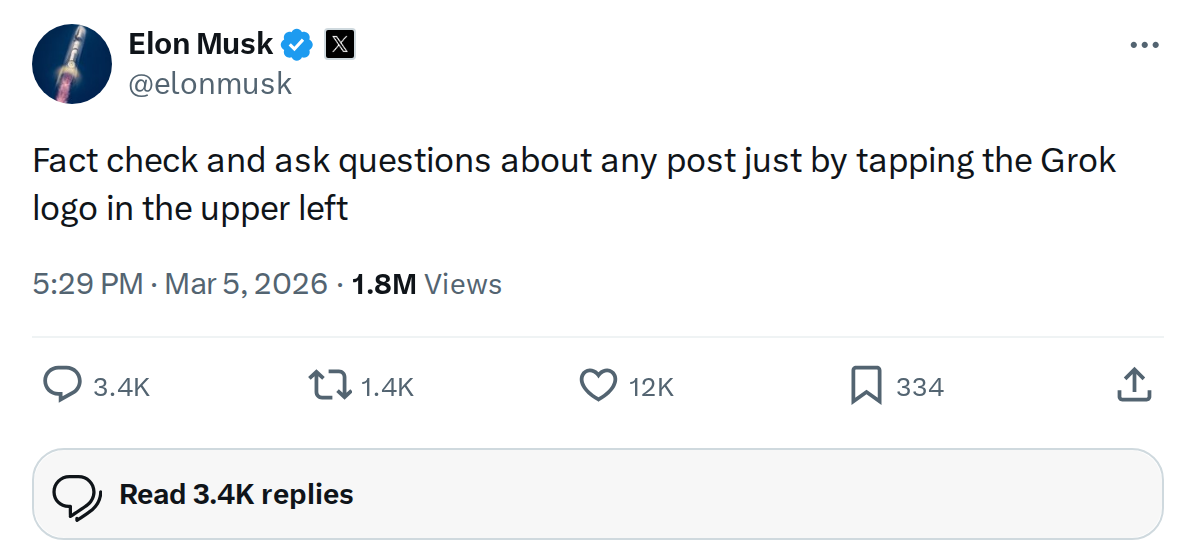
The News: Grok, xAI's AI assistant built into X, now lets any user fact-check or ask questions about any post by tapping the Grok logo in the upper left corner of the interface.
Why It Matters: This puts an AI-powered reality check one tap away for every X user — including Tesla owners navigating a constant stream of EV news, rumors, and FSD claims on the platform.
Source: @elonmusk on X
Grok Can Now Fact-Check Any X Post: Here's How to Use It
Elon Musk just announced a meaningful upgrade to how Grok integrates with X. As of today, you can fact-check or ask questions about any post on the platform — not just ones you've manually copied into Grok's chat window. The trigger is a single tap on the Grok logo sitting in the upper left corner of your screen.
For Tesla owners who spend time on X tracking software updates, FSD progress, and Supercharger news, this is a genuinely useful tool. Misinformation about Tesla moves fast on social media. Now you have an instant AI layer to interrogate any claim before you share it or act on it.

📊 What Changed
| Aspect | Before | After |
|---|---|---|
| Accessing Grok on a post | Manual — copy text, open Grok, paste, ask | One tap on the Grok logo in the upper left |
| Fact-checking workflow | Multi-step, friction-heavy | Instant, in-context, no copy-paste needed |
| Question-asking about a post | Required leaving the post view | Available directly from the post interface |
| Platform integration depth | Grok as a separate tab/tool | Grok embedded contextually into every post |
🚦 Owner's Action Plan
Verdict: Recommended — Takes 30 seconds to learn, saves you from acting on bad Tesla information.
- Update your X app — Make sure you're running the latest version of X on iOS or Android. New Grok integrations roll out via app updates, so an outdated version may not show the feature yet.
- Find the Grok logo — Open any post on X and look for the Grok logo in the upper left corner of the post view or interface header. It should be visible without scrolling.
- Tap it on a post you want to verify — Try it first on a Tesla-related post making a specific claim — a range figure, a software version number, a delivery stat. Grok will pull context and give you an AI-generated assessment.
- Ask a follow-up question — Don't stop at the initial fact-check. You can ask Grok specific questions about the post's claims, request sources, or ask for broader context on the topic.
- Cross-reference on big decisions — If a post is influencing your decision to update FSD, visit a Supercharger, or make a purchase, run it through Grok first. It won't replace primary sources, but it's a fast first filter.
💡 Pro Tip: Grok's fact-checking is most reliable on claims that have a clear factual basis — numbers, dates, official announcements. For opinion-heavy posts or nuanced debates, treat Grok's output as a starting point, not a verdict.
📰 Deep Dive
The friction of fact-checking has always been its biggest enemy. When verifying a claim requires opening a new app, pasting text, and waiting for a response, most people simply don't bother. By embedding the Grok trigger directly into the post interface — one tap, in context — xAI is making the verification reflex as easy as hitting the like button. That's a meaningful UX shift, not just a feature addition.
For the Tesla community specifically, this matters more than it might for the average X user. Tesla-related posts are a constant mix of legitimate news, early speculation, misquoted specs, and outright misinformation. A post claiming a new FSD version is rolling out, or that a Supercharger corridor is down, or that a recall affects your VIN — these are exactly the kinds of claims where a quick Grok check could save you a wasted trip or a bad decision. The feature doesn't replace checking official Tesla channels, but it adds a fast AI triage layer that didn't exist before.
It's also worth noting the broader signal here. xAI is clearly moving to make Grok the connective tissue of the X platform rather than a standalone chatbot. Deep post-level integration is a different product philosophy than what OpenAI or Google are pursuing with their assistants. Whether that tight coupling to X's content ecosystem is an advantage or a limitation will depend on how well Grok's underlying model handles the breadth of topics it'll now be asked to adjudicate — from EV specs to geopolitics — in real time.
Related Gear
Gear up your Tesla with tested, custom-fit BASENOR accessories — shop Tesla accessories →
Sources & reporting notes
The links below identify the material source records used for this report.
- @elonmusk on X (2026-03-05T09:29:02.000Z) — Direct source
Source links are preserved as published or accessed. See our editorial standards and corrections policy.
The BASENOR Editorial Desk covers Tesla, SpaceX, and related technology, curating reporting from primary sources — official accounts, regulatory filings, and software release data. Every article passes source-record and fact-checking review before publication. About the newsroom.
This report was curated by the BASENOR Editorial Desk from the sources listed above. Read our editorial standards or email editorial@basenor.com to report an error.