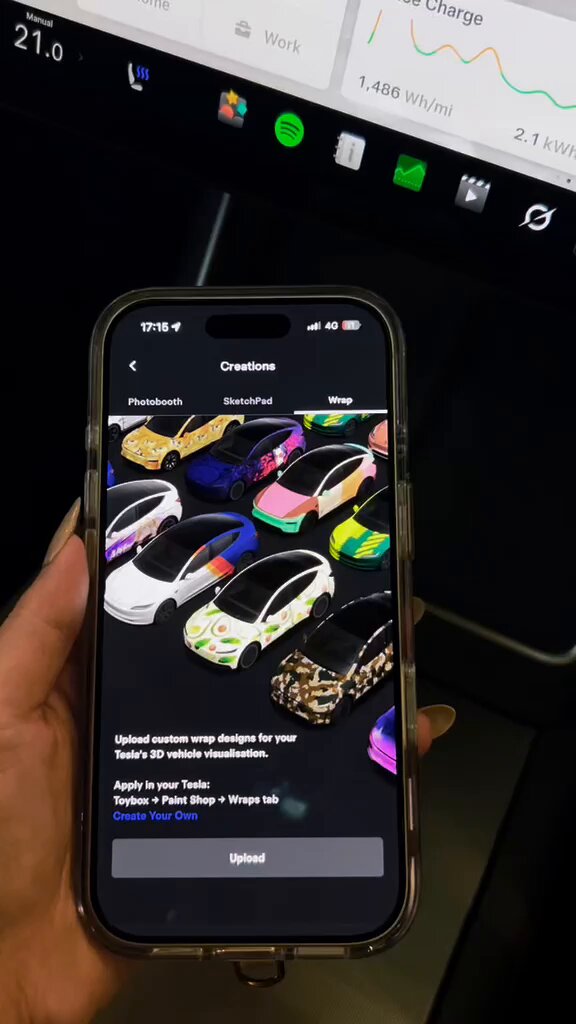
Tesla has quietly expanded one of its more creative owner features: custom car visualization wraps can now be uploaded directly from the Tesla mobile app, no USB drive required. The change, part of the 2026 Summer Update (software version 2026.26), makes personalized wrap designs accessible to anyone with a phone — not just owners willing to dig out a flash drive.

From USB Drive to Your Phone
Custom wrap visualization isn't new to Tesla — the feature debuted with the 2024 Holiday Update on Cybertruck and was broadened in the 2025 Holiday Update under the "Paint Shop" branding. But the workflow always had a friction point: owners had to prepare their design file, load it onto a USB drive, and plug it into the car. For a feature that's fundamentally about personalization and fun, that process felt unnecessarily clunky.
The 2026 Summer Update removes that barrier entirely. The upload path now lives inside the Tesla app under Creations → Wrap → Upload, and the transfer happens over the air directly to the car. According to verified reports, you'll need Tesla App version 4.59.0 or later alongside vehicle software 2026.26 for the feature to appear.
What the App Actually Accepts
Tesla has defined fairly specific parameters for uploaded wrap files. Knowing these upfront will save you a failed upload:
| Parameter | Requirement |
|---|---|
| File format | PNG only |
| Resolution | 512×512 to 1024×1024 pixels |
| File size | Maximum 1 MB |
| Filename characters | Alphanumeric, underscores, dashes, spaces only |
| Filename length | 30 characters maximum |
| Max uploads | 10 custom wrap files via the app |
For owners who want to design their own wrap from scratch, Tesla maintains vehicle-specific templates on its GitHub repository at github.com/teslamotors/custom-wraps — a useful starting point that ensures your design maps correctly onto your car's geometry.
Why This Matters Beyond the Novelty
The visualization wrap feature sits at an interesting intersection of software and physical ownership. For owners who have actually wrapped their car in a custom color or pattern, the ability to mirror that in the app's car display is a genuine quality-of-life touch — your in-app vehicle can match what's sitting in your driveway. For everyone else, it's a low-stakes creative outlet that doesn't require touching the physical car at all.
More broadly, the shift from USB-based transfers to app-based uploads follows a pattern Tesla has pursued across multiple features: reducing dependency on physical media and moving workflows entirely into the connected app ecosystem. The 2026 Summer Update rollout is still in progress, so owners on 2026.26 who don't yet see the option in their app should expect it to appear as the wave continues.
Related Gear
Gear up your Tesla with tested, custom-fit BASENOR accessories — shop Tesla accessories →
Sources & reporting notes
The links below identify the material source records used for this report.
- @Tesla_India on X (2026-08-21T02:03:05.000Z) — Direct source
Source links are preserved as published or accessed. See our editorial standards and corrections policy.
The BASENOR Editorial Desk covers Tesla, SpaceX, and related technology, curating reporting from primary sources — official accounts, regulatory filings, and software release data. Every article passes source-record and fact-checking review before publication. About the newsroom.
This report was curated by the BASENOR Editorial Desk from the sources listed above. Read our editorial standards or email editorial@basenor.com to report an error.