Tesla has pushed an over-the-air update to the Cybertruck that tackles one of the truck's more persistent annoyances — a door rattle caused by the window glass sitting loosely against its seals. The fix is elegant: the window now rises slightly whenever a door is opened, pressing the glass firmly against the seals and eliminating the vibration at the source. If you want the window fully down, one extra button press takes care of it.

What the Update Actually Does
The rattle problem came down to physics: when a Cybertruck door swings open with the window fully lowered, the glass has nothing to brace against. At highway speeds especially, that loose glass can vibrate against door seals and surrounding panels — a familiar complaint in Cybertruck owner forums going back to 2025. Tesla service centers addressed it case-by-case through physical adjustments, re-gluing, or in some instances door replacements, according to reports from Cybertruck Owners Club.
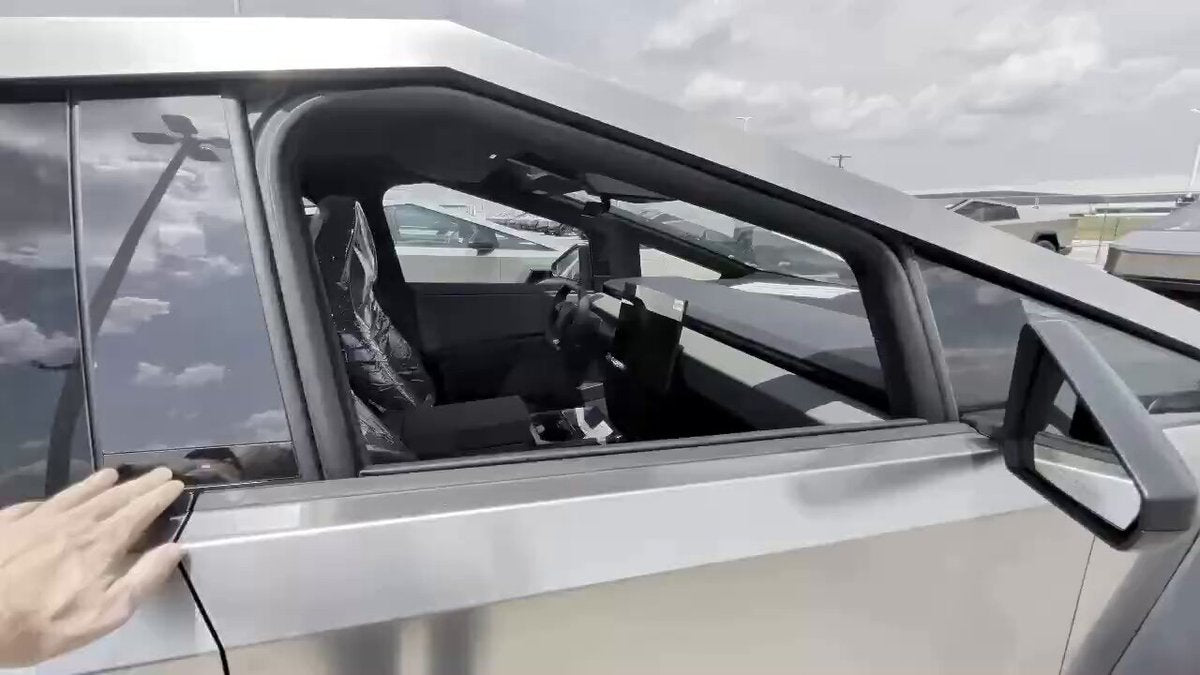
The OTA approach is cleaner. By programming the window to rise a few inches the moment the door handle is pulled, the glass seats itself firmly against the upper seal before the door is even fully open. No rattle, no service appointment, no hardware touched.
There's a small cosmetic side effect worth noting: as @TeslaNewswire points out, the partially raised window creates a subtle Cybertruck silhouette profile when the door is ajar. Whether that's a feature or a coincidence is open to debate, but it's a nice touch either way.
How to Use the New Behavior
The update changes the default window behavior on door open, but it doesn't lock you into it. Here's what to expect:
- Open the door normally. The window will automatically rise slightly — this happens without any input from you. This is the rattle fix in action.
- If you want the window fully down (say, you're pulling up to a drive-through or parking attendant), press the window-down switch a second time after the door opens. The window will drop back to fully open.
- No settings to toggle. This behavior is automatic and on by default. There's no menu option to disable the auto-raise — it's baked into the door-open logic.
If your Cybertruck hasn't received the update yet, check Controls → Software on your touchscreen to see if an update is pending or available for manual installation.
Context: Why a Software Fix Works Here
It's worth understanding why Tesla could solve a mechanical-sounding problem with code. Cybertruck windows are motor-driven and fully integrated with the vehicle's software stack — the same system that manages door-open detection, Blind Spot Warning while parked (added in 2026.8), and automatic window lowering to prevent seal damage when closing. Tesla already had the hooks in place to move the glass on a door-open event; this update just changed the direction and timing of that movement to serve a dual purpose.
The result is a fix that reaches every affected Cybertruck simultaneously, overnight, without owners ever visiting a service center. It's a good example of what over-the-air architecture makes possible — and a reminder to check for pending updates if your truck has been rattling on the highway.
Related Gear
Gear up your Cybertruck with tested, custom-fit BASENOR accessories — shop Cybertruck accessories →
Sources & reporting notes
The links below identify the material source records used for this report.
- @TeslaNewswire on X (2026-09-18T05:11:54.000Z) — Direct source
Source links are preserved as published or accessed. See our editorial standards and corrections policy.
The BASENOR Editorial Desk covers Tesla, SpaceX, and related technology, curating reporting from primary sources — official accounts, regulatory filings, and software release data. Every article passes source-record and fact-checking review before publication. About the newsroom.
This report was curated by the BASENOR Editorial Desk from the sources listed above. Read our editorial standards or email editorial@basenor.com to report an error.