📌 UPDATE — April 20, 2026
Tesla's Spring Update (2026.14.1) has expanded to a new wave, now prioritizing Hardware 3 (HW3) and earlier vehicles in the US and other markets. Additionally, AI4 vehicles in countries without FSD access are also receiving the update in this wave, signaling a broader global distribution push. Both Teslascope and Whole Mars Catalog confirmed the expanded rollout on April 20. If you're on HW3 in the US, now is a good time to check your Tesla app for a pending update.


📌 UPDATE — April 19, 2026
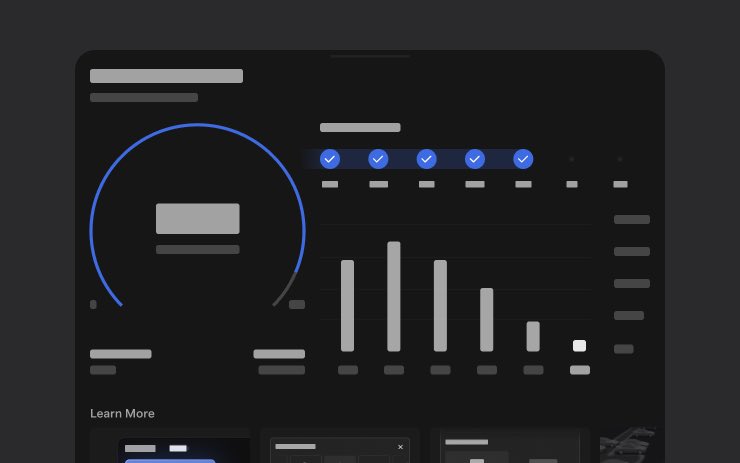
Tesla's 2026.14.1 rollout has now reached its 5th batch, hitting approximately 5% of the fleet. Crucially, this wave officially confirms the inclusion of "Hey Grok" — xAI's Grok assistant integrated directly into Tesla vehicles via voice command. The update also bundles the new Self-Driving App [AI4], which lets drivers subscribe with a single tap, learn activation steps, and track ongoing FSD stats in one place.
📡 Source: @TeslaNewswire · April 19, 2026
📌 UPDATE — April 19, 2026 🔍
An undocumented UI change has been spotted in Tesla's 2026 Spring Update (v2026.14.1): a source icon has been added directly adjacent to the volume slider. This minor but notable visual tweak was not mentioned anywhere in Tesla's official release notes, making it one of the hidden changes in this rollout wave. If you've already received the update, check your audio controls — you should see the new icon appearing next to the volume slider in the media UI.
@TeslaNewswire · Apr 19, 2026Tesla's 2026 Spring Update adds a source icon next to the volume slider. [undocumented change]

 ❤️ 63🔁 4👁️ 5,871View on X →
📌 UPDATE — April 19, 2026
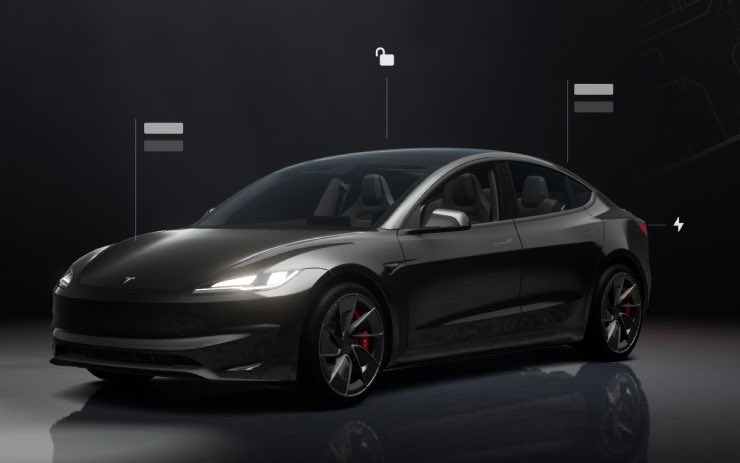
Tesla's 2026.14.1 Spring Update has now reached its 4th rollout wave, hitting approximately 3% of the fleet. This wave officially confirms two notable additions: a dedicated Self-Driving App (AI4) that lets drivers subscribe to FSD with a single tap, view activation instructions, and track ongoing usage stats — and "Hey Grok" voice command integration for hands-free AI assistance directly from the car. These features were not widely confirmed in earlier waves.

Source: @TeslaNewswire · Apr 19, 2026
📌 UPDATE — April 18, 2026
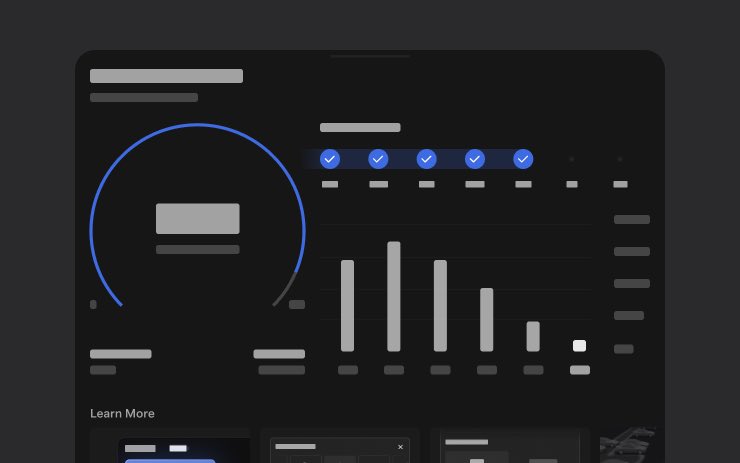
Tesla's 2026.14.1 rollout has now reached a 3rd wave, hitting approximately 2% of the fleet as of today. This wave confirms two key new features: the Self-Driving App (AI4) — a dedicated hub letting owners subscribe to FSD with a single tap, learn how to activate it, and track ongoing usage stats — and "Hey Grok" integration for enhanced in-car AI assistance. These features were not confirmed in earlier wave reports.
📸 Via @TeslaNewswire — April 18, 2026
📌 UPDATE — April 18, 2026
The Tesla Energy app has received a significant revamp as part of 2026.14+, adding full Trips functionality directly within the app. Users can now view a consumption graph for each individual trip, create more than four trips (previously capped), and pause an active trip mid-journey. The Energy app's main card can also now display a selected trip alongside its consumption graph, bringing energy tracking front and center in the UI.
@TeslaNewswire · Apr 18, 2026The Energy app has been revamped in Tesla 2026 Spring Update (2026.14+).
✅ Now includes Trips
✅ Consumption graph for each trip
✅ Create more than 4 trips
✅ Pause a trip
✅ The card can display a trip with its consumption graph
📌 UPDATE — April 18, 2026
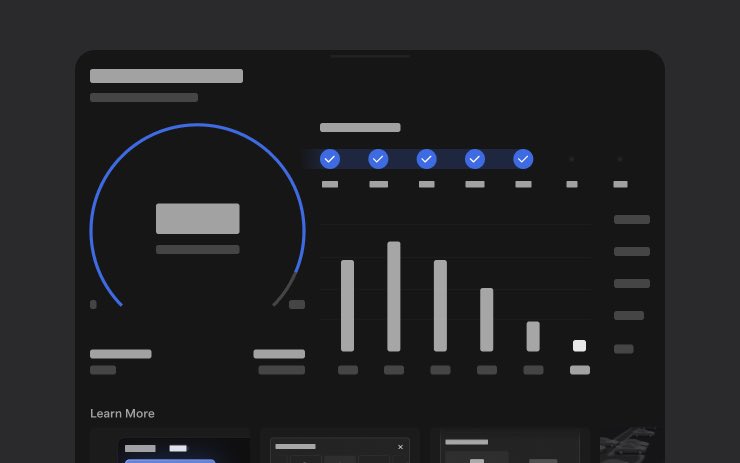
Tesla's 2026.14.1 Wave 2 rollout has now reached approximately 1% of the fleet, and a newly confirmed feature has emerged: the Self-Driving App [AI4]. This dedicated in-car app lets drivers subscribe to Full Self-Driving with a single tap, access tutorials on how to activate and use FSD, and track ongoing usage statistics — all from one place. To open the app, navigate to the Self-Driving section in your Tesla's menu.

Source: @TeslaNewswire · April 18, 2026
The News: Tesla has pushed the second rollout wave of version 2026.14.1, officially branded the Spring Update 2026.
Why It Matters: This is one of Tesla's most feature-dense seasonal updates in recent memory — 20+ confirmed changes spanning voice AI, safety lighting, dashcam, FSD tooling, and more. If you haven't received it yet, wave 2 means your car is likely next.
Sources: @NowRollingOut · @wholemars

📊 What Changed in 2026.14.1
This is the full confirmed changelog for the Spring Update 2026. The table below covers every official release note, plus the FSD-specific additions for AI4 vehicles.
| Change | Type | Models |
|---|---|---|
| "Hey Grok" Wake Word — Hands-free voice launch with location-based reminders | Official | All |
| Automatic Software Updates — Installs overnight while parked | Official | All |
| Autopilot Naming Update — Navigate on Autopilot → Navigate on Autosteer; FSD Computer → AI Computer | Official | All |
| Blind Spot Warning Accent Lights — Interior lights turn red when blind spot is occupied with turn signal active, or when object approaches while parked | Official | All |
| Dashcam Viewer Updates — Recent footage now up to 24 hours (up from 1 hour); permanent clip saving; speed/steering data in downloads | Official | All |
| Immersive Sound Upgrade — Advanced sound extraction for Premium Immersive Sound across all streaming sources | Official | All |
| Keyboard Improvements — Multi-language input switching via long-press global icon | Official | All |
| Music App Queuing — Swipe right to queue tracks in Apple Music or Spotify; swipe left to like/unlike | Official | All |
| Pet Mode — Dog Mode expanded to Pet Mode; choose dog, cat, or hedgehog; add your pet's name | Official | All |
| Rear Display Maps — Rear passengers can view and interact with navigation maps on the rear screen | Official | All |
| Security Improvements — General security hardening | Official | All |
| Sketchpad Stickers & Emojis — Enhanced Sketchpad with sticker/emoji support; sketches sync to Mobile App (requires app 4.55.6+) | Official | All |
| Supercharger Pricing Filter — Route only to Superchargers where Tesla sets pricing; protects Free Supercharging credits | Official | All |
| Trips in Energy App — Create and manage multiple trips to track energy usage per drive or route | Official | All |
| Visual Updates — Higher quality vehicle images on center display; enhanced park scene | Official | All |
| Weather Maps Improvements — Better rain/snow color differentiation; past hour of precipitation data (requires Premium Connectivity) | Official | All |
| Redesigned Self-Driving App — One-tap FSD subscription, usage stats dashboard, streak tracking, weekly/monthly summaries | Official | AI4 vehicles |
| Contextual Max Speed — FSD dynamically adjusts max speed based on visual context for safer traffic flow | Official | FSD-equipped |
| New Driving Notifications — On-screen FSD messages: "takeover recommended," "initiating lane changes," "traffic light may be out of view" | Official | FSD-equipped |
| Model S/X Customization — Digitally apply wraps, window tints, and license plates to in-car vehicle avatar | Official | Model S, Model X |
FSD Beta 14.3.1: What's Happening With the Rollout
Alongside the 2026.14.1 UI update, FSD Beta 14.3.1 (firmware version 2026.2.9) is also in active rollout — but it's moving at a different pace than the main software wave. Right now, 14.3.1 is confirmed on Cybertruck, while some Model 3 owners are still sitting on FSD 14.3.

One notable nuance flagged by @wholemars: the Cybertruck does not have an Adaptive Suspension System (ASS), which means certain 14.3.1 behaviors may differ once it lands on Model 3 — a vehicle that does support adaptive suspension. This is worth watching for Model 3 owners who use FSD regularly, as suspension-aware driving adjustments could be part of what 14.3.1 brings to that platform. For more on the FSD side of this update, see our FSD coverage.
🚦 Owner's Action Plan
Verdict: RECOMMENDED — Several features here are genuinely useful and require manual activation.
Step 1 — Check for the update now.
Go to Controls > Software on your touchscreen. If 2026.14.1 is available, schedule it. Wave 2 is live, so expect delivery within the next 24–48 hours if you haven't seen it yet.
Step 2 — Enable Automatic Software Updates.
Once updated, go to Controls > Software > Automatically Install Updates and turn it on. This is a new toggle in 2026.14.1 — your car will now update overnight without you having to think about it.
Step 3 — Set up "Hey Grok."
Go to Grok > Settings and enable the wake word. Try setting a location-based reminder immediately — it's the standout new feature of this update. Say "goodbye" to dismiss Grok when done.
Step 4 — Enable Blind Spot Warning Accent Lights.
This is on by default, but confirm it's active at Controls > Lights > Blind Spot Warning Accent Lights. It's a genuine safety upgrade — interior lights flash red when your blind spot is occupied and you signal.
Step 5 — Check your Dashcam settings.
Go to App Launcher > Dashcam Viewer. Your Recent footage window has expanded to 24 hours. If you want clips on your phone, enable Controls > Safety > View Camera via Mobile App. You'll need the Tesla app at version 4.55.6 or later and Premium Connectivity.
Step 6 — Activate the Supercharger Pricing Filter.
Go to Controls > Navigation > Trip Planner settings and enable the pricing filter. If you have Free Supercharging credits, this prevents the system from routing you to stations where Tesla doesn't control pricing — protecting your credits.
Step 7 — Explore Trips in the Energy App.
Open App Launcher > Energy > Trips. You can now create named trips and track energy across multiple routes. Useful for commuters or anyone doing range testing.
Step 8 — Model 3 owners with FSD: hold tight on 14.3.1.
If you're on FSD 14.3 and haven't received 14.3.1 yet, that appears to be intentional — Tesla is staging the FSD rollout separately from the main UI update. Check all software updates for rollout progress as it develops.
📰 Deep Dive
The Spring Update 2026 is Tesla's clearest signal yet that the xAI partnership is moving from experiment to infrastructure. "Hey Grok" isn't just a novelty — hands-free AI invocation with location awareness puts Grok on par with the best in-car assistants on the market, and the integration is native rather than bolted on. Location-based reminders in particular are the kind of friction-reducing feature that owners will use daily without thinking about it.
The Dashcam expansion from 1-hour to 24-hour retention is quietly one of the most practical changes in this update. For anyone who's ever had an incident and discovered the footage had already been overwritten, this change is long overdue. The addition of speed and steering angle data to downloaded clips also makes the footage significantly more useful for insurance and legal purposes.
On the FSD side, the split rollout between 14.3.1 on Cybertruck and 14.3 still on some Model 3 units is a reminder that Tesla's software distribution is increasingly model-specific. The Adaptive Suspension System variable is a real one — if 14.3.1 includes suspension-aware driving behavior, the Cybertruck deployment is essentially a partial test. Model 3 owners with adaptive suspension may see meaningfully different behavior once 14.3.1 reaches their vehicles. That's worth monitoring closely in the days ahead.
The Autopilot naming change — Navigate on Autopilot becoming Navigate on Autosteer, FSD Computer becoming AI Computer — is cosmetic but legally significant. It aligns Tesla's in-car terminology more precisely with what these systems actually do, which has been a point of regulatory and public scrutiny. Don't expect any behavioral change, but do expect the updated labels to appear across your UI immediately after the update.
📋 Tracking Tesla software? See every firmware, FSD and app version in one place in our Tesla Software Update Tracker.
Related Gear
Gear up your Tesla with tested, custom-fit BASENOR accessories — shop Tesla accessories →
Sources & reporting notes
The links below identify the material source records used for this report.
- @NowRollingOut on X (2026-04-18T01:50:11.000Z) — Direct source
- @wholemars on X (2026-04-18T01:35:01.000Z) — Direct source
- @TeslaNewswire on X (2026-04-18T05:56:07.000Z) — Direct source
- @TeslaNewswire on X (2026-04-18T16:27:33.000Z) — Direct source
- @TeslaNewswire on X (2026-04-18T20:39:11.000Z) — Direct source
- @TeslaNewswire on X (2026-04-19T07:26:29.000Z) — Direct source
- @TeslaNewswire on X (2026-04-19T18:01:34.000Z) — Direct source
- @TeslaNewswire on X (2026-04-19T20:19:34.000Z) — Direct source
- @teslascope on X (2026-04-20T22:24:18.000Z) — Direct source
- @wholemars on X (2026-04-20T22:46:45.000Z) — Direct source
Source links are preserved as published or accessed. See our editorial standards and corrections policy.
The BASENOR Editorial Desk covers Tesla, SpaceX, and related technology, curating reporting from primary sources — official accounts, regulatory filings, and software release data. Every article passes source-record and fact-checking review before publication. About the newsroom.
This report was curated by the BASENOR Editorial Desk from the sources listed above. Read our editorial standards or email editorial@basenor.com to report an error.