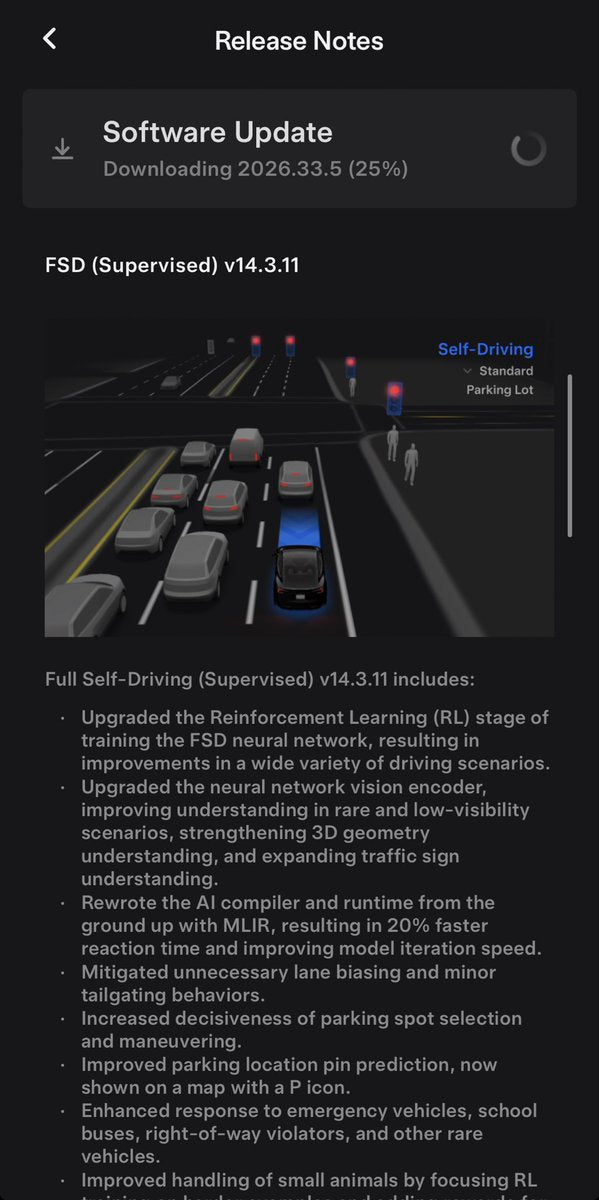
Tesla has begun pushing two new Full Self-Driving builds simultaneously: FSD V14.3.11 for vehicles equipped with AI4 hardware, and FSD V14.3 Lite for owners still on AI3 (Hardware 3). The rollout kicked off in the early hours of October 7, 2026, arriving under software version 2026.33.5. Neither build carries headline new features — these are dot releases focused on under-the-hood refinement — but if you're on FSD, you'll want to grab this update.

What's in This Update
| Change | Type | Models |
|---|---|---|
| FSD V14.3.11 — incremental refinement over V14.3.10 | Official | AI4-equipped vehicles (Model 3, Y, Cybertruck — 2024+) |
| FSD V14.3 Lite — distilled HW4 V14 intelligence for AI3 hardware | Official | AI3-equipped vehicles (Model 3, Y, S, X — pre-2024) |
According to @SawyerMerritt, the release notes for V14.3.11 are consistent with previous FSD dot releases — no major new capabilities announced. @DirtyTesLa confirms the same: nothing visibly new on the surface. Notably, this build does not include the expected Halloween update, which remains on the horizon.

AI3 vs. AI4: Know Which Version You're Getting
The split rollout matters. If your Tesla was built in 2024 or later, you almost certainly have AI4 hardware and will receive V14.3.11. If you're driving a pre-2024 Model 3, Model Y, Model S, or Model X, you're on AI3 and will receive V14.3 Lite instead.
V14.3 Lite is not a stripped-down experience — it's an optimized build that distills the intelligence from the HW4 V14 stack to run efficiently on AI3's compute envelope. According to previous release notes, it carries features like Speed Profiles and Start Self-Driving from Park. The one capability it doesn't get is Automatic Collision Evasion, which remains exclusive to AI4 hardware due to compute requirements.

How to Check and Install Your Update
- Open your Tesla app and tap the car icon. Under Software, check whether an update is queued or downloading. If nothing appears yet, the rollout is staged — your vehicle may not be in the first wave.
- On the touchscreen, go to Controls → Software. If an update is available, you'll see the version number and a prompt to schedule or install now.
- Force a check by tapping your car's software version number on the touchscreen. This can prompt Tesla's servers to push a pending update to your vehicle sooner.
- Connect to Wi-Fi if you haven't already. OTA updates download significantly faster over Wi-Fi than LTE, and some builds require a Wi-Fi connection before they'll install.
- Schedule overnight if needed. The install itself takes 15–25 minutes and requires the car to be parked. Scheduling it for off-hours means you wake up to a finished update.
- After the update completes, go to Controls → Software and confirm the version shows 2026.33.5. Then open the FSD settings and take a short drive to let the system recalibrate to the new build.
What to Expect on Your First Drive
Dot releases in the V14.x line have consistently delivered smoother lane-change behavior and tighter speed management around intersections, even when the official notes don't call out specific changes. On AI4 vehicles, the underlying stack already includes the 20% faster reaction time introduced in V14.3.10, so V14.3.11 builds on that foundation. On AI3, V14.3 Lite represents a meaningful step up from the V14.2 Lite branch that's been running since mid-2026.
The Halloween update that community members have been anticipating is confirmed to be a separate release. Keep an eye on your software tab — that one is still coming.
📋 Tracking Tesla software? See every firmware, FSD and app version in one place in our Tesla Software Update Tracker.
Related Gear
Gear up your Tesla with tested, custom-fit BASENOR accessories — shop Tesla accessories →
Sources & reporting notes
The links below identify the material source records used for this report.
- @wholemars on X (2026-10-07T02:28:52.000Z) — Direct source
- @SawyerMerritt on X (2026-10-07T02:29:47.000Z) — Direct source
- @wholemars on X (2026-10-07T02:34:01.000Z) — Direct source
- @DirtyTesLa on X (2026-10-07T02:34:26.000Z) — Direct source
- @teslascope on X (2026-10-07T02:39:18.000Z) — Direct source
- @teslascope on X (2026-10-07T02:42:17.000Z) — Direct source
Source links are preserved as published or accessed. See our editorial standards and corrections policy.
The BASENOR Editorial Desk covers Tesla, SpaceX, and related technology, curating reporting from primary sources — official accounts, regulatory filings, and software release data. Every article passes source-record and fact-checking review before publication. About the newsroom.
This report was curated by the BASENOR Editorial Desk from the sources listed above. Read our editorial standards or email editorial@basenor.com to report an error.