📌 UPDATE — July 25, 2026
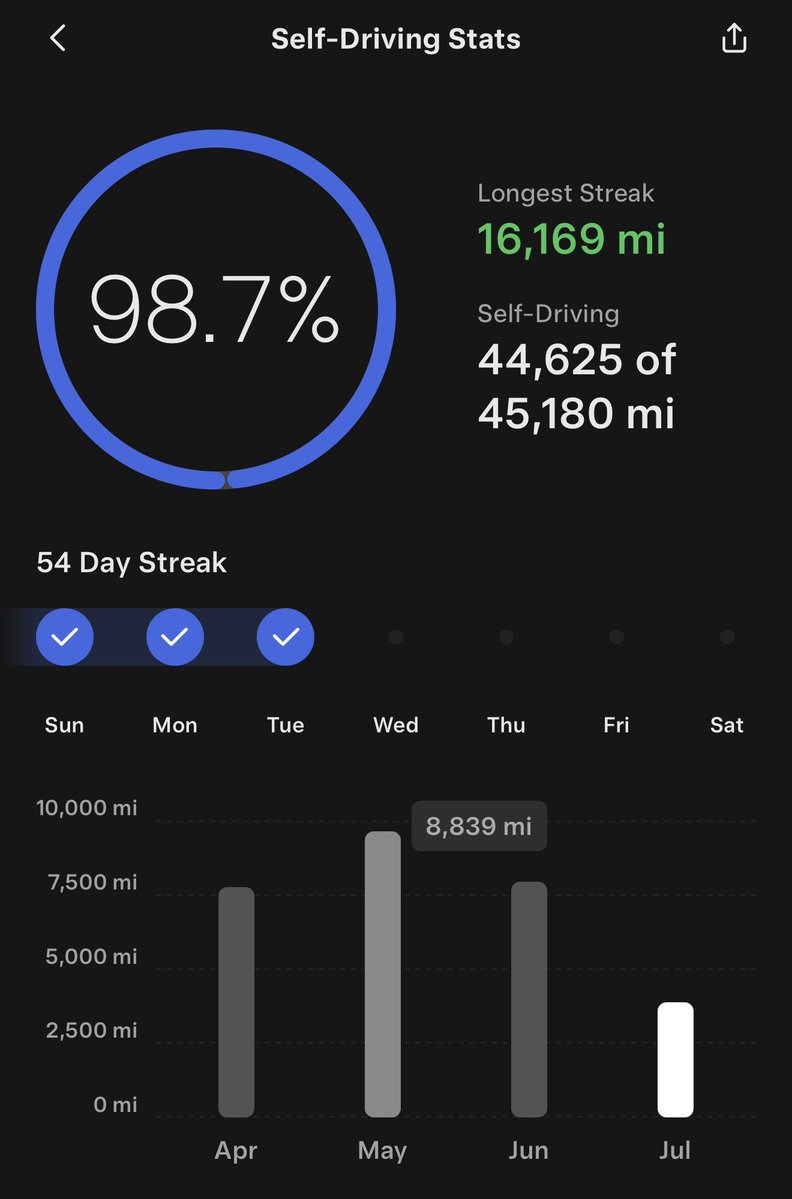
Tesla has pushed App version 4.59.1 to iOS, building on the FSD Stats feature introduced in 4.59.0. Beyond viewing Self-Driving stats, the new update adds the ability to share those stats directly from the app. Two additional features also arrive: a Set Arrival Energy option in the Location tab (available in select countries), and the ability to upload custom wrap designs under Creations > Wraps. Android availability has not yet been confirmed.
@TeslaNewswire · July 25, 2026
🔥🚀 Tesla App update 4.59.1 is now available for download on iOS/iPhone!
✅ View and share Self-Driving stats
✅ Set Arrival Energy in Location tab*
✅ Upload custom wrap designs in Creations > Wraps
*Available in select countries
📌 UPDATE — July 25, 2026
Tesla has pushed app version 4.59.1 just days after 4.59.0, expanding on the Self-Driving stats feature with the ability to not only view but also share your FSD statistics directly from the app. The update also introduces two brand-new features: a Set Arrival Energy option in the Location tab for smarter trip energy planning, and the ability to upload custom wrap designs under Creations > Wraps. The rollout is currently limited to select countries.

Source: @NowRollingOut
Tesla's mobile app just got a meaningful upgrade for Full Self-Driving subscribers. Version 4.59.0 introduces FSD Stats directly in the app, bringing the same driving performance data you'd normally only see on your car's touchscreen to your phone. The rollout is phased, so not every FSD user has it yet — but here's what to look for and how to check.

What's New in 4.59.0
The FSD Stats panel in the app mirrors the in-car UI — meaning you can review your driving data without sitting in the vehicle. According to The Tesla Newswire, the feature is live as of July 21, 2026, and critically, it does not require Tesla's Summer Update on your car's software. This is a standalone app-side addition.
One important caveat: the feature appears to be rolling out in phases. Some FSD subscribers are already seeing it; others aren't yet. This is consistent with how Tesla typically stages app features before a full fleet push.
How to Check If You Have It
- Update the Tesla app. Open the App Store (iOS) or Google Play Store (Android) and check for a pending update. You're looking for version 4.59.0 or later.
- Confirm your FSD subscription is active. FSD Stats are only visible to users with an active FSD subscription or purchased FSD capability. If your subscription has lapsed, the section may not appear.
- Open the app and navigate to your vehicle. After updating, tap into your car's main card. Look for a new Stats or Self-Driving section — the exact placement mirrors the in-car interface layout.
- Don't see it yet? Wait. If you've updated to 4.59.0 and the FSD Stats section isn't showing, you're likely in a later phase of the rollout. There's no manual toggle to force it — Tesla controls the server-side flag.
What the FSD Stats Screen Shows
The in-car FSD Stats panel — which this mirrors — typically displays metrics like miles driven on Autopilot, FSD engagement data, and intervention counts. Having this accessible in the app means you can review your driving history between trips, share stats, or simply keep tabs on FSD performance without firing up the car. The exact data fields visible in the app version should match what your vehicle already surfaces on the touchscreen.
For owners who track their FSD usage closely or are curious how their driving compares over time, this is a genuinely useful addition. Whether Tesla expands the stats view further — or ties it into future gamification or insurance features — remains to be seen, but the groundwork is now in place on the app side.
📋 Tracking Tesla software? See every firmware, FSD and app version in one place in our Tesla Software Update Tracker.
Related Gear
Gear up your Tesla with tested, custom-fit BASENOR accessories — shop Tesla accessories →
Sources & reporting notes
The links below identify the material source records used for this report.
- @TeslaNewswire on X (2026-07-21T20:01:05.000Z) — Direct source
Source links are preserved as published or accessed. See our editorial standards and corrections policy.
The BASENOR Editorial Desk covers Tesla, SpaceX, and related technology, curating reporting from primary sources — official accounts, regulatory filings, and software release data. Every article passes source-record and fact-checking review before publication. About the newsroom.
This report was curated by the BASENOR Editorial Desk from the sources listed above. Read our editorial standards or email editorial@basenor.com to report an error.