📌 UPDATE — August 12, 2026
On top of the navigation changes already documented in NA-2026.26, Tesla's navigation system now appears to have gained awareness of bus lanes — a notable incremental improvement for urban routing and driving assistance. The feature was flagged by @wholemars on X, with a screenshot suggesting the system can recognize and account for dedicated bus lane infrastructure when plotting routes. It's currently unclear whether this is a server-side routing change, part of the 2026.26 map data itself, or a separate rollout — so treat this as an observed behavior for now. 🔍 If you're in a city with marked bus lanes, it's worth testing your navigation to see if routing avoids or flags them appropriately.

@wholemars · Aug 11, 2026 — "Interesting. Tesla navigation seems to be aware of bus lanes now"
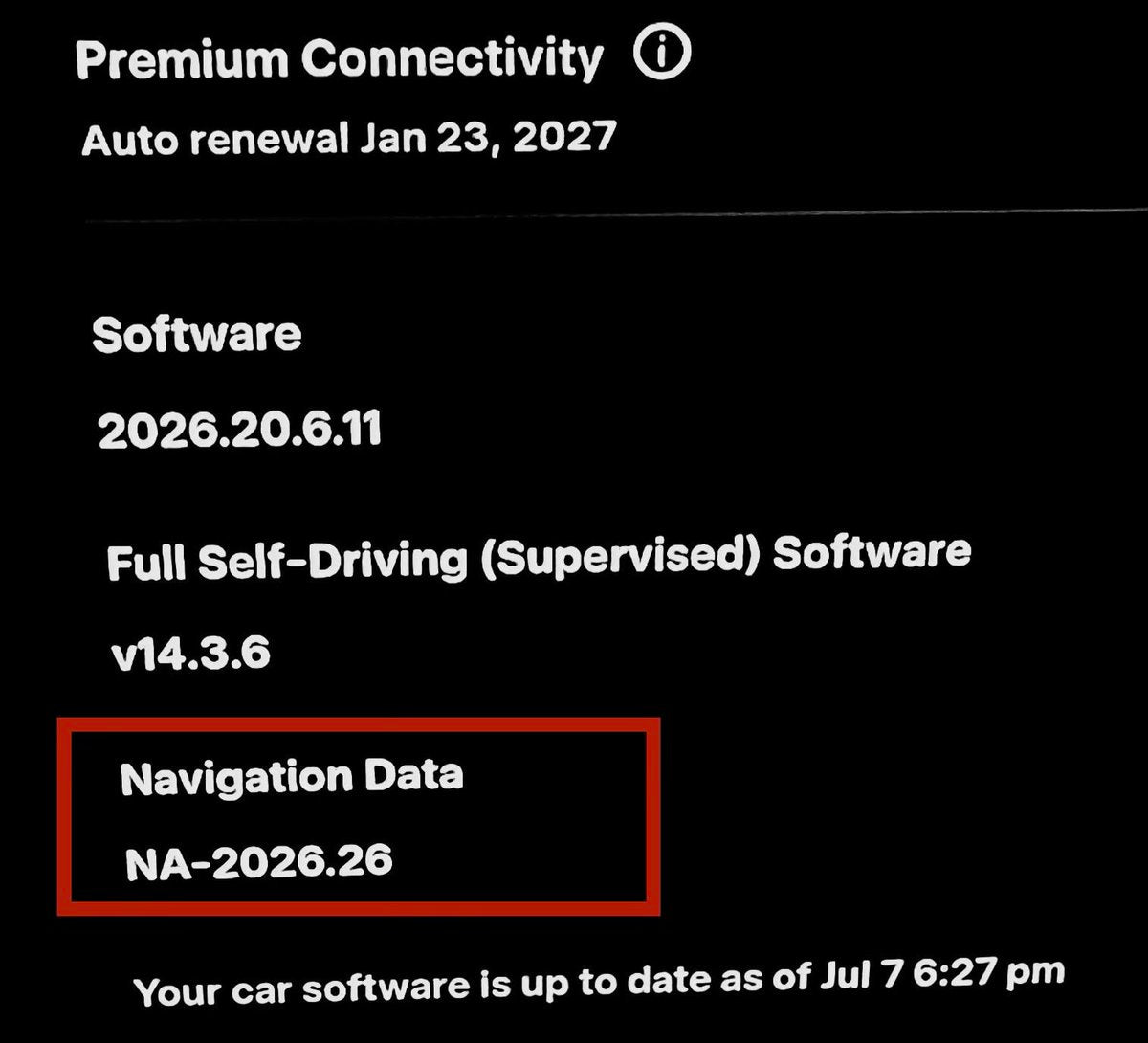
Tesla has begun pushing map update NA-2026.26 to owners in the United States and Canada, arriving alongside the broader 2026.26 Summer Software Update. The package brings meaningful navigation upgrades — smarter automatic routing, a new way to set your arrival charge level before you even get in the car, and a handful of other quality-of-life improvements that are worth knowing about and, in some cases, actively enabling.

What Changed in NA-2026.26
| Change | Type | Models |
|---|---|---|
| Automatic Navigation Enhancements | Official | All |
| Preferred Routes (Online Routing) | Official | All (US) |
| Supercharger Search by Name | Official | All |
| Set Arrival Energy via Mobile App | Official | All |
| Grok AI Assistant (expanded) | Official | AMD Ryzen vehicles |
| Caraoke with Scoring | Official | All |
| Apple Music Queue Additions | Official | All (Apple Music subscribers) |
| New Traction Control Modes (2024+ Model 3) | 🔍 User-Reported | Model 3 (2024+) |
| New Startup Animation | 🔍 User-Reported | Model 3 Performance, Model Y Performance |

Action Plan: Settings to Check Right Now
Several of these improvements are off by default or require a setting to be active. Work through this list once your vehicle installs the update.
1. Turn on smarter Automatic Navigation
The updated Automatic Navigation now learns your recurring stops — not just Home and Work, but places like a school drop-off or gym you visit on a regular schedule. It will proactively suggest routing to these spots when the timing fits your pattern.
Where to enable: Controls > Navigation > Automatic Navigation → toggle on.
2. Enable Preferred Routes
If you consistently take a specific road or avoid a particular highway, the navigation system can now factor that in. Preferred Routes learns from your actual driving history and adjusts trip planning accordingly. This one is US-only for now and requires Online Routing to be active.
Where to enable: Controls > Navigation > Online Routing → toggle on. Preferred Routes activates automatically once Online Routing is enabled.
3. Set your arrival charge level from the app before you leave
Previously, adjusting your target arrival battery percentage meant doing it from the car. With 2026.26, you can set it from the Tesla mobile app before you even get in — useful for planning longer trips from your desk or couch.
Requirement: Tesla app version 4.58.0 or later. Update the app if you haven't recently.
4. Search Superchargers by name
A small but genuinely useful change: you can now type a Supercharger's name directly in the destination search bar rather than hunting for it on the map. Helpful when you know exactly which station you want.
Where to use: Navigation search bar → type the Supercharger station name.
5. Check your Grok capabilities (AMD Ryzen vehicles)
If your vehicle runs an AMD Ryzen processor, Grok has expanded significantly in this update. It can now make phone calls, search and play music, adjust climate settings, and navigate the Settings menu entirely by voice. The "Hey Grok" wake word is also rolling out to more regions. According to the official release notes, Grok requires Premium Connectivity or a WiFi connection.
How to access: App Launcher → Grok, or long-press the voice button on the steering wheel, or say "Hey Grok."
6. Check for new traction control modes (2024+ Model 3 owners)
User reports indicate that 2024 and newer Model 3 vehicles may receive new traction control options — Auto, Slippery Surface, and Stuck Assist — with the system automatically resetting to Auto at the start of each drive. This hasn't appeared in Tesla's official release notes, so availability may vary.
Where to look: Controls > Driving > Traction Control.

How to Check If You Have the Update
Go to Controls > Software on your touchscreen. If the update is available, you'll see a notification. If not, the rollout is phased — it started reaching first vehicles on July 26 and has been expanding since. Parking on WiFi overnight is the most reliable way to get it sooner rather than later. A point release, 2026.26.1, is also in circulation with bug fixes and security improvements; according to Teslascope, that version began rolling out around July 31 and is now reaching the majority of vehicles in the wave.
Not every feature listed here will appear on every vehicle — hardware platform (Intel vs. AMD), model year, and region all affect what lands in your specific car. If a setting isn't visible after the update installs, it may not be supported on your configuration yet.
📋 Tracking Tesla software? See every firmware, FSD and app version in one place in our Tesla Software Update Tracker.
Related Gear
Gear up your Tesla with tested, custom-fit BASENOR accessories — shop Tesla accessories →
Sources & reporting notes
The links below identify the material source records used for this report.
- @TeslaNewswire on X (2026-08-06T05:57:43.000Z) — Direct source
Source links are preserved as published or accessed. See our editorial standards and corrections policy.
The BASENOR Editorial Desk covers Tesla, SpaceX, and related technology, curating reporting from primary sources — official accounts, regulatory filings, and software release data. Every article passes source-record and fact-checking review before publication. About the newsroom.
This report was curated by the BASENOR Editorial Desk from the sources listed above. Read our editorial standards or email editorial@basenor.com to report an error.