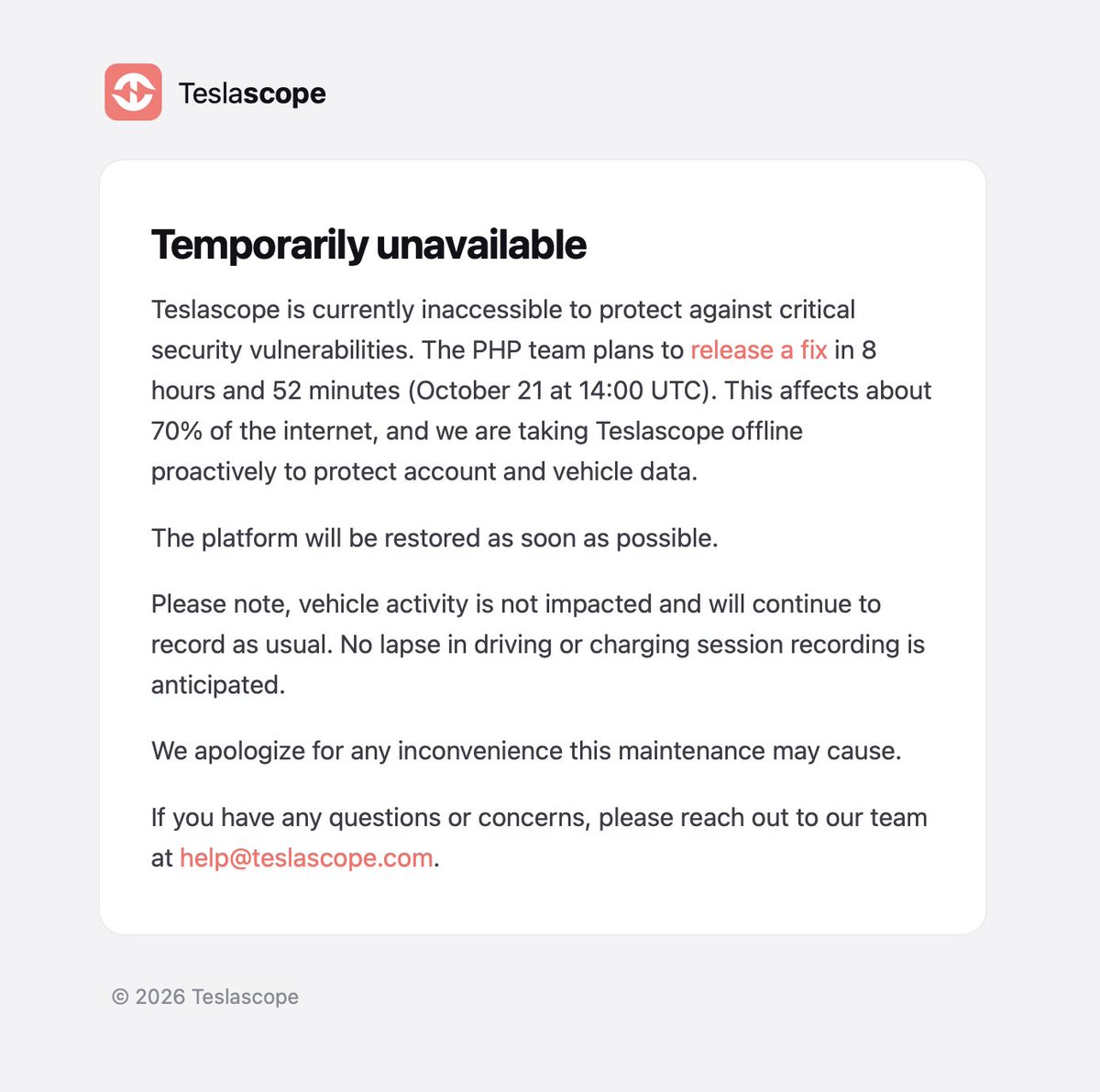
Teslascope, one of the most widely used third-party Tesla tracking and fleet tools, has temporarily shut down its web service and developer APIs as a precautionary response to critical internet security vulnerabilities currently being exploited in the wild. The outage began in the early hours of October 21, 2026, and affects anyone who uses Teslascope's dashboard or any app that relies on its developer APIs — though Tesla vehicle activity itself is not impacted.

According to Teslascope, the vulnerabilities affect approximately 70% of the internet — a scope that suggests this is a broad infrastructure-level issue rather than anything specific to Tesla's ecosystem. The team estimates a fix will be in place within nine hours of the initial announcement and has proactively reached out to other Tesla third-party developers to make sure they're aware and protecting their users.
What's Actually Offline
To be clear about scope: Teslascope's web dashboard and developer APIs are down. Your Tesla vehicle itself continues to operate normally — charging, driving, climate control, and all onboard functions are unaffected. The shutdown is on Teslascope's servers, not on Tesla's own infrastructure or the Tesla app.
If you use any third-party app that pulls data through Teslascope's API, expect those integrations to be broken or returning errors until service is restored. This is intentional — Teslascope pulled the plug proactively to prevent your account credentials and vehicle data from being exposed.
Action Plan for Owners
This is a precautionary shutdown, not a confirmed breach. That said, any time a service you've authorized to access your Tesla data goes offline under security circumstances, it's worth doing a quick credential hygiene check. Here's what to do right now:
- Don't try to log in or force access. Attempting to authenticate with a service that's mid-security-incident can expose your session tokens. Wait for Teslascope to confirm the service is restored.
- Review your Tesla account's connected third-party apps. Open the Tesla app → tap your profile icon → go to Security & Privacy → Third-Party App Access. You'll see every app that has been granted access to your vehicle data. If you see anything you don't recognize or no longer use, revoke it now.
- Change your Tesla account password if you reuse passwords. If your Teslascope login password is the same as your Tesla account password, change your Tesla account password immediately at tesla.com → Account → Security. Use a unique password for each service.
- Enable two-factor authentication on your Tesla account if you haven't already. Tesla app → profile → Security → Two-Step Verification. This is the single most effective protection against unauthorized account access.
- Monitor for Teslascope's restoration announcement. Follow @teslascope on X for the all-clear. They've indicated service should return within roughly nine hours of the 5:16 AM UTC announcement — putting the expected window around 2:00–3:00 PM UTC on October 21.
What Teslascope Is Doing
The team hasn't just gone dark — they've been proactive. According to their follow-up post, Teslascope personally contacted several other Tesla third-party developers to flag the vulnerability and ensure those services have a plan in place for their users. That's a meaningful step. Third-party Tesla apps collectively hold access tokens for hundreds of thousands of vehicles, and a coordinated heads-up across the developer community reduces the blast radius if any single service had remained exposed.
The nature of the underlying vulnerability hasn't been publicly named, but the claim that it affects roughly 70% of the internet points toward a library-level or protocol-level issue — the kind of thing that can cascade across unrelated services simultaneously. Until more details emerge, treat this as a standard security precaution rather than evidence of a targeted attack on Tesla owners specifically.
Once Teslascope confirms the all-clear, resume normal use — but use it as a reminder to audit which third-party apps have access to your vehicle. Most owners grant access once and never revisit the list.
Related Gear
Gear up your Tesla with tested, custom-fit BASENOR accessories — shop Tesla accessories →
Sources & reporting notes
The links below identify the material source records used for this report.
- @teslascope on X (2026-10-21T05:16:25.000Z) — Direct source
- @teslascope on X (2026-10-21T05:16:25.000Z) — Direct source
Source links are preserved as published or accessed. See our editorial standards and corrections policy.
The BASENOR Editorial Desk covers Tesla, SpaceX, and related technology, curating reporting from primary sources — official accounts, regulatory filings, and software release data. Every article passes source-record and fact-checking review before publication. About the newsroom.
This report was curated by the BASENOR Editorial Desk from the sources listed above. Read our editorial standards or email editorial@basenor.com to report an error.