Quick answer: The 2024-2026 Tesla Model 3 Highland is a meaningfully different car from the 2017-2023 Model 3 — no turn signal stalks, no gear selector stalk, acoustic glass on all four doors, and a redesigned interior that rejects most legacy accessories. This delivery-day playbook walks you through everything you need to inspect before signing, and the first seven days of ownership, with specific call-outs for the Highland features that catch new owners off guard.
What makes Highland delivery different from Legacy Model 3
The Highland is a visually-similar-but-mechanically-reengineered car. The changes that matter most on delivery day:
| Feature | 2017-2023 Model 3 | 2024-2026 Highland | Why it matters on delivery |
|---|---|---|---|
| Turn signals | Physical stalk, left of wheel | Capacitive buttons on steering wheel | Learn the button layout before driving off |
| Gear selector | Right stalk (PRND) | Touchscreen swipe or ceiling-mounted button strip | Practice parking lot maneuvers before traffic |
| Dashboard | Flat surface | Ambient light strip + under-screen cavity | New storage option, new trim to protect |
| Glass | Acoustic glass on front two doors only | Acoustic glass on all four doors | Cabin is dramatically quieter — don't expect the same road feel |
| Rear seats | Fixed headrests | Ventilated seats (Performance) + heated rear (all) | Verify rear seat heat works before signing |
| USB ports | USB-A in console, USB-C on front only | USB-C everywhere; no USB-A | Bring USB-C cables for your phone |
| Matrix headlights | Standard LED | Matrix LED with adaptive high-beam masking | Verify high-beam auto-dimming activates in the dark test |
For a deeper technical breakdown, see our Highland vs Legacy Compatibility Guide. For now, the key point: Legacy Model 3 accessories will not fit Highland in 80% of cases. Start fresh.
Day 0: Pre-delivery prep
The 24 hours before delivery are where most first-time owners lose time. Work through this checklist before your appointment.
1. Set up the Tesla app
Download the Tesla app (iOS/Android), sign in to the Tesla account you used to order, and verify your VIN is linked. Once your car is ready for pickup, the app will show the pairing prompt. Your phone becomes your primary key — so make sure Bluetooth, Location, and Notifications are all enabled for the app before you arrive.
2. Insurance and registration
Your insurer needs the VIN to bind coverage. Tesla cannot release the car without proof of insurance, and Tesla Insurance (if available in your state) is the fastest option because it integrates directly with your Tesla account. For third-party insurers, call 24 hours before pickup with your VIN.
3. Home charging — book the electrician now if you haven't
A NEMA 14-50 outlet or Tesla Wall Connector is the single largest quality-of-life improvement in EV ownership. Most electricians have a 1-2 week backlog. For your first week, the included Mobile Connector on a 110V outlet adds 3-5 miles per hour of charge — practical as a top-up, not as primary charging. Superchargers are your fallback.
4. Pre-order the day-2 accessories
Ship-by-delivery-day orders save a week of exposure to paint damage, white seat stains, and interior wear. The three most urgent items to have waiting at home:
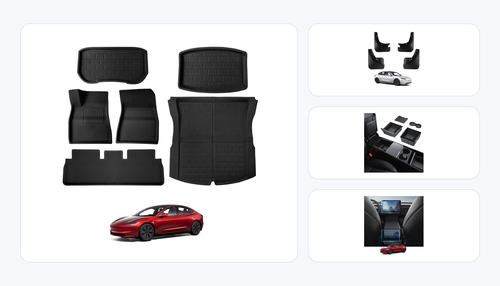
- Highland mud flaps — install in 15 minutes, no tools. Prevents rear quarter panel rock chips from the first highway drive.
- Highland floor mats (6-piece 3D all-weather) — $179.99, fits the new footwell shape.
- Highland matte screen protector — $29.99, 9H tempered glass for the center touchscreen.
Day 1: The 30-minute inspection
Tesla's delivery appointment is nominally 60 minutes. You'll sign the tablet around minute 45. After that, Tesla's willingness to fix anything drops dramatically — an issue raised at minute 50 becomes a service appointment three weeks later, not a same-day fix. Here's what to inspect, in the order that matters.
Exterior, in daylight (12 minutes)
Walk a complete lap of the car in natural light. Tesla's specialists know the common QC misses and will address them if you flag them on-site. The five issues that matter on Highland deliveries:
- Front bumper paint match. Highland front bumpers are painted on a separate line from the body panels. Color mismatch under bright sun is uncommon but not rare — check the seam line where bumper meets fender.
- Panel gaps at the frunk. The frunk-to-fender gap should be even on both sides. An uneven gap typically means the hinge was over-tightened during assembly.
- Matrix headlight alignment. Both headlamp clusters should sit at the same height. Ask Tesla to test the auto-adaptive beam — a specialist can demonstrate it without driving.
- Rear taillight seal. The updated Highland taillights extend into the trunk lid. Look for moisture or cloudiness behind the lens — indicates a failed seal that will cause condensation problems.
- Wheel curb rash. Transport damage is common on all four wheels. Inspect every inside face.
Interior (10 minutes)
Sit in the driver's seat, then in each passenger seat, and run through these checks. Do this inside the delivery bay with interior lights on.
- Touchscreen — no dead pixels, no lag. Open the camera views, play a song, open maps. Any lag indicates a processor issue.
- Ambient lighting strip. Go to Controls → Lights → Ambient Lighting and cycle through all 64 colors. Every color should illuminate evenly from door to door.
- Rear seat heating. Enable rear seat heat from the main screen. Touch each rear seat cushion after 90 seconds — all three should be equally warm. Common QC miss: one seat's heater wiring is disconnected.
- Windows and acoustic glass. Close all four windows. Cabin should be noticeably quieter than a legacy Model 3. If road noise is unchanged, a door seal may be improperly seated.
- Steering wheel buttons. Press each capacitive button on the wheel. The left side has turn signals; the right has wipers, lights, and horn. All should register with no lag.
The drive-off test (5 minutes)
Before you leave the delivery center, drive the car around the lot for 2-3 minutes. This catches issues that only manifest when the car is moving.
- Gear selection. Swipe up on the touchscreen to go into Drive, down for Reverse. Practice this in a parking space. The ceiling-mounted button strip is the backup — if the touchscreen freezes, this is your emergency shifter.
- One-pedal driving. Lift off the accelerator. The car should slow aggressively — this is regen braking in Standard mode. It's the correct setting; don't change it.
- Brake pedal feel. Press the brake firmly once. It should feel solid and progressive. A soft or sinking pedal indicates a hydraulic issue — refuse delivery and document it.
- Steering centering. Drive straight on flat pavement. The wheel should sit centered with no correction needed. An off-center wheel typically means an alignment issue from transport.
Day 2-3: Protection first
Your first 48 hours at home are the highest-risk window for paint damage and interior wear. Install the items you pre-ordered in this order.
Floor mats (5 minutes)
Lift the factory mats out of each footwell, drop in the BASENOR 3D mats, press the anchor clips. The 6-piece set covers driver, passenger, rear, trunk, and sub-trunk. The 3D lipped edge contains spills — critical in the first winter.
Mud flaps (15 minutes)
Each flap clips into a factory mounting point inside the wheel arch. No drilling, no adhesive. Install time from unboxing to completion: 15 minutes for all four. Your lower rear quarter panels now survive the first 6 months of highway driving.
Screen protector (8 minutes)
Matte 9H tempered glass. The Highland touchscreen is a 15.4-inch center display with a matte finish that shows fingerprints immediately. The BASENOR matte protector preserves the matte aesthetic while adding a 9H hardness layer that resists scratches from keys, fingernails, and sunglasses dragged across it. Install while the screen is cold and dust-free (turn off climate control first).
Day 4-5: Interior organization
By day 4, you'll notice where your sunglasses end up, where parking tickets go to die, and which surfaces pick up fingerprints fastest. Two accessories solve 80% of this:
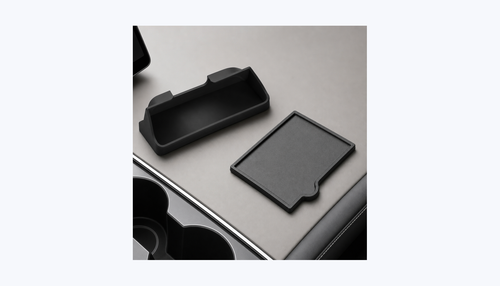
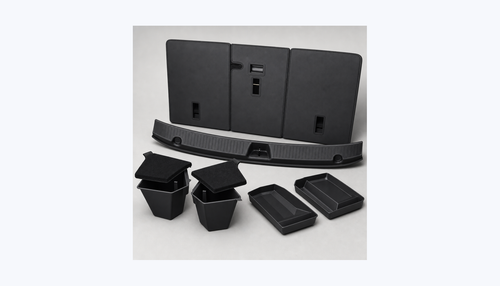
- Highland console organizer ($39.99) — 4-piece insert that divides the center console into organized compartments. Keys in one, sunglasses in another, phone charger cable in the third, parking card in the fourth.
- Under-screen storage ($39.99) — Drops into the cavity beneath the center touchscreen. Holds a phone, wallet, or small items. Has a screw-lock mechanism so items don't slide during spirited driving.
The under-screen storage is a Highland/Juniper-exclusive category that didn't exist on legacy Model 3 — the pre-Highland dashboard has no cavity below the screen.
Day 6-7: Comfort upgrades
Roof sunshade
The Highland's panoramic glass roof is unchanged from legacy Model 3 in dimensions, meaning most 2017+ Model 3 sunshades fit. The BASENOR Nano Ice Crystal variant blocks 99.2% of UV and drops cabin temperature by 12-15°F in direct sun. If you live in Arizona, Texas, or any desert climate, this is not optional — it's critical.
Pet seat cover (if applicable)
For dog owners, install the rear bench cover before the first muddy paw disaster. The hammock-style BASENOR pet cover is universal across all Tesla Model 3 years and installs in 3 minutes via 4 headrest anchor straps.
Software settings to change on day 1
Highland ships with conservative defaults. These five settings change the driving experience most meaningfully:
- Stopping Mode → Hold (Controls → Driving). Car holds itself at a stop without brake pedal input. Required for true one-pedal driving.
- Regen Braking → Standard (Controls → Driving). Maximum energy recovery. Don't use Low — it wastes energy and feels sluggish.
- Mirror Auto-Fold → On (Controls → Vehicle → Mirrors). Mirrors fold when parked — essential in tight garages.
- Close Windows on Lock → On (Controls → Vehicle). If you forget to roll up a window, the car handles it.
- Joe Mode → On (Controls → Safety). Reduces chime volume by ~50%. Named after a Tesla owner who requested it for sleeping kids; useful for everyone.
The "skip until later" list
These accessories matter eventually but are not urgent in your first week:
| Accessory | When to buy | Why it can wait |
|---|---|---|
| HEPA cabin air filter | Month 6-12 | Factory filter is fine for the first year |
| Wheel rim protectors | Month 2-3 | Cosmetic only |
| Side window sunshades | First road trip | Roof shade handles 80% of heat |
| Rear spoiler | Anytime | Cosmetic, no time pressure |
| Key card holder | Anytime | App-as-key works fine; card is backup |
Total first-week cost
Following this playbook in full, your first week of Highland accessory spending works out to:
| Category | Product | Price |
|---|---|---|
| Protection | Mud flaps | $34.99 |
| Protection | Floor mats (6-piece) | $179.99 |
| Protection | Screen protector (matte) | $29.99 |
| Organization | Console organizer | $39.99 |
| Organization | Under-screen storage | $39.99 |
| Comfort | Roof sunshade | $29.99 |
| Essentials tier total | $354.94 | |
Free shipping on orders over $39 in North America. Orders placed before 2pm PT ship same-day.
FAQ
Do I really need to refuse delivery if I find an issue?
Refusal is the nuclear option. For minor issues (small paint chips, minor trim alignment), document on the delivery receipt with photos and accept. For major issues (windshield cracks, dead touchscreen, misaligned body panels), refuse — Tesla will reassign you a different VIN, typically within 2-4 weeks. The specialist on-site should be your first negotiation.
What if I pick up at a service center vs home delivery?
Service-center pickup gives you better light, more experienced specialists, and an easier rejection path. Home delivery is convenient but the delivery driver usually has minimal training — any issue gets deferred to a service appointment. If your car is going to home delivery and you want the full inspection, ask to reschedule to service-center pickup.
My Highland arrived with 35% battery — is that normal?
Yes. Tesla ships cars at 30-50% state-of-charge. Plug in overnight at home and set daily limit to 80%. Avoid charging to 100% except the night before a long trip.
The touchscreen froze during my test drive. Is that a dealbreaker?
A single freeze during delivery day is worth flagging but not necessarily a dealbreaker — firmware version issues during the delivery handoff are surprisingly common and typically resolve after the first OTA update. Ask Tesla to check the firmware version and force an update before you drive off. If the freeze repeats, request a new VIN.
Do Highland accessories fit my 2023 Model 3?
No — the 2024 Highland and pre-2024 Model 3 are dimensionally different in almost every area that accessories touch (footwell, console, dashboard, under-screen area). See our Legacy Model 3 Accessories Guide for the right products.
Should I install everything on day 1 or spread it out?
Spread it out. Day 2-3 for protection (mats, flaps, screen), day 4-5 for organization, day 6-7 for comfort. Installing 10 products in one evening leads to rushed install and skipped steps.