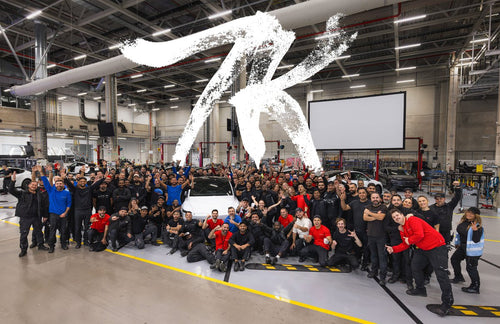
Tesla officially pulled back the curtain on the Roadster's user interface at an event held at SpaceX's McGregor facility in Waco, Texas on October 15, 2026 — and it looks like nothing the company has shipped before. The design borrows from fighter jet cockpits, leans into a retro-futuristic aesthetic, and packs in track-mode tools that go far deeper than any current Tesla UI. Here are the six details that stand out.

1. Fighter Jet Cockpit Was the Design Brief
Tesla didn't reach for the usual automotive touchscreen playbook. According to reporting from the event, the team explicitly cited fighter jet cockpit screens as the inspiration. The result is a predominantly black display with striking red and white graphics — a palette that reads as high-contrast and purposeful rather than decorative. Tesla has described the controls as "like nothing else Tesla has designed" and "very unique to this vehicle." There's also a light mode that reportedly echoes the look of the 2017 Roadster prototype's infotainment system, giving longtime fans a nod to the car's history.
2. The Charging Screen Shows a 3D Wireframe of the Car
On the charging screen, the display renders a 3D wireframe of the Roadster with the battery highlighted and a visible charge limit bar. It's a detail that sounds minor but signals how deeply the UI is integrated with the car's identity — the Roadster isn't just displaying a battery percentage, it's showing you the physical architecture underneath. This kind of visualization is a step beyond what current Tesla models display during charging sessions.
3. Track Mode Is a Serious Driver's Tool
The dedicated track-mode screen is where the UI gets genuinely technical. According to reporting from the October 15 reveal, it displays a lap map, session lap times, brake and tire readouts, and a thruster gauge reading 5,500 PSI with a "Boost Ready" indicator. Drivers also get real-time readouts for battery and motor temperatures, aero balance, and brake balance. Stability and traction control can be disabled directly from this screen. This isn't a cosmetic track mode — it's a data-dense interface built for drivers who actually intend to use it on circuit.
4. Custom Drive Mode Lets You Tune Nearly Everything
The Roadster offers four driving modes — Comfort, Balance, Sport, and Custom — accessible from the main UI. The Custom mode is the standout: it allows individual adjustment of acceleration, ride and handling, front and rear wings, suspension height, hood vent, and barge boards. That level of granularity puts the Roadster in a different category from Tesla's existing lineup, where drive mode customization is comparatively limited. The steer-by-wire yoke also integrates buttons for DRS (Drag Reduction System), turn signals, and Boost — keeping critical performance controls at the driver's fingertips without requiring a touchscreen tap.
5. The Bottom Menu Bar Keeps Navigation Familiar
For all its unique visual language, the Roadster's UI doesn't abandon usability. A menu bar at the bottom of the display provides access to Home, Vehicle, Listen, Climate, and Navigate — a structure that any current Tesla owner will find immediately legible. It's a smart design decision: the car looks and feels like nothing else Tesla makes, but the core interaction model stays consistent with the broader ecosystem. Owners switching from a Model 3 or Model Y won't need to relearn how to find the climate controls.
6. There's a Hidden Easter Egg in Reverse
Tesla buried a small animation in the reverse camera view: when the Roadster is put into reverse, a hedgehog appears on screen, walking up a driveway in front of a house and waving. It's the kind of detail that has been a Tesla tradition since the early days, and its inclusion here suggests the Roadster's software team had some fun alongside the serious engineering work. Whether it's a one-time animation or loops every time you back up remains to be seen — but it's already one of the more talked-about details from the reveal.
The Roadster's UI reveal doesn't answer every open question about the car — pricing, delivery timing, and final production specs are still outstanding. But the interface itself makes a clear statement: Tesla built this as a driver's machine first, with software to match. The depth of the track-mode tools alone puts it in a different conversation from anything currently in the Tesla lineup.
Related Gear
Gear up your Tesla with tested, custom-fit BASENOR accessories — shop Tesla accessories →
Sources & reporting notes
The links below identify the material source records used for this report.
- @TeslaNewswire on X (2026-10-23T21:13:51.000Z) — Direct source
Source links are preserved as published or accessed. See our editorial standards and corrections policy.
The BASENOR Editorial Desk covers Tesla, SpaceX, and related technology, curating reporting from primary sources — official accounts, regulatory filings, and software release data. Every article passes source-record and fact-checking review before publication. About the newsroom.
This report was curated by the BASENOR Editorial Desk from the sources listed above. Read our editorial standards or email editorial@basenor.com to report an error.