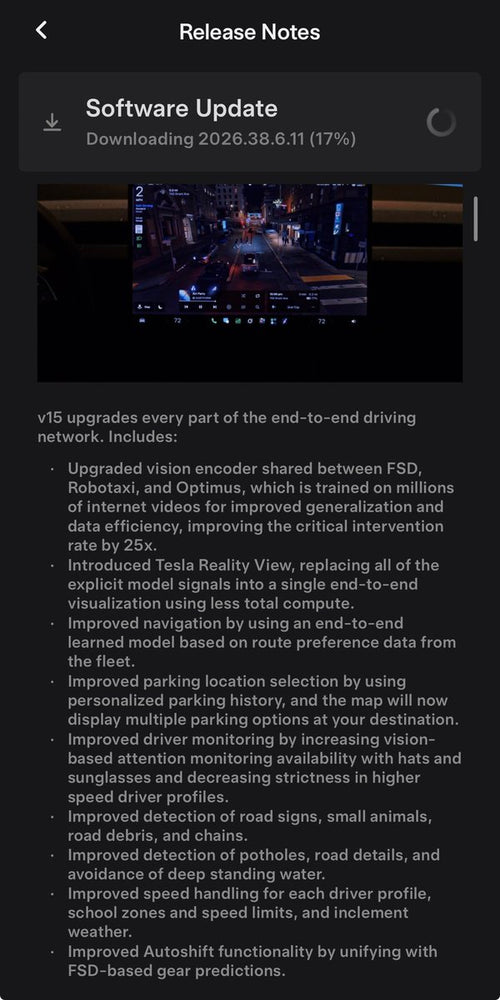

Tesla has begun rolling out FSD (Supervised) v15, and its headline feature is something owners haven't seen before: Tesla Reality View, a real-time generative visualization that shows a live overhead perspective of your car and everything FSD is planning to do. The first wave hit early access members on November 21, 2026, with a wider release expected as part of the December 2026 Holiday Update.

What Tesla Reality View Actually Does
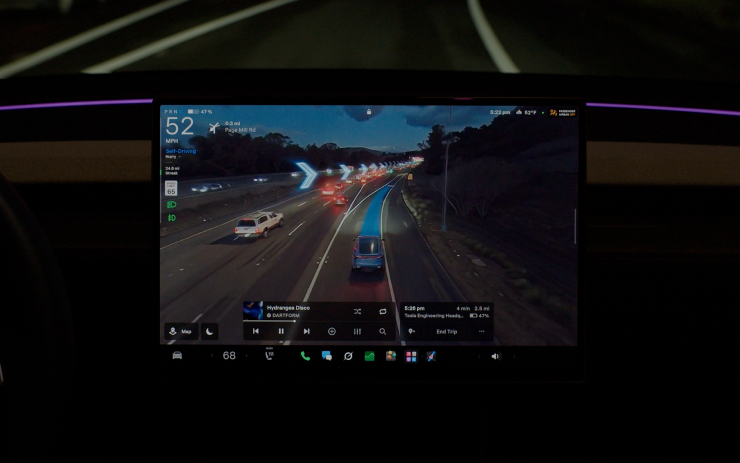
Rather than the traditional 2D radar-style visualization Tesla has used for years, Reality View streams a continuous generative render from a virtual camera positioned above your vehicle. Think of it as a cinematic bird's-eye view that updates in real time as FSD navigates — not a static map overlay, but a living picture of what the car sees and intends to do next.

According to background research, the visualization replaces explicit model signals with a single end-to-end display — and reportedly uses less total compute than the previous approach. Upcoming turns appear as directional arrows, parking destinations as pins. A tap-to-navigate function lets you tap any point on the visualizer to direct the car there, which is a meaningful quality-of-life upgrade for anyone who's fumbled with the map while FSD is active.
Who Gets It — and Who Doesn't
This is the part that matters most for a large chunk of the Tesla fleet: FSD v15, including Reality View, is exclusive to vehicles with AI4 hardware (typically 2026 Model Y and newer AI4-equipped cars). If your car runs Hardware 3 (HW3/AI3), it will remain on a separate v14 Lite branch and will not receive this update. There is no workaround for this — it's a hardware limitation tied to the compute requirements of the new end-to-end architecture.
If you're unsure which hardware generation your car has, check Controls → Software → Additional Vehicle Information on your touchscreen.
How to Set It Up Once You Have v15
Once the update installs, Reality View doesn't require any deep menu diving. Here's how to get the most out of it:
- Confirm your software version. Go to Controls → Software and verify you're on FSD v15 (version 15.0.1 or later). If you don't see it yet, you may be in the second wave — check back in December.
- Engage FSD on a familiar route. Reality View activates automatically when FSD (Supervised) is running. You'll see the generative overhead render replace the standard visualization on your center screen.
- Choose your display layout. Tap the visualization to cycle between three modes: Fullscreen (maximum situational awareness), Split (visualization alongside the standard map), or Maps (map-primary with Reality View inset). A fourth option, Quiet Mode, minimizes the display if you find it distracting.
- Try tap-to-navigate. While FSD is active, tap any point on the Reality View display to instruct the car to route toward that location. This works as a quick directional nudge without opening the full navigation interface.
- Watch for navigation cues. Upcoming turns are shown as arrows directly in the visualization; parking targets appear as pins. These replace the older text-based prompt overlays.
What Else Comes with FSD v15
Reality View is the visual centerpiece, but v15 ships with a meaningful set of supporting changes according to research. Tesla claims a 25x improvement in handling safety-critical cases, attributed to an upgraded vision encoder now shared across FSD, Robotaxi, and Optimus — trained on millions of internet videos. Other additions include:
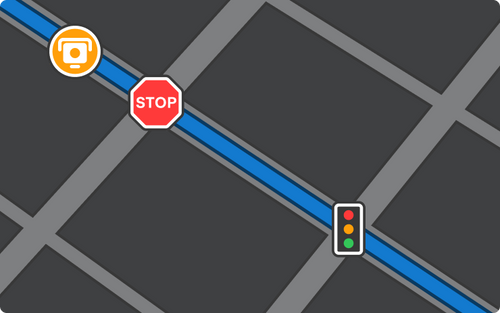
- Speed Camera Slowdown — FSD automatically reduces speed when it detects a speed camera.
- Bike Rack Mode — enables FSD use when a bike rack or hitch accessory is attached.
- Improved detection of road signs, small animals, debris, potholes, and standing water.
- Better driver monitoring — improved recognition with hats and sunglasses on, and reduced strictness at higher speed profiles.
- Unified Autoshift with FSD-based gear predictions.
- Smarter route learning — navigation models now incorporate fleet route preferences for trip start and end points.
For AI4 owners, the combination of Reality View and the safety encoder upgrade makes v15 the most substantive FSD release in some time. The broader December rollout will be the real test of how the feature holds up across diverse driving conditions — but if you're in the first wave, it's worth spending a few drives getting familiar with the new layout before the Holiday Update brings it to everyone. For more context on where FSD has been heading, see our FSD coverage.
📋 Tracking Tesla software? See every firmware, FSD and app version in one place in our Tesla Software Update Tracker.
Related Gear
Gear up your Tesla with tested, custom-fit BASENOR accessories — shop Tesla accessories →
Sources & reporting notes
The links below identify the material source records used for this report.
- @teslascope on X (2026-11-21T22:38:34.000Z) — Direct source
- @teslascope on X (2026-11-21T22:55:34.000Z) — Direct source
Source links are preserved as published or accessed. See our editorial standards and corrections policy.
The BASENOR Editorial Desk covers Tesla, SpaceX, and related technology, curating reporting from primary sources — official accounts, regulatory filings, and software release data. Every article passes source-record and fact-checking review before publication. About the newsroom.
This report was curated by the BASENOR Editorial Desk from the sources listed above. Read our editorial standards or email editorial@basenor.com to report an error.