📌 UPDATE — February 28, 2026
Tesla's Grok rollout is going global: software update 2026.2.6.5 is now pushing a second wave that brings xAI's Grok assistant to owners in Australia and New Zealand. This expansion follows the earlier European language launch and signals Tesla is accelerating its worldwide AI integration timeline. Australian and New Zealand Tesla owners should check their vehicles for the pending update in the software settings menu. No additional setup steps beyond the update itself have been announced for these regions at this time.

📌 UPDATE — 28 February 2026
Tesla's software version 2026.2.6 is now in a wide rollout, officially reaching approximately 49% of the fleet (13th batch). This update formally packages Grok with Navigation Commands (Beta) for European Ryzen-equipped vehicles — confirming the feature is no longer limited to early testers and is being pushed at scale. If you haven't received it yet, your vehicle is likely in an upcoming batch; check Software → Update Available on your touchscreen. No additional action is required beyond accepting the OTA update when it arrives.

Source: @TeslaNewswire · 28 Feb 2026
📌 UPDATE — 28 February 2026
Tesla's Grok navigation rollout has now expanded beyond Europe: software version 2026.2.6.5 is actively being pushed to the first batch of vehicles in Australia and New Zealand as of today. The update bundles Grok for FSD v13.2.9 and brings the same natural-language Grok with Navigation Commands (Beta) feature — but critically, it remains limited to Ryzen-equipped vehicles only. Owners of older AMD or Intel hardware will not receive the Grok navigation functionality in this build. This marks the first confirmed Grok navigation rollout in the Asia-Pacific region, suggesting Tesla is now scaling the feature globally in parallel waves rather than completing the European rollout first.
@TeslaNewswire · Feb 28, 2026 — "🚀🇦🇺🇳🇿 The Tesla 2026.2.6.5 software update has been detected and is now rolling out to the 1st batch of vehicles in Australia and New Zealand! It brings Grok for FSD (Down Under) v13.2.9 users."
📌 UPDATE — February 28, 2026
Tesla's 2026 firmware branch continues to expand its reach: version 2026.2.6.5 has now been spotted on a 2026 Model Y AWD Long Range in South Australia, confirming an active rollout to the latest vehicle hardware in the region. This is the newest detected build in the 2026.2 branch and suggests Tesla is pushing incremental updates alongside the broader European language feature rollout. Australian owners on 2026 hardware should keep an eye on their vehicles' software screens for the incoming update notification. No additional changelog details have been officially disclosed for this build at this time. 🔍

30-Second Brief
The News: Tesla Europe has officially confirmed that Grok AI now supports Italian, German, French, Portuguese, and Spanish — and can handle real-time navigation tasks including adding stops and editing routes.
Why It Matters: Millions of European Tesla owners on Ryzen-equipped vehicles can now interact with their car's AI assistant in their native language and manage complex navigation hands-free.
Source: @teslaeurope on X

Grok AI Arrives Across Europe With Multi-Language Support
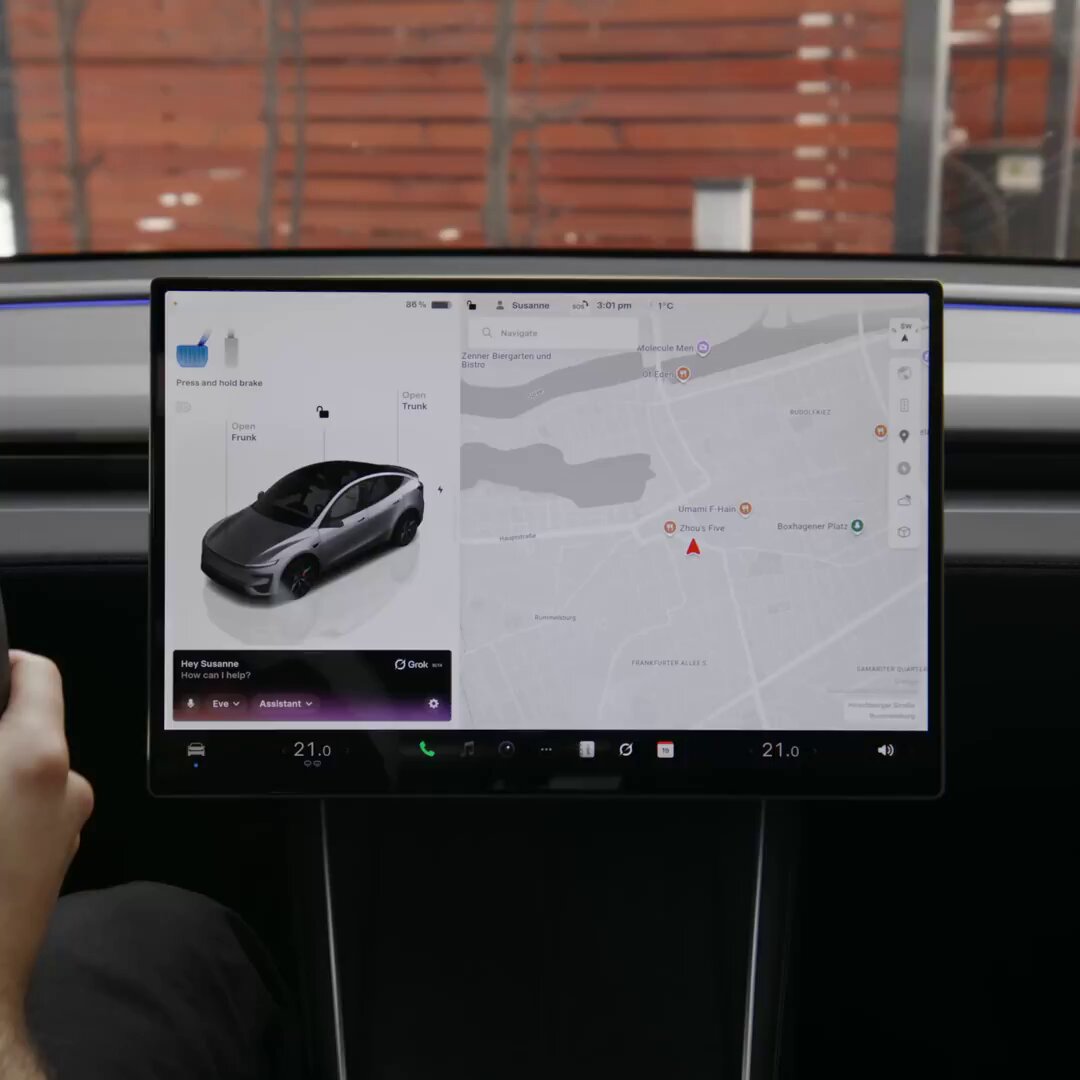
Tesla's Grok AI assistant — powered by xAI — has just taken a major leap forward for European owners. The official Tesla Europe, Middle East & Africa account confirmed today that Grok now speaks Italian, German, French, Portuguese, and Spanish, putting native-language AI assistance inside the cabin for drivers across the continent.
The rollout began around February 16, 2026, via software update 2026.2.6, covering nine countries: the United Kingdom, Ireland, Germany, Switzerland, Austria, Italy, France, Portugal, and Spain. If your Tesla runs on an AMD Ryzen infotainment processor and you're in one of these markets, Grok is — or very soon will be — available to you.
📊 What Changed
| Feature | Before | After (2026.2.6) |
|---|---|---|
| Grok Language Support (Europe) | English only | English + Italian, German, French, Portuguese, Spanish |
| Navigation Commands | Basic destination setting | Add stops, edit routes, reroute around traffic, switch destinations — all via natural language |
| Points of Interest | Manual search required | Grok suggests nearby POIs using real-time info |
| Real-Time Information | Not available | Live Q&A powered by xAI's real-time data |
What Grok Can Now Do in Your Car
The capabilities confirmed by Tesla Europe go well beyond simple voice Q&A. Here's the full picture of what Grok can handle as of this update:
- Answer real-time questions — news, weather, general knowledge, all with live data
- Add stops to your active route — "Add a coffee stop before my destination"
- Edit your route on the fly — reroute around traffic or switch destinations mid-drive
- Suggest points of interest nearby — restaurants, charging stations, attractions, all contextually aware
- Respond in your native language — Italian 🇮🇹, German 🇩🇪, French 🇫🇷, Portuguese 🇵🇹, Spanish 🇪🇸
According to verified reports, navigation commands specifically require software version 2025.44.25 or newer — though the full feature set is packaged in 2026.2.6. Check your current version before troubleshooting.
🚦 Owner's Action Plan
✅ Verdict: ESSENTIAL — Takes under 5 minutes
- Check your hardware: Grok requires an AMD Ryzen infotainment chip. Go to Controls → Software → Additional Vehicle Information. Look for "Ryzen" or "AMD" listed under infotainment hardware. If you have an older Intel chip, this update does not apply to your vehicle yet.
- Verify your software version: Tap Controls → Software and confirm you're on 2026.2.6 or later (minimum 2025.44.25 for navigation commands). If not, connect to Wi-Fi and check for updates.
- Confirm your connectivity: Grok requires either an active Premium Connectivity subscription or a stable Wi-Fi connection. Premium Connectivity runs approximately €10/month in Europe. Without it, the AI assistant will not function.
- Activate Grok: Press and hold the right scroll wheel button, or tap the microphone icon on the touchscreen. Say "Hey Tesla" or use the dedicated Grok button if visible in your UI.
- Set your preferred language: Navigate to Controls → Display → Language and select your preferred language. Grok will respond in the display language of your vehicle.
- Test a navigation command: Try saying "Add a charging stop before my destination" or "Find a restaurant near me" in your language to confirm everything is working.
Known Limitations to Be Aware Of
- Ryzen-only: Older Intel-based Teslas are not supported. This includes many pre-2022 vehicles.
- Connectivity required: Grok will not function offline or without Premium Connectivity / Wi-Fi.
- Navigation minimum version: Navigation command support requires at least software 2025.44.25. Basic Q&A may work on earlier versions.
- Regional availability: Currently limited to UK, Ireland, Germany, Switzerland, Austria, Italy, France, Portugal, and Spain. Other EMEA markets have not been confirmed yet.
📰 Deep Dive
The significance of today's announcement isn't just linguistic — it's a signal of how Tesla is positioning Grok as the central intelligence layer of the in-car experience. By enabling natural-language navigation edits in real time, Tesla is effectively replacing a touchscreen-heavy workflow with conversational AI. Telling your car "add a petrol station stop, skip the motorway, and find me a decent pizza place for dinner" and having it execute all three isn't a feature — it's a paradigm shift in how drivers interact with navigation.
The rollout strategy is also telling. Starting with nine high-volume European markets and five major languages suggests Tesla and xAI have invested seriously in localisation, not just translation. Voice recognition for German or French in an in-car environment — where road noise, accents, and casual phrasing all compound — is genuinely difficult to do well. The fact that Tesla is shipping this via an OTA update rather than waiting for a hardware refresh underscores the competitive advantage of software-defined vehicles: the car you bought two years ago can wake up tomorrow meaningfully smarter.
For owners, the immediate practical win is hands-free route management. No more tapping the screen to add a charging stop mid-motorway. No more pulling over to search for a nearby restaurant. Grok's integration with real-time data means it can factor in live traffic, current business hours, and Supercharger availability when making suggestions — a step beyond what a static voice command system can offer. European owners who've been watching North American Grok coverage with envy now have full access, and the all software updates coverage at BASENOR will track how this evolves across coming versions.
📋 Tracking Tesla software? See every firmware, FSD and app version in one place in our Tesla Software Update Tracker.
Related Gear
Gear up your Tesla with tested, custom-fit BASENOR accessories — shop Tesla accessories →
Sources & reporting notes
The links below identify the material source records used for this report.
- @teslaeurope on X (2026-02-27T19:04:48.000Z) — Direct source
- @teslascope on X (2026-02-27T23:53:16.000Z) — Direct source
- @TeslaNewswire on X (2026-02-28T08:31:50.000Z) — Direct source
- @TeslaNewswire on X (2026-02-28T09:12:39.000Z) — Direct source
- @NowRollingOut on X (2026-02-28T22:58:08.000Z) — Direct source
Source links are preserved as published or accessed. See our editorial standards and corrections policy.
The BASENOR Editorial Desk covers Tesla, SpaceX, and related technology, curating reporting from primary sources — official accounts, regulatory filings, and software release data. Every article passes source-record and fact-checking review before publication. About the newsroom.
This report was curated by the BASENOR Editorial Desk from the sources listed above. Read our editorial standards or email editorial@basenor.com to report an error.