📌 UPDATE — July 11, 2026
New details have emerged about the Tesla App's FSD visual indicator: beyond the blue route, the app also displays a "Rainbow Road effect" when FSD (Supervised) is actively engaged. This animated effect is available to owners running software version 2026.20+ paired with FSD v14 Lite. The combination of the blue route and Rainbow Road effect makes it visually unmistakable in the app when FSD has taken the wheel.
@TeslaNewswire · July 11, 2026"Tesla App now shows when FSD (Supervised) is active with 2026.20+ and FSD v14 Lite. It even displays the Rainbow Road effect when it's enabled."

📌 UPDATE — July 7, 2026
Tesla's 2026.20.6.1 update — the same build introducing the FSD blue route in the app — has now reached its 6th rollout batch, covering approximately 49% of the fleet. According to Teslascope, roughly 10,670 additional vehicles received the update in just the last five minutes of tracking. The update itself carries only minor fixes, building on 2026.20.6's security improvements and 2026.20.3's new Blind Spot Warning While Parked feature (new Model Y and 2021+ Model S/X only). If you haven't seen the update yet, the broad rollout suggests it should be arriving for most owners very soon.


📌 UPDATE — July 7, 2026
Tesla is now pushing a sixth wave of the 2026.20.6.1 software update, according to @NowRollingOut. This latest wave includes minor fixes, meaning more Tesla owners should now have access to the FSD blue route feature covered in this article. If you haven't received the update yet, it's worth checking your Tesla app or vehicle screen — availability is expanding with each new wave.

📣 @NowRollingOut · July 7, 2026
📌 UPDATE — July 6, 2026
Tesla's 2026.20.6.1 rollout has now reached its 5th batch, covering approximately 40% of the fleet. Alongside the FSD blue route feature, the update bundles security improvements from 2026.20.6 and the Blind Spot Warning While Parked feature introduced in 2026.20.3 — available on newer Model Y, 2021+ Model S, and 2021+ Model X vehicles. The current batch carries only minor fixes on top of those cumulative changes, so if you haven't received it yet, it's actively pushing out now.
@TeslaNewswire · July 6, 2026
🔥🚀 The Tesla 2026.20.6.1 software update is now rolling out to the 5th batch of vehicles (reaching ~40% of the fleet)!
✅ Minor fixes | ✅ Security improvements | ✅ Blind Spot Warning While Parked [new Y, 2021+ S/X]
📌 UPDATE — July 6, 2026
Tesla's 2026.20.6.1 rollout is accelerating — this is now the 5th wave of the update, with Teslascope tracking approximately 9,460 additional vehicles receiving it within a five-minute window earlier today. Now Rolling Out confirms the wave includes minor fixes alongside the previously reported FSD blue route feature. If you haven't seen the update yet, chances are higher than ever it's heading your way soon.


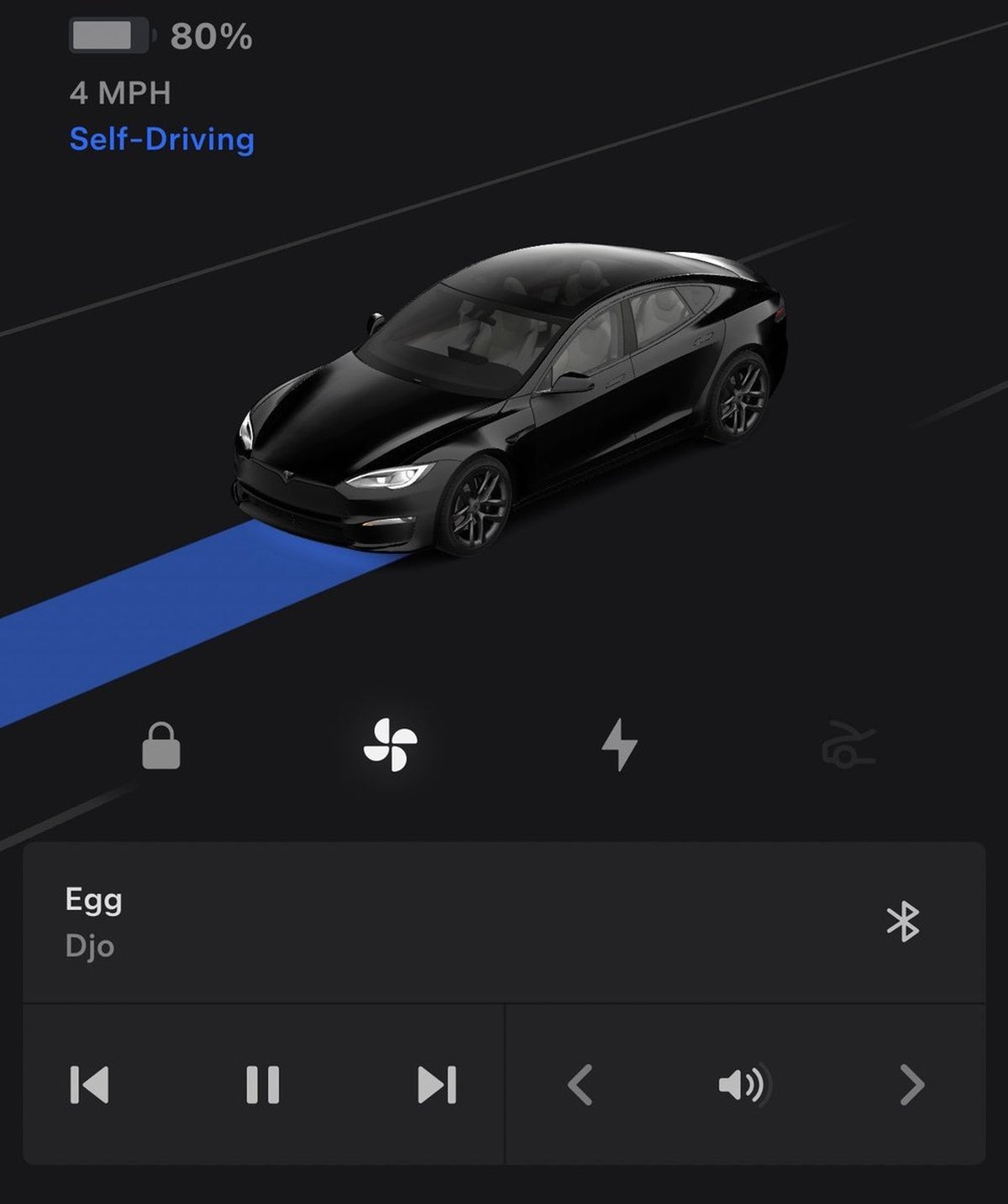
Tesla has quietly pushed a meaningful update to its mobile app: owners can now see a blue route on the map when their vehicle is actively driving itself with FSD (Supervised). The feature rolled out alongside vehicle software update 2026.20.6.1 — the same build bringing FSD v14 Lite to older Hardware 3 (AI3) vehicles — and gives you real-time visibility into your car's self-driving state directly from your phone.

What Changed
Previously, the Tesla app showed your car's location and basic status — but gave no indication of whether FSD was actively engaged. Now, when FSD (Supervised) is driving, the app map displays a blue route line mirroring what the in-car touchscreen already shows. It's a small visual cue with a real practical use case.
As Sawyer Merritt noted, the feature is particularly useful if someone else is using your car — a family member, a valet, or a teenager — and you want to know whether the vehicle is operating under self-driving control remotely. That's a genuinely new layer of owner awareness that didn't exist before.

What Else Is in 2026.20.6.1
The FSD blue route is an app-side change and does not appear in the vehicle's official release notes. The 2026.20.6.1 vehicle update itself carries several documented improvements worth knowing about:
| Change | Type | Models |
|---|---|---|
| FSD Blue Route in App — App map shows blue route when FSD is actively driving | App Update | All FSD-capable |
| Automatic Software Updates — Vehicle installs updates overnight while parked; enable via Controls > Software | Official | All models |
| Dashcam Viewer Updates — Footage extends to 24 hours; clips downloaded to phone now include speed, steering angle, and Self-Driving state (requires Premium Connectivity + App 4.55.6+) | Official | All models |
| Weather Maps Improvements — Snow and rain shown with improved color distinction; view past hour of weather data (requires Premium Connectivity) | Official | All models |
| Supercharger Pricing Filter — Route only to Superchargers where Tesla sets pricing; enable via Controls > Navigation > Trip Planner | Official | All models |
| Trips in Energy App — Trips moved to the Energy app; access via App Launcher > Energy > Trips | Official | All models |
| Dashcam Clip Encryption — Clips saved to USB flash drive are now encrypted for privacy; only your vehicle can decrypt them | Official | All models |
| Keyboard Language for Dictation — Selected keyboard language now also sets dictation language; tap international keyboard button to switch without changing voice command language | Official | All models |
Action Plan
Here's what to check right now:
- Confirm your vehicle software version. Go to Controls > Software on your touchscreen. You need 2026.20.6.1 or later to see the FSD blue route in the app.
- Update your Tesla app. The blue route feature is app-side. Make sure you're running the latest version of the Tesla app on iOS or Android. Force-close and reopen if the feature isn't appearing.
- Enable Automatic Software Updates so you don't miss future builds. Go to Controls > Software > Automatically Install Updates and toggle it on.
- If you have FSD and Hardware 3 (AI3): FSD v14 Lite began rolling out to early-access HW3 owners on June 29, 2026, according to Tesla AI executive Ashok Elluswamy. Watch for the update in your Software menu.
- Check the Dashcam Viewer improvements. If you use Dashcam, clips downloaded to your phone now include Self-Driving state data alongside speed and steering angle — useful context for reviewing footage. Requires Premium Connectivity and app version 4.55.6 or later. Enable via Controls > Safety > View Camera via Mobile App.

The rollout is currently tied to vehicles on 2026.20.6.1, but Sawyer Merritt noted it should expand to a wider portion of the fleet soon. If you're not seeing the blue route yet, the vehicle software version is the most likely bottleneck — the app update appears to be server-side and broadly available already.
📋 Tracking Tesla software? See every firmware, FSD and app version in one place in our Tesla Software Update Tracker.
Related Gear
Gear up your Tesla with tested, custom-fit BASENOR accessories — shop Tesla accessories →
Sources & reporting notes
The links below identify the material source records used for this report.
- @teslascope on X (2026-07-05T20:47:27.000Z) — Direct source
- @SawyerMerritt on X (2026-07-05T20:38:52.000Z) — Direct source
- @TeslaNewswire on X (2026-07-05T20:21:38.000Z) — Direct source
- @teslascope on X (2026-07-06T18:55:19.000Z) — Direct source
- @NowRollingOut on X (2026-07-06T18:38:08.000Z) — Direct source
- @TeslaNewswire on X (2026-07-06T20:10:20.000Z) — Direct source
- @NowRollingOut on X (2026-07-07T19:34:09.000Z) — Direct source
- @teslascope on X (2026-07-07T21:15:06.000Z) — Direct source
- @TeslaNewswire on X (2026-07-07T21:19:40.000Z) — Direct source
- @TeslaNewswire on X (2026-07-11T15:58:27.000Z) — Direct source
Source links are preserved as published or accessed. See our editorial standards and corrections policy.
The BASENOR Editorial Desk covers Tesla, SpaceX, and related technology, curating reporting from primary sources — official accounts, regulatory filings, and software release data. Every article passes source-record and fact-checking review before publication. About the newsroom.
This report was curated by the BASENOR Editorial Desk from the sources listed above. Read our editorial standards or email editorial@basenor.com to report an error.