📌 UPDATE — August 29, 2026
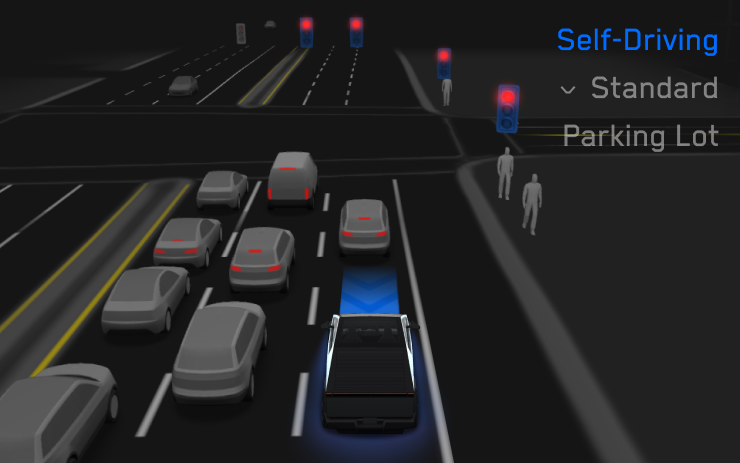
Early user reports highlight a notable improvement in FSD v14.3.8's reaction speed. @wholemars reports that the system now reacts instantly to predictive cues — such as a car activating its right turn signal to pull into a parking lot — slowing down before the driver even consciously registers the event. This proactive response results in smoother, more gradual deceleration rather than last-second braking, marking a meaningful step forward in anticipatory driving behavior. The improvement suggests FSD 14.3.8 is better leveraging blinker and intent signals from surrounding vehicles, not just reacting to their physical movements.
"Tesla Self-Driving 14.3.8 just reacts *instantly* when anything happens. A car turned on its right blinker to pull into a parking lot. My car slowed down instantly when the blinker came on, before I even realized what happened. This allowed it to slow down much more smoothly" — @wholemars, Aug 29, 2026
📌 UPDATE — August 29, 2026
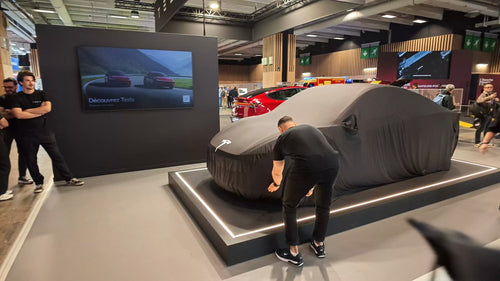
A production Cybercab — fully driverless, with no steering wheel or pedals — was spotted at Terry Black's BBQ in Austin, Texas late Friday, suggesting Tesla employees are now taking production Cybercab rides on public roads ahead of a broader rollout. @wholemars, who photographed the vehicle, believes public access outside the company could come as soon as next week, consistent with Elon Musk's February commitment to sell a Cybercab in 2026.

The sighting aligns closely with early user impressions of FSD v14.3.8 — the same version bundled in 2026.26.6.5. @wholemars notes the model now reacts almost instantly to lane markings, executing lane changes the moment a marking becomes visible — a meaningful leap in decisiveness. In a separate report, a round-trip to the post office and a full mall garage navigation completed with zero intervention, prompting the description: "14.3.8 is feeling like a Cybercab to me."
Tesla has begun pushing software update 2026.26.6.5 to vehicles across the fleet, and it's a big one — this release bundles FSD (Supervised) v14.3.8 with the long-anticipated 2026 Summer Update. Tracking service Teslascope first flagged the version late Tuesday on a Cybertruck AWD in Florida, and within minutes owners including Sawyer Merritt, Whole Mars Catalog, and Dirty Tesla confirmed downloads had started on their Model Ys.
If you've been waiting on Summer Update features to reach your car, this is the release to watch for. Here's what's inside, who gets it, and exactly what to do once it lands.

What's in 2026.26.6.5
This update is essentially two shipments rolled into one firmware bundle: the FSD stack advances from v14.3.7 to v14.3.8, and eligible vehicles finally get the 2026 Summer Update feature set that has been trickling out on earlier 2026.26.x branches since late July.
| Change | Type | Models |
|---|---|---|
| FSD (Supervised) v14.3.8 | Official | HW4 3, Y, S, X, Cybertruck |
| 2026 Summer Update feature bundle | Official | FSD-equipped vehicles |
| Expanded Grok voice commands (calls, music, climate, vehicle Q&A) | Official | Compatible models |
| Automatic Navigation & Preferred Routes | Official | All |
| Caraoke with scoring | Official | All |
| Self-Driving Stats in mobile app | Official | FSD vehicles |
| Arrival energy setting via mobile app | Official | All |
| Rear display parental lock | Official | Model S, X, Y (rear screen) |
| Google Meet, Microsoft Teams, Discord video conferencing | Official | All |
| Dashcam clip encryption | Official | All |
| Blind Spot Warning While Parked | Official | All |
Dirty Tesla noted that the FSD-specific release notes look identical to v14.3.7's — meaning v14.3.8 is likely a refinement pass on the same architecture rather than a headline feature drop. According to previous Tesla release patterns, v14.3.7 already delivered a rewritten AI compiler for roughly 20% faster reaction times, reduced jittery braking, and improved 3D geometry and sign recognition. Expect v14.3.8 to sharpen those behaviors further.

Who gets it
FSD v14.3.x is a Hardware 4 (AI4) release, so 2026.26.6.5 in this exact form is targeted at HW4 vehicles with the FSD (Supervised) package. That includes Model 3 and Model Y refreshes built with AI4, current Cybertrucks, and newer Model S/X units that shipped with HW4 before the S/X production wind-down. Chuck Cook's Cybertruck AWD was the first vehicle Teslascope caught receiving the version.
Owners on Hardware 3 are on a parallel track — Tesla has been distributing FSD v14 Lite under versions like 2026.20.6.11 in the US and Canada, optimized for HW3's older compute. If your car is HW3, you won't see 2026.26.6.5 with v14.3.8 land; watch for the v14 Lite branch instead.

Action plan: what to do the moment it lands
Once your car pulls 2026.26.6.5 and finishes installation, work through this checklist. Several of the new features are opt-in or require setup — they won't show up on their own.
- Install overnight, not before a drive. This is a major-branch update with a full FSD stack replacement. Plan for 30–45 minutes of installation time and start it while the car is parked at home on Wi-Fi.
- Open the Tesla mobile app and check for the Self-Driving Stats card. The new in-app dashboard summarizes miles driven on FSD, interventions, and safety events. It should appear automatically on FSD-equipped cars but may require the latest app version — update the app on your phone first.
- Enable Grok voice commands. Go to Controls → Voice and confirm Grok is set as your voice assistant. Then try new commands: "Call [contact]," "Play [song] on Spotify," "Set temperature to 68," or vehicle-specific questions like "How much range do I have left?"
- Set up Preferred Routes. Under Navigation Settings, look for the new Automatic Navigation and Preferred Routes options. Adding your daily commute here lets the car auto-suggest and pre-load routing without you tapping in a destination.
- Configure arrival energy in the app. In the Tesla app under charging settings, you can now specify how much battery you want at your destination. Useful before road trips — the car adjusts Supercharger stops automatically.
- Turn on Dashcam Clip Encryption. Under Safety & Security → Dashcam, enable the new encryption toggle if you want saved clips protected from unauthorized playback. You'll set a PIN for retrieval.
- Test Blind Spot Warning While Parked. This runs passively when the car is parked and someone approaches from a blind zone — no configuration needed, but verify it's active under Autopilot settings.
- For rear-screen equipped Model S/X/Y: set the parental lock. The new rear display lock lives under Display Settings and lets you disable rear-seat controls for kids.
- Recalibrate FSD expectations for the first 100 miles. After any major FSD version jump, driving behavior shifts. Keep hands ready, especially at intersections and merge points, until you learn what v14.3.8 does differently from your previous version.

If you don't see it yet
Rollouts of this scale ship in waves. The parent 2026.26.x branch has been deploying since late July, and earlier point releases like 2026.26.6.2 had only reached a small percentage of the fleet by August 22 according to Teslascope's tracking data. Don't force a manual check every ten minutes — Tesla staggers releases by region, VIN batch, and hardware config.
To improve your odds:
- Keep the car on Wi-Fi with strong signal when parked.
- Confirm Software Update Preferences is set to Advanced (Controls → Software) so you're on the earliest available branch.
- Make sure your car has been driven or woken recently — dormant vehicles get skipped in rollout batches.
The FSD v14.3.8 code appears to be the same driving stack as v14.3.7 with tuning changes, so early adopters may not notice dramatic behavior shifts. The real headline here for most owners is the Summer Update feature bundle finally landing on a broader version — that's what makes this release worth actively watching for.
Once you install, the Grok expansions and Preferred Routes are the features owners on earlier 2026.26.x branches have called out as day-one wins. Start there.
📋 Tracking Tesla software? See every firmware, FSD and app version in one place in our Tesla Software Update Tracker.
Related Gear
Gear up your Tesla with tested, custom-fit BASENOR accessories — shop Tesla accessories →
Sources & reporting notes
The links below identify the material source records used for this report.
- @teslascope on X (2026-08-26T01:22:45.000Z) — Direct source
- @teslascope on X (2026-08-26T01:22:49.000Z) — Direct source
- @teslascope on X (2026-08-26T01:22:52.000Z) — Direct source
- @NowRollingOut on X (2026-08-26T01:24:09.000Z) — Direct source
- @NowRollingOut on X (2026-08-26T01:26:28.000Z) — Direct source
- @SawyerMerritt on X (2026-08-26T01:29:43.000Z) — Direct source
- @wholemars on X (2026-08-26T01:32:26.000Z) — Direct source
- @DirtyTesLa on X (2026-08-26T01:32:48.000Z) — Direct source
Source links are preserved as published or accessed. See our editorial standards and corrections policy.
The BASENOR Editorial Desk covers Tesla, SpaceX, and related technology, curating reporting from primary sources — official accounts, regulatory filings, and software release data. Every article passes source-record and fact-checking review before publication. About the newsroom.
This report was curated by the BASENOR Editorial Desk from the sources listed above. Read our editorial standards or email editorial@basenor.com to report an error.