📌 UPDATE — July 28, 2026
Tesla has kicked off the second wave of the 2026.26 software update, and this wave is the one that carries the full Summer Update 2026 package. If you didn't receive 2026.26 in the first wave, now is a good time to check your Tesla app for a pending update notification. Rollout waves are staggered, so delivery to all eligible vehicles may take several more days.

📌 UPDATE — July 28, 2026
Tesla's 2026.26 Summer Update also brings in-cabin camera and microphone support to the built-in web browser — but only on Ryzen-equipped vehicles. The feature enables video conferencing directly from your Tesla through web-based platforms like Microsoft Teams, with the cabin camera feed automatically cropped to keep the driver centered in frame. This is separate from the Grok AI voice and command expansions covered below, adding a productivity dimension to the update that wasn't previously reported.

Source: @TeslaNewswire
📌 UPDATE — July 27, 2026
The 2026.26 Summer Update also brings a new Welcome Animation exclusive to Model 3 and Model Y Performance vehicles — a visual treat that plays on startup and adds a sporty flair to the UI experience. This is separate from the Grok AI voice command expansions covered below, and represents an additional UI enhancement tucked into the same OTA release. First real-world footage of the animation has surfaced, showing the Performance-specific branding in action.

Source: @TeslaNewswire, July 27, 2026
📌 UPDATE — July 26, 2026
The 2026.26 Summer Update also brings expanded traction control options to Model 3 and Model Y owners — a feature not previously covered in this article. Tesla has introduced three distinct modes: Auto for everyday driving, Slippery Surface for icy or wet road conditions, and Stuck Assist for extreme situations like deep snow or mud. The new modes give drivers more granular control over how the vehicle manages wheelspin and torque delivery beyond the previous single-toggle traction control setting.

Source: @TeslaNewswire
📌 UPDATE — July 26, 2026
The 2026.26 Summer Update also brings a new welcome animation to Model 3 and Model Y vehicles — an addition not previously detailed. The Tesla logo animation dynamically syncs its color to whatever ambient lighting color you have set in the cabin, creating a cohesive startup experience. Owners who prefer a clean boot can toggle the animation off entirely in settings. First-look footage shared by @SawyerMerritt and @TeslaNewswire confirms the feature is already appearing in the wild.

📌 UPDATE — July 26, 2026
Tesla's 2026.26 Summer Update includes more than just Grok upgrades — the update also introduces three new traction control modes. Drivers can now choose Auto for normal conditions, Slippery Surface for wet or icy roads, or Stuck Assist when the vehicle is bogged down in snow, mud, or sand. The mode automatically resets to Auto at the start of each new drive, so there's no risk of accidentally leaving a specialized mode active. The update is currently rolling out to less than 1% of the fleet in its first batch.

📌 UPDATE — July 26, 2026
Tesla firmware 2026.26 has begun its initial fleet rollout, with early tracker data from TeslaFi and NotATeslaApp confirming approximately 20 installs so far. This is a very early wave — typical of Tesla's staged rollout approach before wider distribution. If you haven't received the update yet, expect it to reach more vehicles over the coming days. Check Software → Update Available in your Tesla app or touchscreen to see if you're in the first batch.
📌 UPDATE — July 22, 2026
The 2026 Summer Update (2026.26) may also bring digital seat controls to the in-car UI for Premium and Performance Model 3/Y owners — a feature previously limited to Standard Range variants. The seat settings icon was spotted in an official Tesla video filmed inside a Model 3 Performance, strongly hinting at a broader rollout. This would let Premium and Performance drivers adjust seat positions directly from the touchscreen rather than relying solely on manual controls. No official confirmation has been issued by Tesla yet, but the appearance in first-party footage makes it a credible addition to the upcoming release.

📌 UPDATE — July 22, 2026
Tesla has revealed a new startup animation coming to the Model 3 Performance with the 2026 Summer Update (2026.26). The Model Y Performance is expected to receive the same animation, while non-Performance variants of the Model 3 and Model Y will get a separate, different startup animation. Tesla shared a preview of the animation directly, giving owners their first look ahead of the rollout.

Tesla has unveiled its 2026 Summer Update — expected to arrive as software build 2026.26 (with 2026.26.1 already spotted in the wild) — and the headline feature is a major expansion of what Grok, the in-car AI assistant, can actually do. According to @TeslaNewswire, Grok can now place phone calls, search and play music, adjust climate, open the glovebox, and answer questions about your Tesla directly by voice. Early user reports suggest the rollout began around July 10, and Tesla is targeting broad fleet distribution by the end of the month.
For owners, this is the biggest functional leap Grok has taken since it debuted in the 2026 Spring Update as a natural-language navigation co-pilot. Grok is now allowed to touch vehicle hardware — a line Tesla explicitly did not cross earlier this year.

What Changed
Before this update, Grok was primarily a conversational layer on top of navigation and search. It could answer questions, suggest routes, and set location-based reminders, but it could not directly control vehicle systems — you still needed the touchscreen or a traditional voice command for climate, media, or hardware actions. As of February 2026, Grok also required a button press to activate on most vehicles.
The 2026.26 update rewires that relationship. Grok now sits on top of the same command surface that voice commands and the mobile app use, meaning a single natural-language sentence can now trigger actions that previously required multiple taps.
| Change | Type | Models |
|---|---|---|
| Grok can make phone calls | Official | 3, Y, S, X, Cybertruck (AI4/Ryzen) |
| Grok can search and play music | Official | 3, Y, S, X, Cybertruck |
| Grok can adjust climate | Official | 3, Y, S, X, Cybertruck |
| Grok can open the glovebox | Official | 3, Y, S, X, Cybertruck |
| Grok can answer vehicle-specific questions | Official | 3, Y, S, X, Cybertruck |
Action Plan: How to Get and Use the New Grok Commands
If you own a compatible Tesla, here is exactly what to do to make sure you receive 2026.26 and can use the new capabilities the moment it lands.
1. Confirm your vehicle is eligible
According to background reporting, Grok functionality typically requires an AMD Ryzen infotainment processor, which most Teslas built from mid-2021 onward have. Full "Hey Grok" hands-free activation is further restricted to vehicles with AI4 hardware or newer Model 3 and Model Y builds. You also need an active Premium Connectivity subscription for the cloud portion of Grok to function.
To check your processor: go to Controls → Software → Additional Vehicle Information. If your car predates the Ryzen switch, Grok features will not be delivered even after the update installs.
2. Put your car in position to receive the OTA
- Connect to strong Wi-Fi — Tesla stages large firmware payloads over Wi-Fi, not cellular.
- Leave the car awake and connected overnight for a few nights in a row during the rollout window.
- In the mobile app, go to Software and confirm advanced update preference is set to Advanced if you want it as early as possible.
- Do NOT reject or delay the update prompt — some owners report the next re-offer can take days.
3. Verify the install
Once installed, open Controls → Software and confirm the build reads 2026.26 or 2026.26.1. Tesla typically publishes the full official release notes only after the staged rollout is well underway, so what you see on-screen may be shorter than the community-reported feature list.
4. Learn the new Grok commands
The new capabilities are all natural-language, but a few phrasings work more reliably than others. Based on the announcement, try these after your update lands:
- Phone calls: "Hey Grok, call [contact name]." Requires your phone paired via Bluetooth as usual.
- Music: "Hey Grok, play [song or artist name]" — searches your active streaming service and adds directly to the queue.
- Climate: "Hey Grok, set the temperature to 70" or "Hey Grok, turn on the driver seat heater."
- Glovebox: "Hey Grok, open the glovebox" — the first hardware-actuation command Grok has been given.
- Vehicle Q&A: "Hey Grok, how much range do I have left?" or "Hey Grok, what's my tire pressure?"
5. Know the fallback
Grok is still a cloud-dependent assistant. If Premium Connectivity drops or the cellular link is weak, Grok will not respond. Tesla's older, on-device voice command system remains available for hardware actions — so your existing "open glovebox" voice command still works as a backup.
What Else Is in 2026.26
The Grok expansion is the headline, but user reports and community changelogs point to a broader feature set landing alongside it. These are user-reported and not yet in an official Tesla changelog, so treat them as expected rather than confirmed until your release notes appear on-screen:
- Self-Driving Stats in the mobile app — view and share your FSD statistics from your phone.
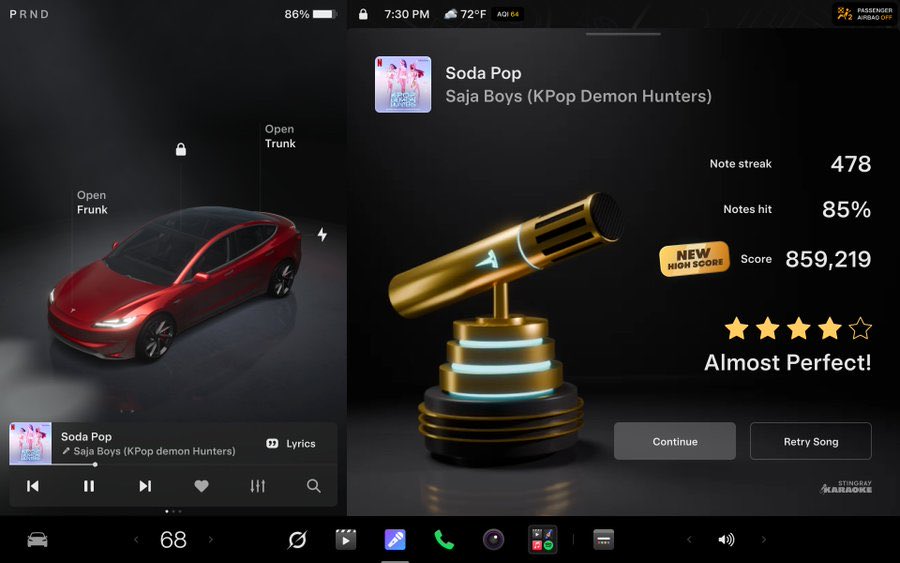
- Caraoke with scoring — sing while parked, get a score, save high scores to your Tesla profile.
- Automatic Navigation — the car learns routines (gym, school drop-off) and suggests them alongside Home/Work.
- Preferred Routes — navigation now prioritizes paths you've historically taken.
- Set Arrival Energy from the mobile app — configure how much charge you want left on arrival, remotely.
- Send custom wraps from the mobile app — no more USB drive juggling for the theater/wrap system.
- Rear Display Lock — kids can watch, but front-row controls the rear screen.
- Find Superchargers by name, add Apple Music songs to queue from artist pages, set preferred FSD visualization zoom, and camera/microphone support in the in-car browser.
For deeper reference on voice control syntax that still works alongside Grok, our complete voice commands list covers the on-device system.
What to Watch Next
The most important thing to watch is Tesla's official release notes. Because 2026.26 gives Grok direct hardware access for the first time, Tesla will almost certainly publish more detailed documentation once the staged rollout hits a critical mass — that's typically when the full changelog goes live inside the car. Expect that within the next week or two based on the current rollout pace.
The second thing to watch: how far Grok's hardware permissions go from here. Opening the glovebox is a low-stakes first step. Windows, trunk, frunk, charge port, and Sentry Mode toggling would be the logical next expansions, and would fundamentally change how owners interact with their cars day to day.
📋 Tracking Tesla software? See every firmware, FSD and app version in one place in our Tesla Software Update Tracker.
Related Gear
Gear up your Tesla with tested, custom-fit BASENOR accessories — shop Tesla accessories →
Sources & reporting notes
The links below identify the material source records used for this report.
- @TeslaNewswire on X (2026-07-21T15:39:35.000Z) — Direct source
Source links are preserved as published or accessed. See our editorial standards and corrections policy.
The BASENOR Editorial Desk covers Tesla, SpaceX, and related technology, curating reporting from primary sources — official accounts, regulatory filings, and software release data. Every article passes source-record and fact-checking review before publication. About the newsroom.
This report was curated by the BASENOR Editorial Desk from the sources listed above. Read our editorial standards or email editorial@basenor.com to report an error.