
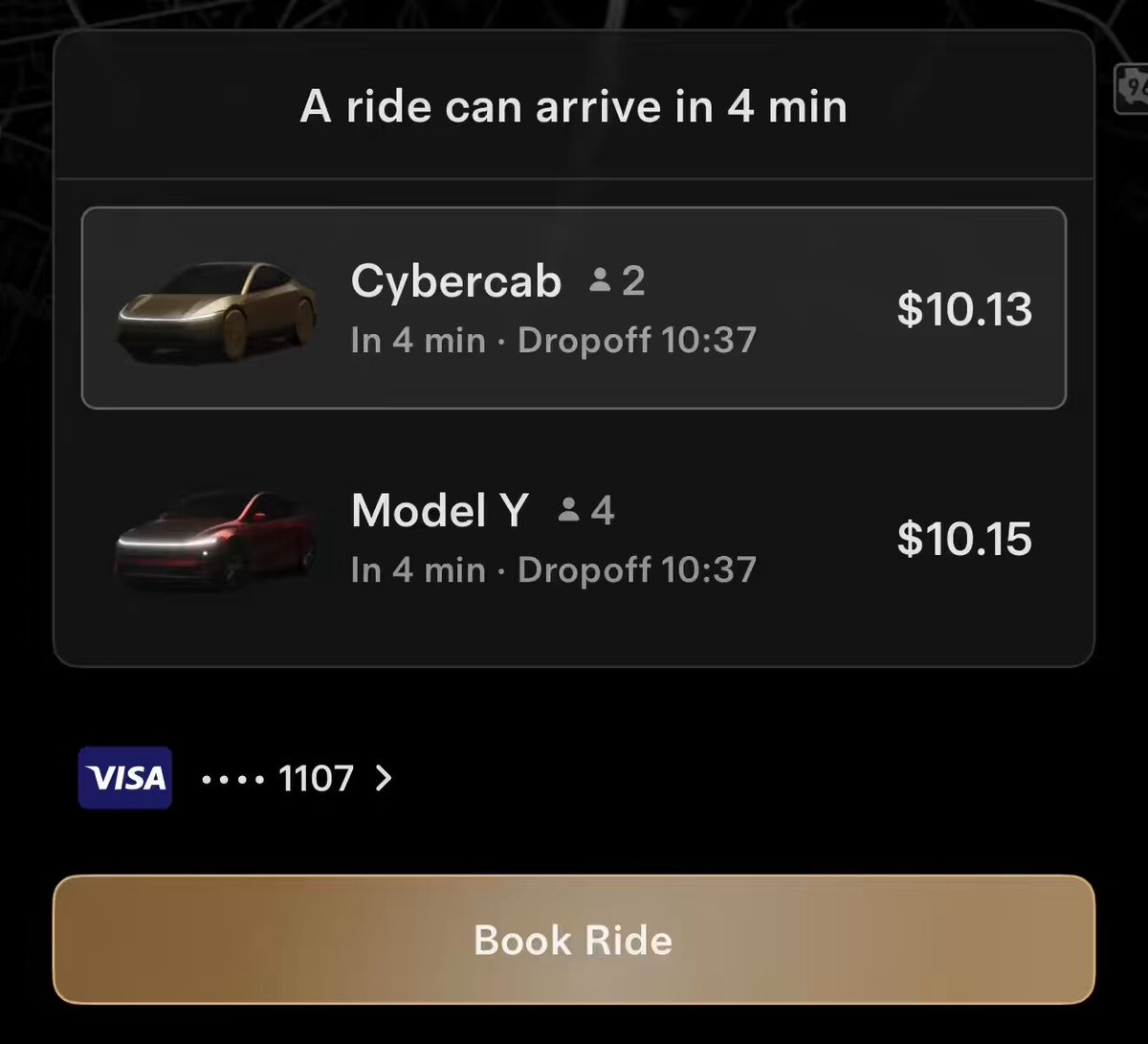
Tesla has pushed version 26.11.0 of the Robotaxi app, and the headline change is a redesigned vehicle selection screen. It's a focused quality-of-life update — but for anyone trying to decide between a Cybercab and a Model Y on a busy evening, the difference is real. Here's what the new screen brings to the table.

1. ETAs Are Now Front and Center
Previously, estimated arrival times were available somewhere in the booking flow, but not always surfaced prominently at the moment of vehicle selection. Version 26.11.0 moves ETA information directly onto the selection screen, so you can see how long each option will take to reach you before you commit. That's a small change in placement but a meaningful one when you're standing outside and in a hurry.
2. Wait Times Are Displayed Per Vehicle Option
Closely related to ETA but distinct: wait time reflects how long you'll actually be standing at the pickup point, accounting for traffic and routing to your location. Having this broken out per vehicle type — Cybercab versus Model Y — lets riders make a genuine trade-off. A Cybercab might be closer but the Model Y might have a shorter wait due to routing. Now you can see that comparison at a glance rather than guessing.
3. Availability Is Shown Inline
Earlier versions of the app could leave riders in the dark when demand was high, with vague messaging about service availability. According to background research, Tesla addressed the worst of that with a queue system in a prior update — but 26.11.0 goes further by surfacing per-vehicle availability directly on the selection screen. If a Cybercab is unavailable in your area right now, you'll know immediately rather than after attempting to book it.
4. It Builds on a Series of UX Improvements
This update doesn't arrive in isolation. Version 26.8.2, released in late September 2026, introduced a seating capacity indicator to help riders choose between the two-seat Cybercab and the four-seat Model Y Robotaxi. iOS Live Activities support followed, enabling lock-screen trip tracking via Dynamic Island. The 26.11.0 vehicle selection screen is the next logical step: once you know the seating options, you need clean, comparable data on timing and availability to make the right call. Tesla appears to be iterating the booking UX in deliberate, incremental steps.
5. The Bigger Picture: Making Multi-Vehicle Choice Practical
When Robotaxi launched with a single vehicle type, a selection screen was largely irrelevant. Now that both the Cybercab and Model Y are in the fleet, the booking experience needs to function more like a proper ride-hailing interface — one where riders can meaningfully compare options rather than just accept whatever is assigned. Version 26.11.0 moves the app meaningfully closer to that standard. Whether Tesla adds pricing comparison or surge indicators to this screen in a future update remains to be seen, but the foundation is clearly being built.
📋 Tracking Tesla software? See every firmware, FSD and app version in one place in our Tesla Software Update Tracker.
🚕 Following the Robotaxi rollout? See every operating city, launch date and announced market in our Tesla Robotaxi Tracker.
Related Gear
Gear up your Tesla with tested, custom-fit BASENOR accessories — shop Tesla accessories →
Sources & reporting notes
The links below identify the material source records used for this report.
- @TeslaNewswire on X (2026-11-07T14:10:36.000Z) — Direct source
Source links are preserved as published or accessed. See our editorial standards and corrections policy.
The BASENOR Editorial Desk covers Tesla, SpaceX, and related technology, curating reporting from primary sources — official accounts, regulatory filings, and software release data. Every article passes source-record and fact-checking review before publication. About the newsroom.
This report was curated by the BASENOR Editorial Desk from the sources listed above. Read our editorial standards or email editorial@basenor.com to report an error.