📌 UPDATE — April 18, 2026 🔍
Beyond the parking UI improvements, FSD v14.3.1 is showing additional capability gains in the wild. Tesla owner and tech reporter Sawyer Merritt (@SawyerMerritt) reported that the system actively avoided potholes and manholes during a real-world drive — though it remains unclear whether FSD acted independently or mimicked the vehicle ahead. Separately, Merritt noted that FSD clips can now be saved directly to your phone, a convenience upgrade that does not appear in Tesla's official release notes, making it a potentially undocumented change. Both observations suggest v14.3.1 may be a more substantial update than its minor version number implies.
📎 View original tweet by @SawyerMerritt — 263 likes · 12,606 views
📌 UPDATE — April 15, 2026
Tesla's v14.3.1 rollout is now expanding beyond its initial wave — @wholemars reports that the update is actively rolling out to Model S and Model X vehicles as of April 14, 2026. If you own a Model S or X and haven't received the update yet, it should be arriving soon — check Software → Check for Updates in your Tesla app or touchscreen.

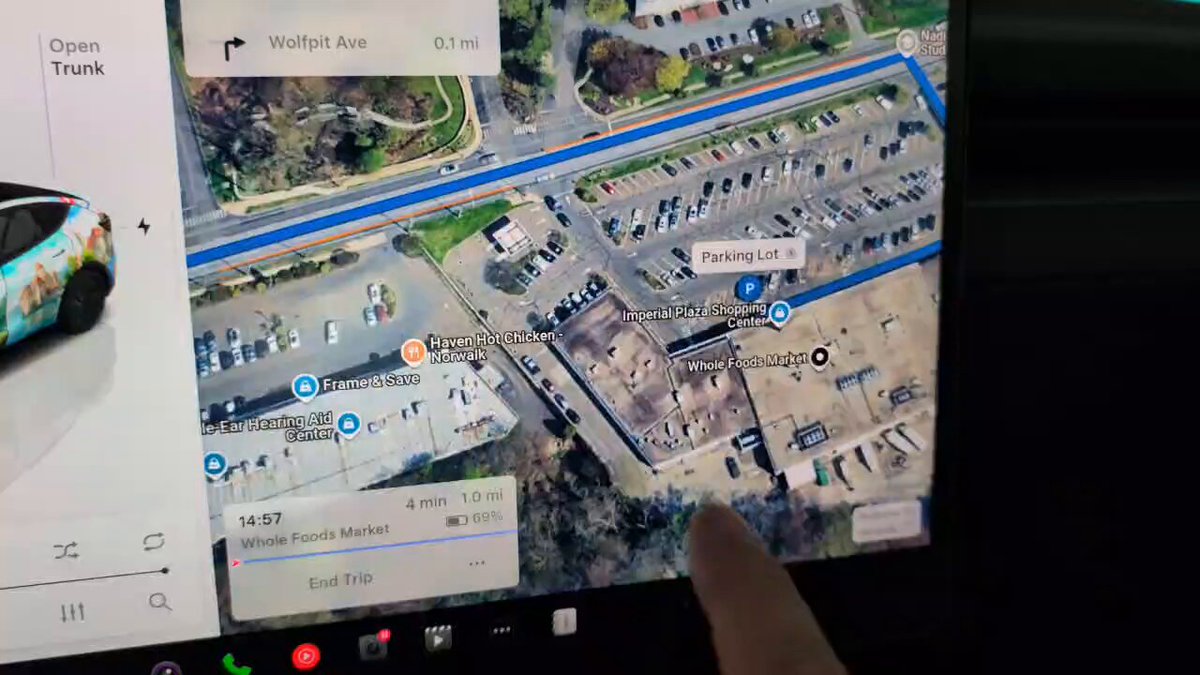
The News: Tesla has released FSD (Supervised) v14.3.1, which adds a small but practical improvement to the parking UI — tapping the arrow now directly opens the parking options menu.
Why It Matters: For owners who regularly use FSD to park, this streamlines access to parking controls without digging through menus.
Source: @TeslaNewswire on X
Tesla FSD (Supervised) v14.3.1 Improves Parking UI: Here's What Changed
Tesla has pushed FSD (Supervised) v14.3.1, a point release following the major v14.3 rollout that arrived with software version 2026.2.9.6 as part of the Spring Update 2026. The headline change in this incremental update is a parking UI refinement: tapping the small arrow within the parking interface now directly opens the parking options menu, cutting out an extra navigation step for drivers relying on FSD to handle parking maneuvers.

📊 What Changed in FSD v14.3.1
| Change | Type | Models |
|---|---|---|
| Parking UI Arrow Shortcut — Tapping the small arrow in the parking UI now directly opens the parking options menu | Official | Model 3, Model Y, Model S, Model X, Cybertruck |
This is a targeted point release — v14.3.1 does not appear to overhaul the broader FSD feature set introduced in v14.3. The parent update (v14.3 / 2026.2.9.6) was a landmark release that included a rewritten AI compiler and runtime using MLIR for 20% faster reaction times, upgraded reinforcement learning, improved parking spot selection decisiveness, and the renaming of Autopilot to "Self-Driving" across the UI. The v14.3.1 patch builds on that foundation with this specific UI polish.
🚦 Owner's Action Plan
Verdict: Informational — No action required. The update installs automatically over Wi-Fi when available.
- Check your current FSD version. Go to Controls → Software and look for the FSD version listed. If you're on v14.3, this patch may already be queued for your vehicle.
- Connect to Wi-Fi overnight. Tesla OTA updates download fastest on a home Wi-Fi connection. Plug in and leave your car connected to ensure the update installs without interruption.
- Test the parking UI change. Once updated, engage FSD in a parking scenario and look for the small arrow in the parking interface. Tap it — you should land directly in the parking options menu without extra steps.
- If you haven't received v14.3 yet, this patch will arrive as part of the broader rollout. The Spring Update 2026 (2026.2.9.6) is still deploying across the fleet — check for updates manually via Controls → Software → Check for Updates.
📰 Deep Dive
Point releases like v14.3.1 often get overlooked in favor of the headline features in major updates, but they matter for daily usability. The parking workflow in FSD has been an area of active development — v14.3 itself introduced improved parking spot selection decisiveness and a new map-based parking location pin with a 'P' icon. The v14.3.1 UI tweak is a logical follow-on: once the system is better at choosing where to park, making it easier for the driver to interact with those options reduces friction at a critical moment.
The arrow shortcut is a small change, but it reflects a broader Tesla design philosophy of collapsing menu depth. In a parking scenario, the driver is often in a tight space with limited time to navigate nested menus — a single tap to reach options is meaningfully better than two or three. Owners who use FSD for parking regularly in garages or dense urban environments will notice this most.
It's also worth noting the versioning context: FSD version numbers (v14.3, v14.3.1) are distinct from the vehicle software build number (2026.2.9.6). You may see either referenced depending on the source. Both refer to the same underlying software generation — the FSD version is the AI stack, while the build number covers the full vehicle software package. For all software updates, the FSD version is what matters most when tracking autonomous driving capability changes.
📋 Tracking Tesla software? See every firmware, FSD and app version in one place in our Tesla Software Update Tracker.
Related Gear
Gear up your Tesla with tested, custom-fit BASENOR accessories — shop Tesla accessories →
Sources & reporting notes
The links below identify the material source records used for this report.
- @TeslaNewswire on X (2026-04-14T19:59:37.000Z) — Direct source
- @wholemars on X (2026-04-14T23:28:28.000Z) — Direct source
- @SawyerMerritt on X (2026-04-18T00:31:35.000Z) — Direct source
Source links are preserved as published or accessed. See our editorial standards and corrections policy.
The BASENOR Editorial Desk covers Tesla, SpaceX, and related technology, curating reporting from primary sources — official accounts, regulatory filings, and software release data. Every article passes source-record and fact-checking review before publication. About the newsroom.
This report was curated by the BASENOR Editorial Desk from the sources listed above. Read our editorial standards or email editorial@basenor.com to report an error.