📌 UPDATE — August 5, 2026
The FSD v14 Lite overheating reports are now being called into question. Prominent Tesla commentator @wholemars (Whole Mars Catalog) says he has seen "0 compelling evidence" that v14 Lite actually causes overheating, characterizing the narrative as speculation that has snowballed into accepted fact. He also points out a key technical detail: Tesla's FSD computers are liquid-cooled, giving them considerably more thermal headroom than air-cooled systems. Until more rigorous, reproducible data emerges — such as logged thermal readings tied specifically to v14 Lite installs — treat overheating claims with caution. We will continue monitoring owner reports and update this article if verified cases surface.
"So far i've seen 0 compelling evidence that V14 Lite causes overheating. I'm not saying it's impossible, but seems to be speculation that everyone is treating as fact at this point. The computers are liquid cooled."
— @wholemars, Aug 5, 2026
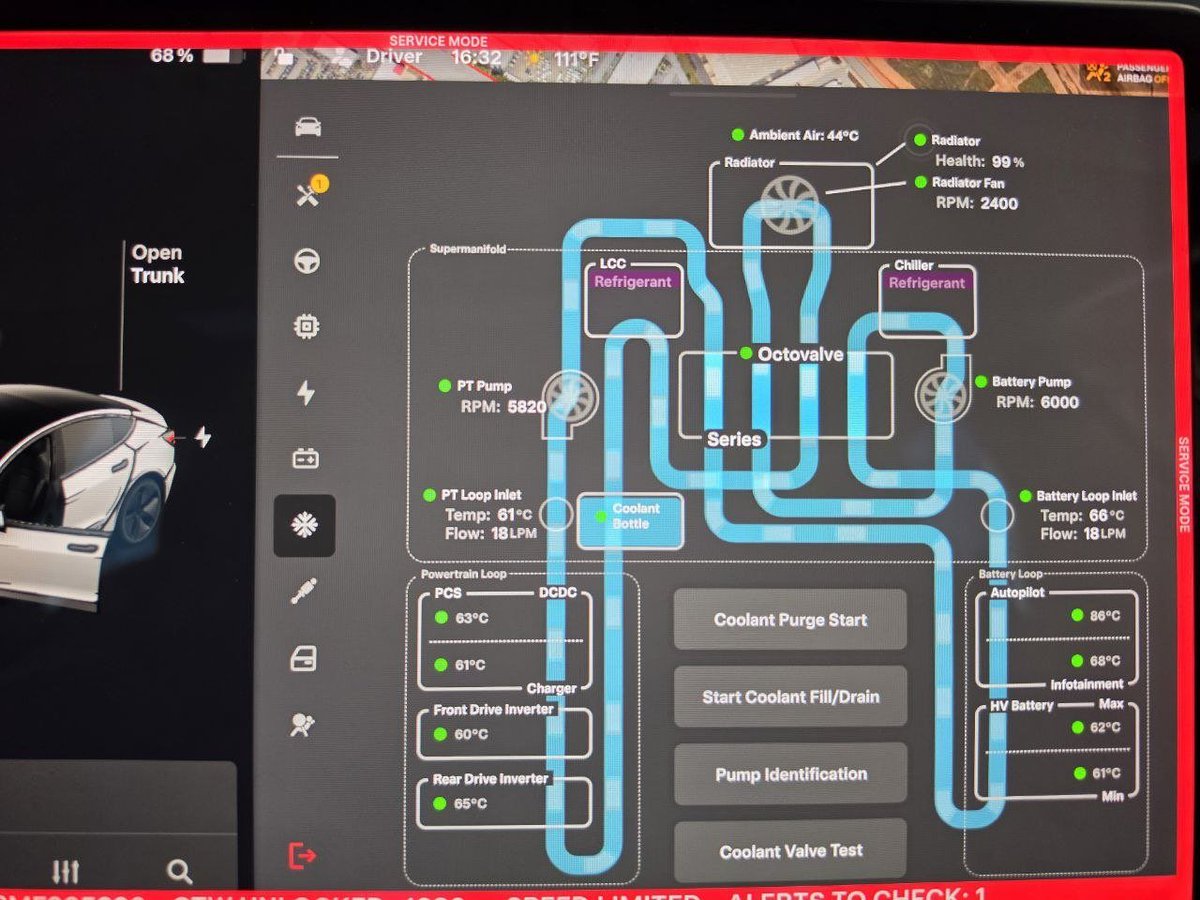
A growing number of Tesla owners running Hardware 3 (HW3/AI3) are reporting Autopilot computer overheating alerts — and in some cases, outright ECU failures — after installing FSD v14 Lite. The reports have accelerated over the past two weeks since Tesla's wide release of v14 Lite for HW3 vehicles on July 22, 2026, with service-mode screenshots showing internal board temperatures climbing to 99°C, above the 90°C recommended ceiling.
Tesla has not issued an official statement as of this morning. If you own an HW3 Tesla and have already accepted the v14 Lite update, there are concrete steps you should take today to monitor your vehicle and reduce the risk of a computer replacement.

What's Happening
FSD v14 Lite is Tesla's compressed version of the full v14 neural-network stack, engineered to run on the older HW3 AI processor. According to Tesla's Director of AI Ashok Elluswamy, the "distilled" V14 architecture was designed to bring HW3 vehicles up to a similar experience as HW4 — including new features like starting FSD from Park, reverse driving, automatic shifting, and parking at destination.
The tradeoff, based on early owner reports, appears to be thermal. HW3 is a Samsung-fabricated 14nm chip with over 6 billion transistors and 8GB of LPDDR4 RAM. Running the more computationally dense v14 Lite model reportedly pushes sustained workload — and heat — closer to the chip's design ceiling. Owners are seeing:
-
APP_w141_ECU_Thermal_Issuealerts on the driver display - Standard Autopilot, automatic wipers, lane departure warnings, and automatic emergency braking dropping offline mid-drive
- In a small number of cases, burning odors from the dashboard area
- At least one confirmed complete FSD computer replacement on a 2022 Model Y, according to owner reports aggregated by Electrek and community threads
Early HW3 units (roughly 2019-2021 production) appear over-represented in the reports, though HW3 vehicles built as recently as 2023 have also flagged the alert.
Action Plan: What HW3 Owners Should Do Today
If your Tesla is running HW3 and you've received software version 2026.20.6.11 (FSD v14.3.6) or later, work through the following checklist.
1. Confirm whether you're on HW3
On the touchscreen, go to Controls → Software → Additional Vehicle Information. Look for "Autopilot Computer" — if it reads "HW3" or "AI3," you're in the affected group. HW4/AI4 vehicles are not reporting the same thermal issue at this time.
2. Check for the thermal alert in your service log
If you see or have previously dismissed a warning referencing ECU_Thermal_Issue, an Autopilot camera fault, or a message that Autopilot features are temporarily unavailable — do not ignore it. Screenshot the alert and note the date, ambient temperature, and drive conditions. This documentation matters if you later need warranty service.
3. Reduce sustained FSD load in hot conditions
Until Tesla addresses the issue, owners in the community are recommending the following mitigations:
- Avoid long, continuous FSD drives (60+ minutes) in ambient temperatures above 85°F / 29°C
- Pre-cool the cabin before driving — the HVAC system helps pull heat away from the shared ECU area
- Park in shade or a garage when possible; heat-soaked cars start FSD sessions with an already-elevated ECU baseline
- If you feel comfortable doing so, drop back to standard Autopilot for highway commutes and reserve FSD for shorter city trips
4. Log a service request — even if nothing has failed yet
If you're seeing the thermal alert, open the Tesla app and submit a service request under "Autopilot / FSD." Describe the alert code, attach screenshots, and note the software version. Creating a documented service record now is critical if your computer fails later and Tesla questions whether it's a warranty repair. HW3 FSD computer replacements are covered under Tesla's Autopilot hardware warranty (typically 8 years / 100,000-150,000 miles depending on model), but a paper trail helps.
5. Do not attempt to defer or roll back the update
Tesla does not support user-side rollbacks. Attempting third-party downgrades can void warranty coverage on the exact component you may need replaced. If you have not yet installed v14 Lite and want to wait, you can simply leave the update pending — Tesla does not force-install FSD updates.
Known Issues Summary
| Symptom | What It Means | Action |
|---|---|---|
| APP_w141_ECU_Thermal_Issue alert | ECU exceeded thermal threshold | Screenshot, submit service ticket |
| Autopilot / AEB / wipers offline | ECU protection shutdown | Pull over safely, restart, log incident |
| Burning odor from dash | Potential hardware damage | Stop driving, contact Tesla service immediately |
| Board temp near or above 90°C in service mode | Above recommended ceiling | Reduce FSD use, request inspection |
What to Watch Next
Three things to monitor this week:
- A follow-up point release. Tesla typically pushes a hotfix within 7-14 days when a rollout generates widespread hardware alerts. Watch for a 2026.20.6.x update with thermal-management tweaks.
- An official Tesla acknowledgment. Tesla has stayed quiet so far, but a public statement or service bulletin is likely if reports keep climbing.
- NHTSA involvement. Because the thermal shutdown disables safety features including AEB, this is exactly the kind of pattern that draws a regulator preliminary evaluation. No formal NHTSA action has been opened as of publication.
For HW3 owners, the short version is: don't panic, but don't ignore the alert either. Document everything, use FSD more conservatively for the next couple of weeks, and let Tesla come to you with a fix rather than gambling on the hardware.
📋 Tracking Tesla software? See every firmware, FSD and app version in one place in our Tesla Software Update Tracker.
Related Gear
Gear up your Tesla with tested, custom-fit BASENOR accessories — shop Tesla accessories →
Sources & reporting notes
The links below identify the material source records used for this report.
- @TeslaNewswire on X (2026-08-04T06:42:29.000Z) — Direct source
Source links are preserved as published or accessed. See our editorial standards and corrections policy.
The BASENOR Editorial Desk covers Tesla, SpaceX, and related technology, curating reporting from primary sources — official accounts, regulatory filings, and software release data. Every article passes source-record and fact-checking review before publication. About the newsroom.
This report was curated by the BASENOR Editorial Desk from the sources listed above. Read our editorial standards or email editorial@basenor.com to report an error.