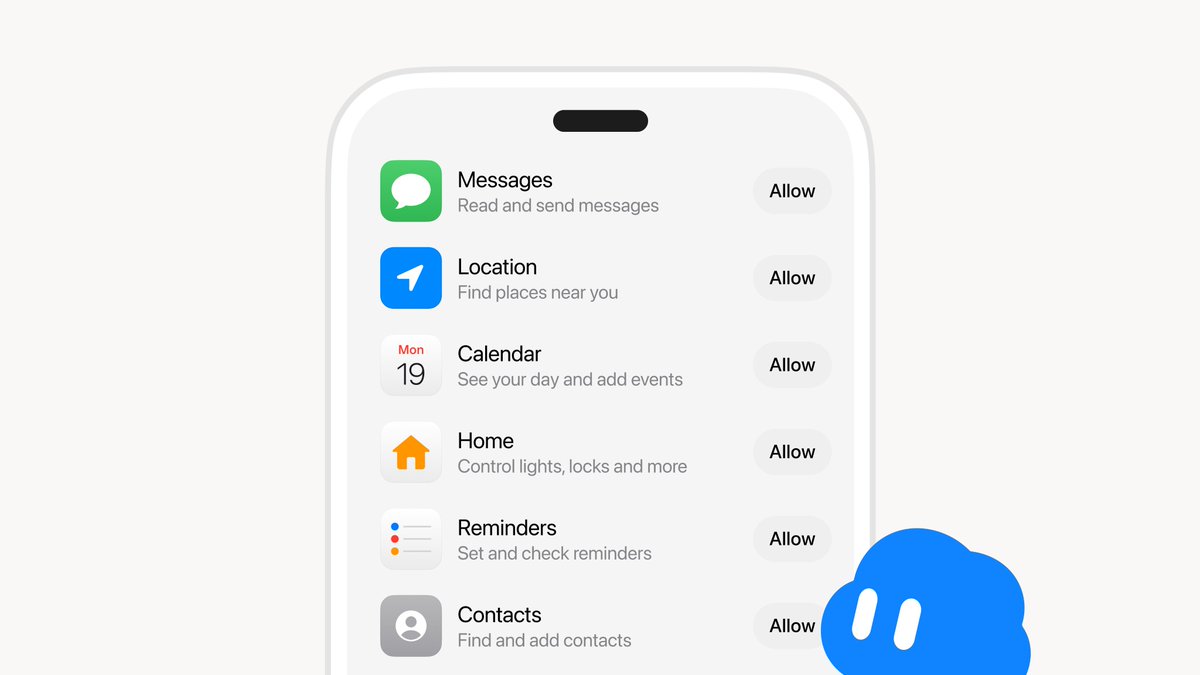
Grok Bot just got significantly more useful. As of October 22, 2026, the AI agent is rolling out direct integration with native phone applications on both iOS and Android — meaning it can now interact with your calendar, contacts, messages, and more, not just your connected online accounts.

What exactly can Grok Bot do with my phone apps now?
According to background research from verified sources, Grok Bot can now interact with six categories of built-in phone apps: Calendar (view your schedule, add events), Reminders (set and check reminders), Contacts (find and add contacts), Messages (read and send texts), Location (find nearby places), and Home (control smart home devices like lights and locks). This moves it well beyond its earlier scope of connected accounts like email and X, into genuine on-device agent territory.
Does Grok Bot get blanket access to my phone?
No. Access is granted on an app-by-app basis — you decide which phone apps Grok Bot can see and interact with. If you want it to manage your calendar but not your messages, that's a valid configuration. This per-app permission model is consistent with how iOS and Android handle third-party integrations generally, so the process should feel familiar.
What's the difference between this and what Grok Bot could already do?
Previously, Grok Bot's agent capabilities were largely tied to connected online accounts — your email, your X feed. Phone app integration adds a layer of personal, on-device context: your actual schedule, your real address book, your local smart home setup. That's the shift from a well-connected AI assistant to something closer to a true personal agent that knows your day-to-day life, not just your inbox.
Is this available right now, and on which devices?
The rollout began October 22, 2026, for both iOS and Android. As with most feature rollouts of this scope, not every user will see it simultaneously — if the option isn't visible in your Grok Bot settings yet, it's likely still propagating to your account. Worth checking daily over the next few days.
What else has Grok Bot added recently that's worth knowing about?
The phone app integration is part of a rapid expansion streak. On October 21, Grok Bot became accessible via the iPhone Action Button for one-press voice chats. The day before the phone app announcement, it was demonstrated handling X Direct Messages and functioning as the default Android assistant. And around October 16, a broader update improved response speeds substantially — computer-based tasks reportedly run three times faster, with other queries responding in under half the previous time. Voice call quality and third-party integrations also improved in that update.
Do I need a specific subscription to use Grok Bot?
Grok Bot is included with paid individual Cursor plans and Cursor Teams plans. It can also be linked to individual SuperGrok, SuperGrok Plus, or SuperGrok Heavy subscriptions. If you're on the X Subscription — which launched October 12, 2026, and bundles Grok, Grok Bot, Cursor, and X Premium — you're covered there as well. Free-tier X users do not have access to Grok Bot.
The pace of Grok Bot's feature additions over the past two weeks suggests xAI is pushing hard to establish it as a default daily-driver assistant before the end of the year. Whether phone app integration becomes the feature that tips casual users into genuine daily reliance on it is the real test — and that answer will come from usage patterns over the next few weeks, not from the announcement itself.
Related Gear
Gear up your Tesla with tested, custom-fit BASENOR accessories — shop Tesla accessories →
Sources & reporting notes
The links below identify the material source records used for this report.
- @elonmusk on X (2026-10-23T01:34:55.000Z) — Direct source
Source links are preserved as published or accessed. See our editorial standards and corrections policy.
The BASENOR Editorial Desk covers Tesla, SpaceX, and related technology, curating reporting from primary sources — official accounts, regulatory filings, and software release data. Every article passes source-record and fact-checking review before publication. About the newsroom.
This report was curated by the BASENOR Editorial Desk from the sources listed above. Read our editorial standards or email editorial@basenor.com to report an error.