📌 UPDATE — June 1, 2026
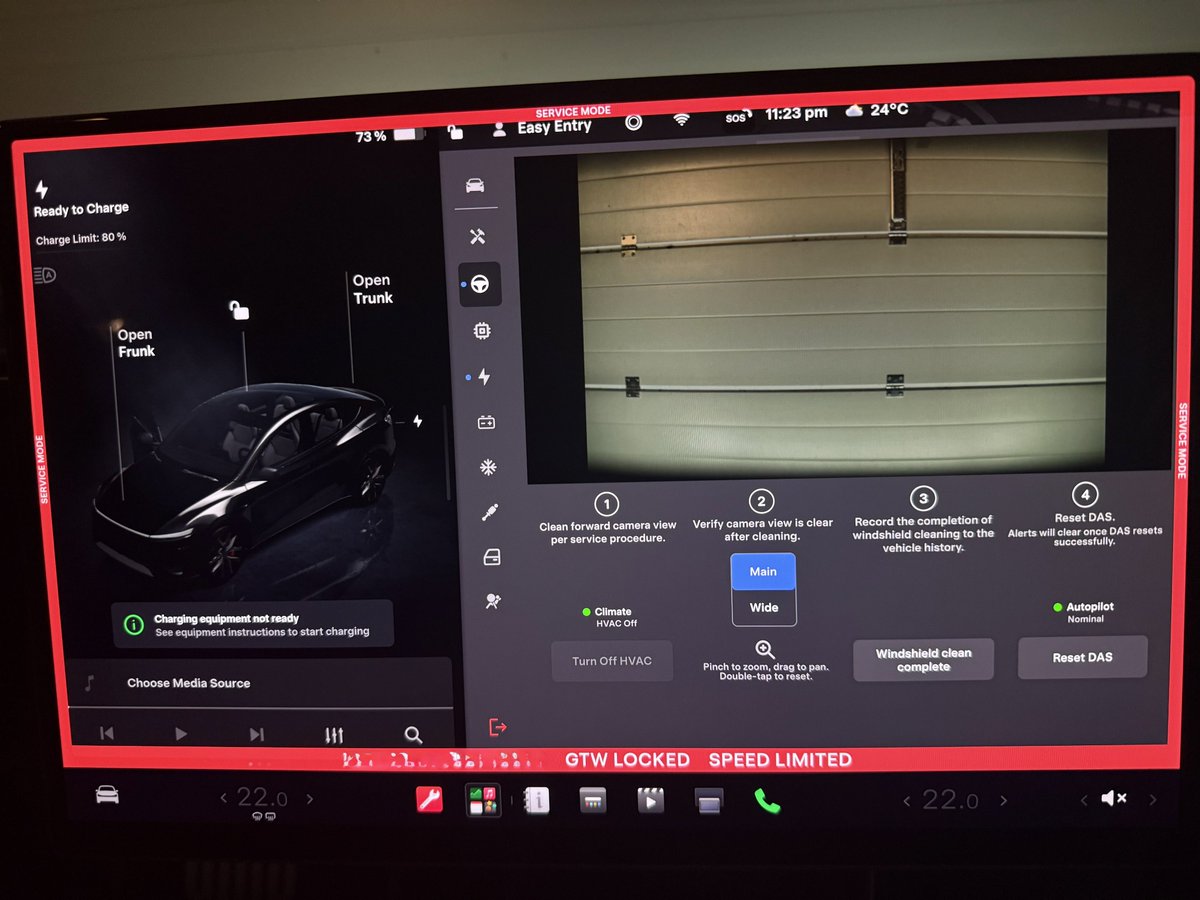
Tesla's software update version 2026.20 has officially tied the Forward Camera Cleaning panel to a specific release, confirming the feature is now rolling out as part of a named update rather than a silent server-side change. The new panel, accessible through Service Mode, is labeled Forward Camera Cleaning and provides the guided cleaning steps previously reported. Owners on 2026.20 should be able to locate the panel immediately without waiting for a separate update.

Tesla has quietly updated its Service Mode with a formal 4-step front-facing camera cleaning procedure, targeting the windshield haze that builds up over time and degrades camera performance. The guide is aimed at technicians, but owners who've noticed blurry Autopilot visuals or received camera visibility alerts should pay close attention — this is the fix.

Why This Matters
The forward-facing camera sits behind the windshield and feeds directly into Autopilot, FSD, and every driver-assistance system on your Tesla. Over time, a haze or film can develop on the inside surface of the windshield in that camera zone — invisible to the naked eye under normal lighting, but enough to degrade the camera's ability to read lane markings, detect objects, and process depth accurately.
Tesla introduced automatic detection of this problem back in November 2025 with FSD V14.1.7, which triggers an in-car alert when forward camera visibility is limited and prompts owners to schedule a free cleaning at a Tesla Service Center. The new Service Mode guide is the technician-side response to that alert system — a standardized, documented procedure to actually fix the issue once flagged.
The 4-Step Cleaning Procedure
According to Tesla's service documentation (updated May 14 and May 27, 2026 for North America and China), the procedure is accessed through the vehicle touchscreen via Service Mode Plus > Driver Assist > Cameras > Main Pitch > Windshield clean complete. The process breaks down as follows:
- Inspect the windshield interior. Using an LED flashlight in an indoor environment, the technician examines the inside surface of the windshield in the forward-facing camera area for haze, fogginess, stains, or residue.
- Clean the forward camera view. The cleaning is performed per Tesla's precision cleaning service procedure using approved materials only — specifically Zeiss Pre-moistened Clean Wipes, new lint-free microfiber towels, cleanroom dry wipes, and glass cleaner. Nitrile gloves are required. Critically, unapproved IPA wipes must not be used, as they can damage the windshield's hydrophobic coating.
- Verify the camera view is clear. After cleaning, the technician confirms the haze has been fully removed before proceeding.
- Reset the driver assistance system. The final step is tapping Reset DAS within Service Mode to reinitialize the driver assistance system with the now-clean camera input.
For vehicles running firmware 2024.26.X or fsd-eap-12-4-1 or newer, the full outlined procedure applies. A dedicated camera update routine will also become available in software version 2026.8.6 and later.
What Owners Should Do
This is a technician-executed procedure — you won't be doing this yourself at home. But here's what you should act on:
- Watch for the in-car alert. If your Tesla displays a notification about limited forward camera visibility, don't dismiss it. Schedule a Service appointment immediately. The cleaning is covered at no charge.
- Don't attempt DIY cleaning. The inside of the windshield in the camera zone requires specific approved wipes. Using standard IPA wipes or household glass cleaners risks stripping the hydrophobic coating — making the problem worse and potentially voiding coverage.
- After any windshield replacement, clear camera calibration. If your windshield has been replaced recently, navigate to Controls > Service > Camera Calibration > Clear Calibration on your touchscreen. This resets the camera's positional data so it re-learns from scratch.
- Expect a short recalibration drive. After either a cleaning or calibration reset, camera calibration typically completes after driving 20–25 miles (32–40 km) on straight, multi-lane roads with clear lane markings. Autopilot and FSD features may be temporarily limited during this window.
The Bigger Picture
The formalization of this procedure is a meaningful step. Windshield haze has been a known pain point for Tesla owners for years — particularly in humid climates or older vehicles — and the absence of a standardized fix led to inconsistent service outcomes. Pairing the automated in-car detection from V14.1.7 with a documented technician protocol closes that loop. If your cameras are flagged, there's now a clear, approved path to resolution rather than a technician improvising with whatever cleaning supplies are on hand.
If you've been running FSD or Autopilot with any unexplained degradation in lane detection or object recognition, a hazy forward camera could be the culprit. It's worth requesting an inspection at your next service visit even if the alert hasn't fired yet.
📋 Tracking Tesla software? See every firmware, FSD and app version in one place in our Tesla Software Update Tracker.
Related Gear
Gear up your Tesla with tested, custom-fit BASENOR accessories — shop Tesla accessories →
Sources & reporting notes
The links below identify the material source records used for this report.
- @SawyerMerritt on X (2026-06-01T14:38:48.000Z) — Direct source
- @TeslaNewswire on X (2026-06-01T18:14:09.000Z) — Direct source
Source links are preserved as published or accessed. See our editorial standards and corrections policy.
The BASENOR Editorial Desk covers Tesla, SpaceX, and related technology, curating reporting from primary sources — official accounts, regulatory filings, and software release data. Every article passes source-record and fact-checking review before publication. About the newsroom.
This report was curated by the BASENOR Editorial Desk from the sources listed above. Read our editorial standards or email editorial@basenor.com to report an error.