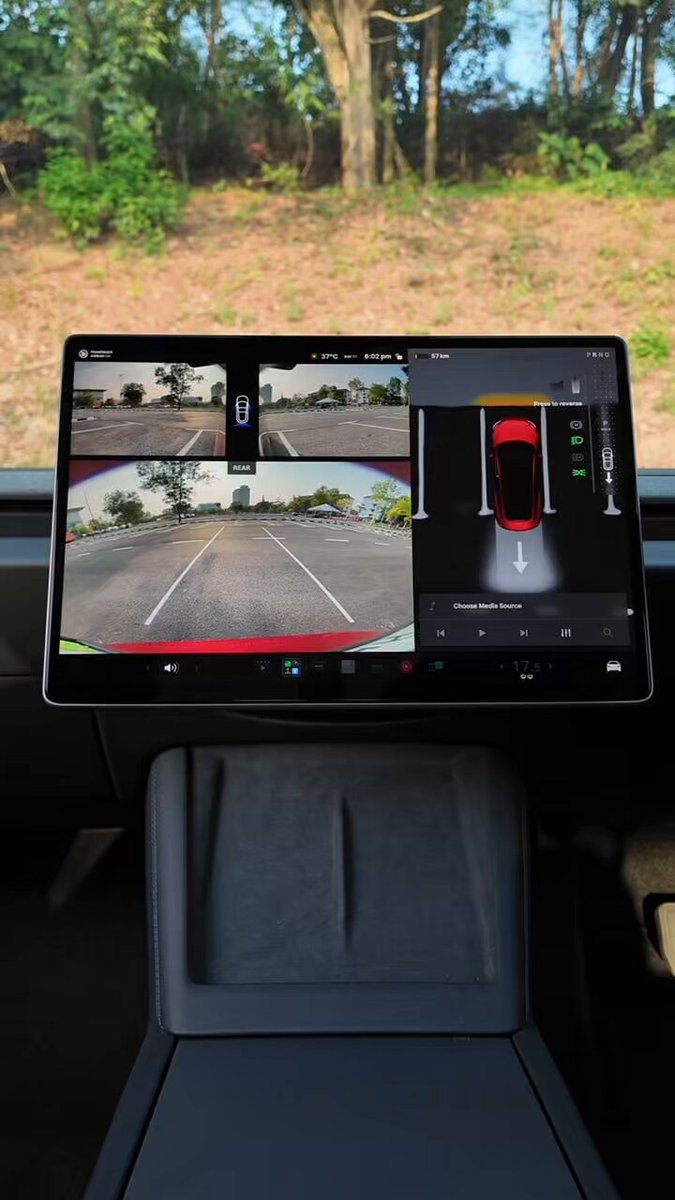
Backing out of a parking spot or driveway is one of the highest-risk moments in everyday driving — and Tesla's Rear Cross-Traffic Alert (RCTA) system is specifically designed for it. Tesla India recently highlighted the feature, reminding owners that their cars will flag both pedestrians and vehicles crossing behind them while in Reverse, with a visual warning on the camera feed and an optional audible chime if a collision looks likely.
If you've never dug into this setting, there's a good chance you're only getting half the protection the system offers. Here's exactly what the feature does and the one step you need to take to get the most out of it.

How the System Actually Works
The moment you shift into Reverse, your Tesla's cameras scan for anything moving across the path behind the vehicle. If a crossing object is detected, vertical red bars appear on the corresponding side of the rear camera view — right side, left side, or both if traffic is coming from either direction. This visual alert is always active; you don't need to enable anything for it.
What isn't on by default for every owner is the Rear Cross-Traffic Chime — the audible alert that fires when a potential collision is detected. According to Tesla's documentation, the chime only triggers when three conditions are met simultaneously: the car is in Reverse, the vehicle is in motion (even at low speed), and cross-traffic is detected. If you're sitting still waiting to pull out, the chime won't sound even if something crosses behind you — that's by design.
Beyond warnings, the system is also tied into Automatic Emergency Braking. When reversing cross-traffic is detected, AEB can apply the brakes to help mitigate a collision. Tesla notes that AEB in reverse has limited functionality, so it's a last-resort assist — not a substitute for looking over your shoulder.
Action Plan: Enable the Audible Chime Now
The visual alert is automatic, but the audible chime needs to be switched on manually. It takes about 15 seconds:
- Tap Controls on the touchscreen.
- Select Safety.
- Find Rear Cross-Traffic Chime and toggle it on.
That's it. The chime will now sound whenever you're reversing and the system detects a crossing vehicle or pedestrian on a collision path.
One caveat if you use Joe Mode: Joe Mode reduces the volume of non-critical chimes to avoid waking passengers. The Rear Cross-Traffic Chime can be affected by this. If you have Joe Mode enabled and want full-volume cross-traffic alerts, you'll need to decide which setting takes priority for your typical driving situation.
What the System Won't Catch
RCTA is a driver-assistance tool, not a replacement for visual checks. Tesla's own guidance is clear that the system may not detect every object — particularly items very close to the ground — and that performance can vary based on environmental conditions. Treat the alerts as a second set of eyes, not the only set.
The feature has been part of Tesla's software stack since the Holiday Update (version 2024.44.25), with pedestrian detection added in the 2025.2 rollout. If your car hasn't received an update in a while, check Controls > Software to make sure you're current.
Parking lots and tight driveways are where most low-speed collisions happen. Spending 15 seconds enabling the audible chime is one of the easiest safety wins available on any Tesla — worth doing today if you haven't already.
Related Gear
Gear up your Tesla with tested, custom-fit BASENOR accessories — shop Tesla accessories →
Sources & reporting notes
The links below identify the material source records used for this report.
- @Tesla_India on X (2026-10-03T10:22:33.000Z) — Direct source
Source links are preserved as published or accessed. See our editorial standards and corrections policy.
The BASENOR Editorial Desk covers Tesla, SpaceX, and related technology, curating reporting from primary sources — official accounts, regulatory filings, and software release data. Every article passes source-record and fact-checking review before publication. About the newsroom.
This report was curated by the BASENOR Editorial Desk from the sources listed above. Read our editorial standards or email editorial@basenor.com to report an error.